QBot
Scenario
Reconstruct the QBot malware infection timeline by analyzing a Windows memory dump — identifying malicious processes, files, and network communications using Volatility 3 and VirusTotal.
Background — QBot
QBot (also known as Qakbot or Pinkslipbot) has been active since 2007. It started as a banking trojan designed to steal financial credentials, but evolved into a full initial access broker — renting access to compromised machines to ransomware groups including Black Basta and Conti.
The delivery method in this lab is the classic vector: a malicious Excel document delivered via phishing. The victim opens the XLS, enables macros, and QBot’s DLL loader executes silently in the background. After Microsoft disabled Office macros by default in 2022, QBot operators pivoted to HTML smuggling chains — but the macro-enabled XLS remained effective against unpatched or misconfigured environments.
Once running, QBot injects into legitimate Windows processes, harvests credentials from browsers and Outlook, hijacks existing email threads for further phishing, and has been observed moving laterally via SMB within the hour of initial infection. The FBI took down QBot infrastructure in August 2023 (Operation Duck Hunt) — disrupting over 700,000 infected machines — but variants have continued to surface since.
Methodology
C2 Communications — windows.netscan
The first priority is identifying external communications. Running netscan against the memory dump and filtering for port 80 connections surfaces three external IPs:
python3 vol.py -f ../../Artifacts/memory.dmp windows.netscan | grep " 80 "94.140.112.73
45.147.230.104
196.204.5.11These represent the C2 beaconing activity captured in memory at the time of the dump. Port 80 is consistent with QBot’s use of HTTP for initial C2 communication before establishing encrypted channels.
Process Tree — Identifying the Parent
Given the lab context, the delivery vector is almost certainly Excel or Word — QBot’s two classic carriers. Running windows.pstree confirms this:
python3 vol.py -f ../../Artifacts/memory.dmp windows.pstree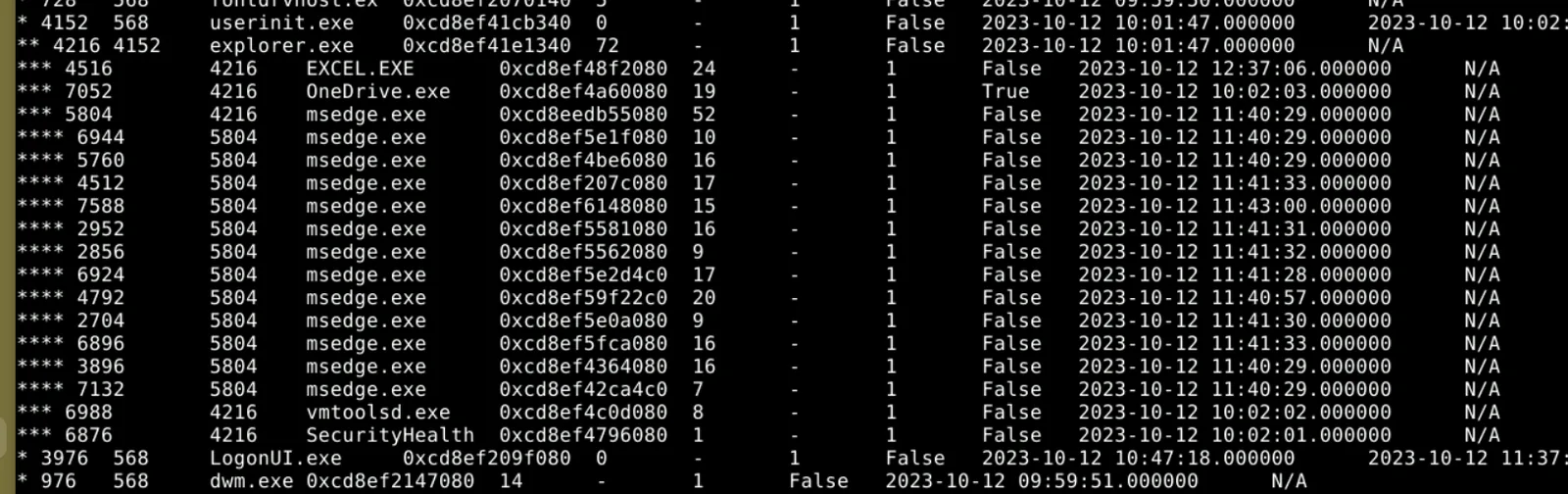
EXCEL.EXE (PID 4516) is the process that spawned the malware, with explorer.exe (PID 4216) as its parent — the standard process lineage when a user double-clicks a file from Windows Explorer.
One thing worth noting here — the pstree output initially looked like OneDrive.exe might be a child of Excel because both show 4216 in the same column. The key is distinguishing the PID column from the PPID column. 4216 is explorer’s own PID, and both Excel and OneDrive list it as their parent — making them siblings, not parent and child. The asterisk indentation depth in pstree is the clearest way to read the actual hierarchy without getting turned around by the raw numbers.
File Identification — windows.filescan
Pivoting to filescan and grepping for xls locates the malicious document on disk:
python3 vol.py -f ../../Artifacts/memory.dmp windows.filescan | grep -i "xls"
0xcd8ef507ac60    \Users\PC-28\Downloads\Payment.xls
0xcd8ef5489960    \Users\PC-28\Downloads\Payment.xls
Payment.xls in the Downloads folder is the initial lure — a classic social engineering filename designed to get the victim to open and enable macros without hesitation.
File Extraction — windows.dumpfiles
With the virtual address in hand, the file can be extracted for analysis:
python3 vol.py -f ../../Artifacts/memory.dmp windows.dumpfiles --virtaddr 0xcd8ef507ac60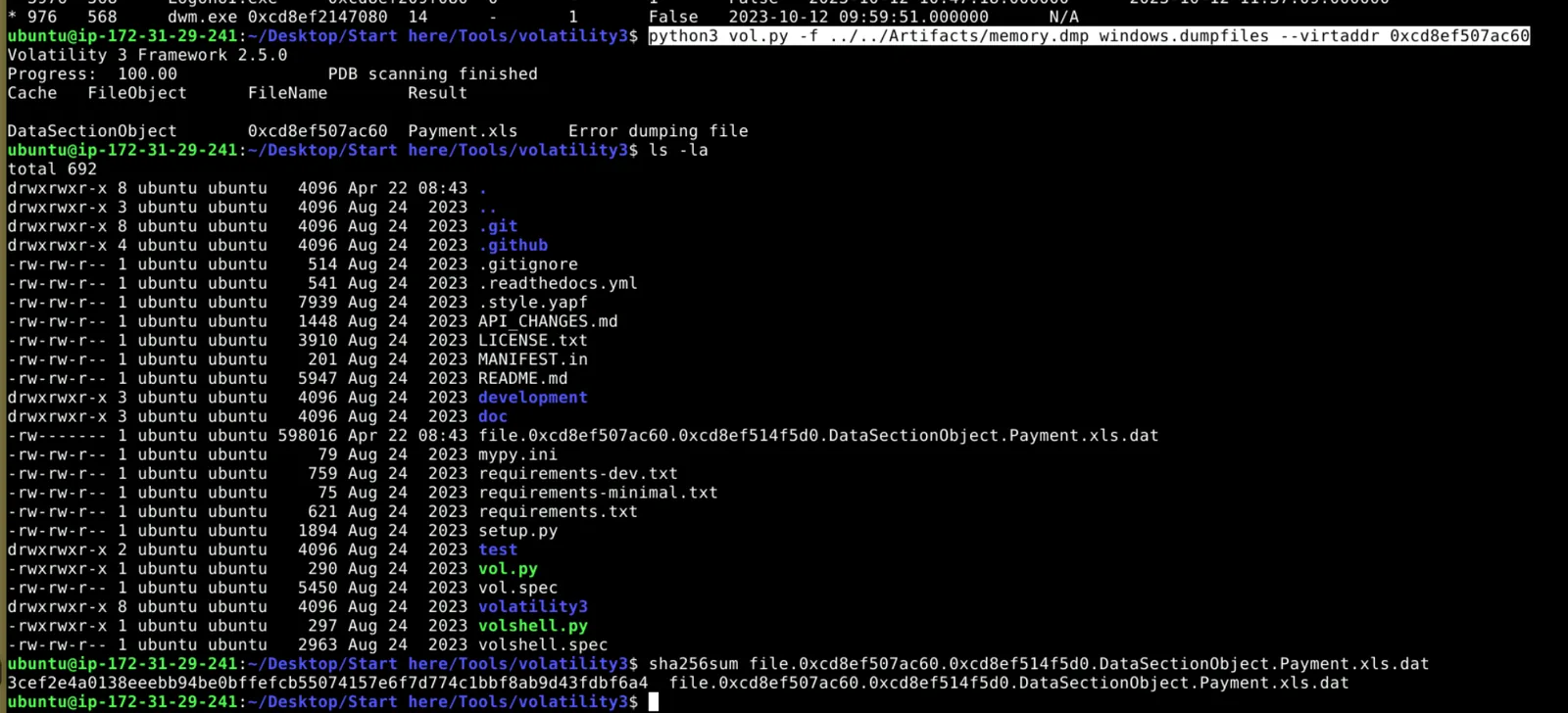
Volatility reports an error on the SharedCacheMap portion but still produces the DataSectionObject — the actual file content. The error is misleading; the extracted .dat file is a functional partial recovery of the XLS. Renaming it back to .xls and hashing it gives a valid SHA256 that VirusTotal recognises.
VirusTotal — Attribution
Submitting the hash to VirusTotal returns 37/62 detections.
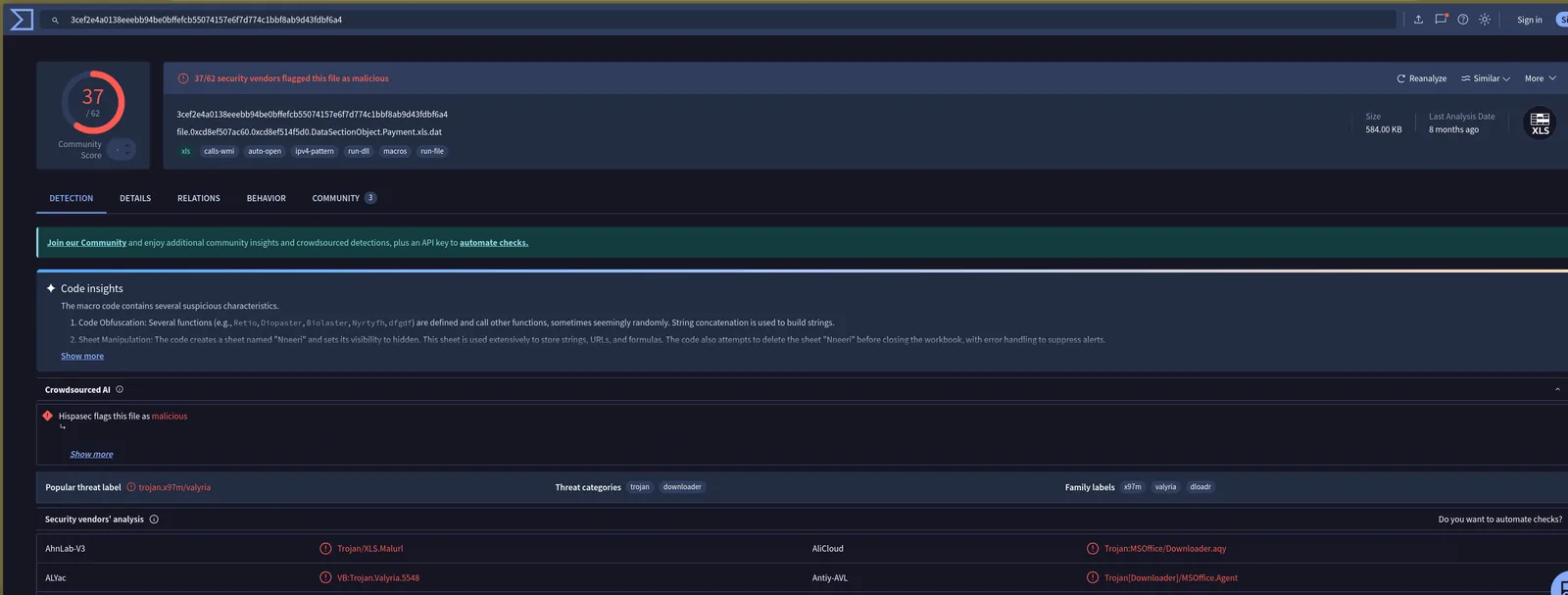
The popular threat label comes back as trojan.x97m/valyria rather than QBot directly — which makes sense. The XLS itself is the macro dropper, not the QBot payload. VT’s code insights confirm obfuscated VBA macros with string concatenation, hidden sheet manipulation (Nneeri), and WMI calls — all consistent with a QBot macro stager. QBot in this case was using the XLS purely as a loader to pull down and execute the actual DLL payload, so the file itself gets attributed to the macro family rather than the final stage.
The creation timestamp on the file from VirusTotal Details shows 2015-06-05 18:17 UTC — a timestomped date, a common technique to make malicious files appear older and more legitimate than they are.
Attack Summary
| Phase | Action |
|---|---|
| Delivery | Payment.xls phishing lure opened in EXCEL.EXE (PID 4516) |
| Execution | Obfuscated VBA macros execute — WMI calls, hidden sheet used for staging |
| C2 Contact | Beacons to 94.140.112.73 and 45.147.230.104 over port 80 |
| Payload | QBot DLL pulled down and loaded into memory via macro stager |
IOCs
| Type | Value |
|---|---|
| File | Payment.xls |
| SHA256 | 3cef2e4a0138eeebb94be0bffefcb55074157e6f7d774c1bbf8ab9d43fdbf6a4 |
| File Creation (Timestomped) | 2015-06-05 18:17 UTC |
| IP (C2) | 94[.]140[.]112[.]73 |
| IP (C2) | 45[.]147[.]230[.]104 |
| IP (C2) | 196[.]204[.]5[.]11 |
| Process | EXCEL.EXE (PID 4516) |
| Path | \Users\PC-28\Downloads\Payment.xls |
MITRE ATT&CK
| Technique | ID | Description |
|---|---|---|
| Spearphishing Attachment | T1566.001 | Payment.xls delivered as phishing lure |
| Malicious File | T1204.002 | User opened and enabled macros in XLS |
| Visual Basic | T1059.005 | Obfuscated VBA macros with WMI calls and hidden sheet staging |
| Process Injection | T1055 | QBot injects into legitimate Windows processes post-execution |
| Web Protocols | T1071.001 | C2 beaconing over port 80 to three external IPs |
| Timestomp | T1070.006 | File creation date set to 2015 to appear legitimate |
Defender Takeaways
Macro execution policy — The entire infection chain depends on the victim enabling macros. Enforcing Block macros from running in Office files from the internet via group policy cuts this delivery vector entirely. For environments that legitimately need macros, restricting execution to digitally signed macros from trusted publishers significantly reduces the attack surface.
EXCEL.EXE spawning child processes or making network connections — Legitimate Excel usage doesn’t involve outbound connections to external IPs over port 80. An EDR or Sysmon rule alerting on EXCEL.EXE establishing external network connections, or spawning processes like cmd.exe, wscript.exe, or mshta.exe, is a high-fidelity detection for macro-based malware across the board — not just QBot.
Timestomping as a VT evasion signal — A 2015 creation date on a file that was actively beaconing in 2023 is an immediate red flag. When triaging suspicious files, cross-referencing the PE compile timestamp or Office document metadata against the first-seen date on VirusTotal quickly surfaces timestomping. A file first seen on VT in 2023 with a 2015 metadata date warrants immediate suspicion.
Port 80 for C2 — QBot’s use of plain HTTP on port 80 is deliberate — it blends into normal web traffic and often bypasses egress controls that focus on unusual ports. Content inspection on HTTP egress rather than purely port-based filtering is needed to catch this class of C2 communication.