Curiosity
Scenario
NAE Systems is developing an unreleased home automation product when threat intelligence sources report the sensitive source code is already being advertised for sale on the dark web. IR traces suspicious outbound network activity to an employee workstation and begins an insider threat investigation. The task is to determine whether the employee possessed a copy of the stolen files and identify evidence of staging, transfer, or exfiltration activity.
Methodology
Parsing the USN Journal
The artefact provided is a raw $J USN Journal extracted from the suspect workstation. MFTECmd from Zimmerman Tools parses it into a CSV suitable for Timeline Explorer:
.\MFTECmd.exe -f "C:\Users\BTLOTest\Desktop\Artefacts\test" --csv "C:\Users\BTLOTest\Desktop\output" --csvf journal.csv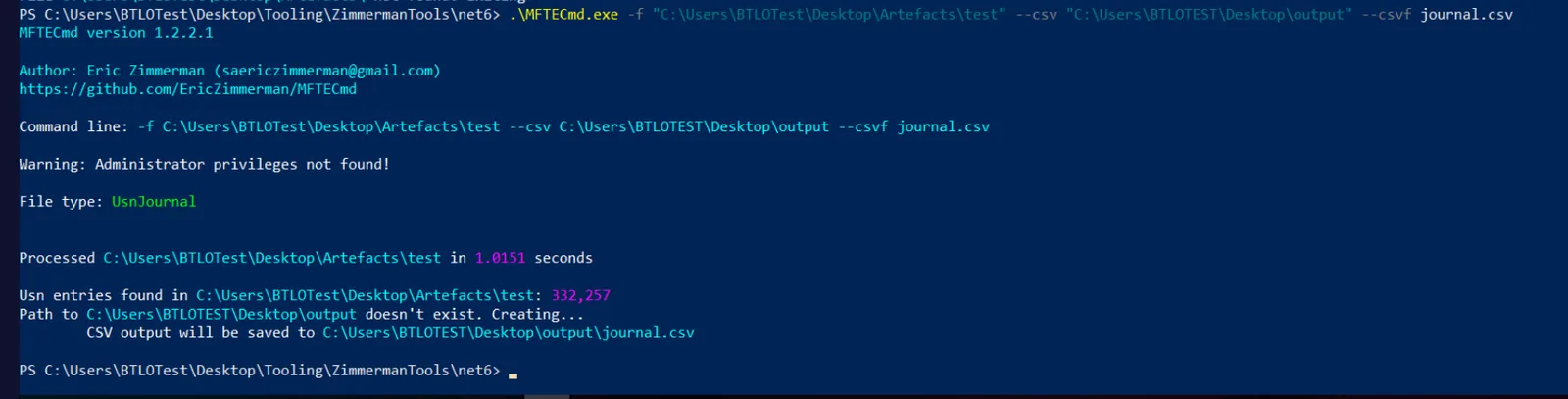
The resulting CSV contains 332,257 entries covering all file system activity recorded by the journal. Timeline Explorer’s grouping and filtering capabilities make this navigable.
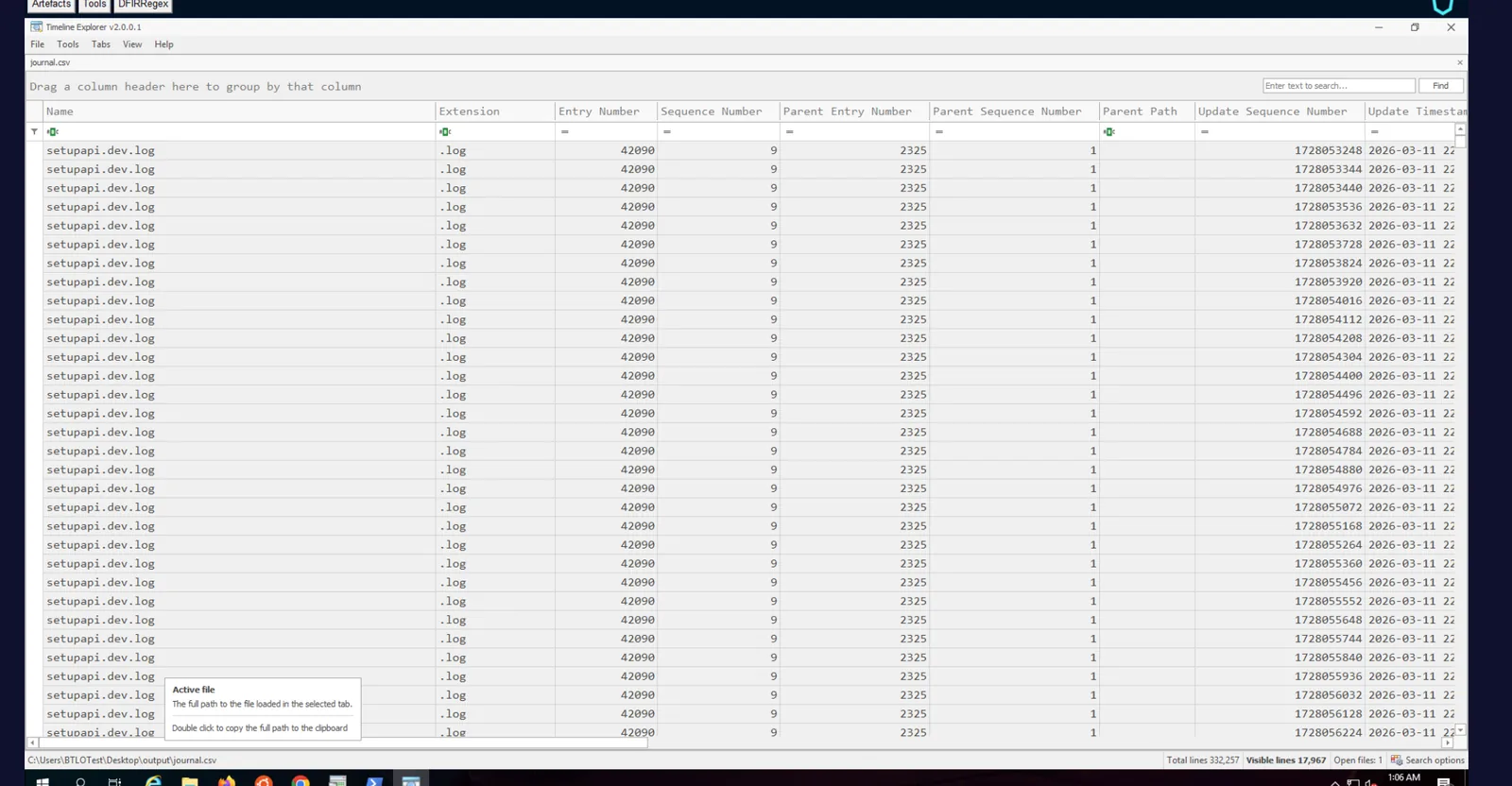
Company Invoices
Searching invoice in the Name column and grouping by Extension → FileCreate reveals four unique invoice PDFs present on the workstation during acquisition — invoice-jan.pdf, invoice-feb.pdf, invoice-mar.pdf, and invoice-apr.pdf, each appearing across two parent entry numbers indicating they existed in two locations.

Company-Owned .docx Files
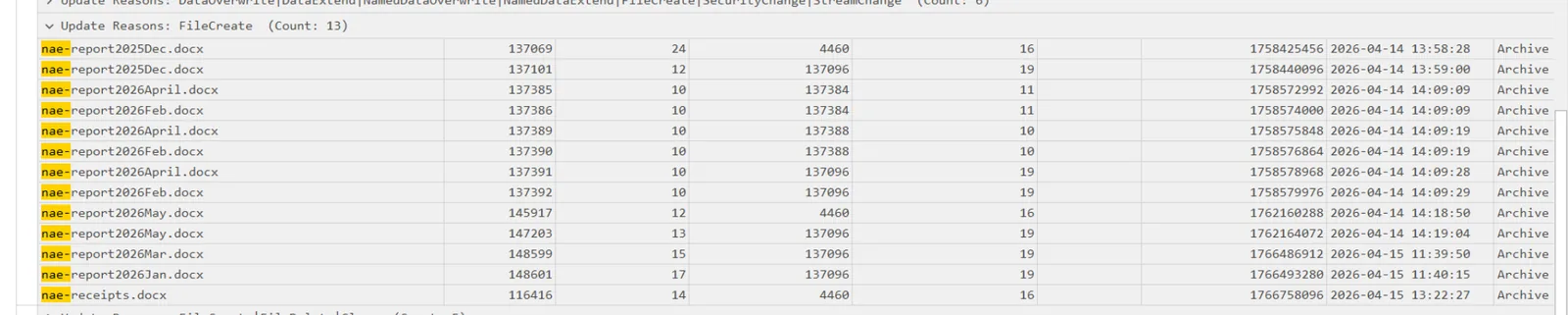
Searching nae- and grouping by FileCreate under the .docx extension surfaces all company-prefixed documents. Seven unique filenames are present: nae-report2025Dec.docx, nae-report2026April.docx, nae-report2026Feb.docx, nae-report2026May.docx, nae-report2026Mar.docx, nae-report2026Jan.docx, and nae-receipts.docx — the receipts file hiding outside the standard report naming pattern.
Identifying the Stolen Product — homepilot
Searching the journal for homepilot reveals the product name and tells the full story of what the employee did with it. The rename chain is visible in the RenameOldName and RenameNewName entries:
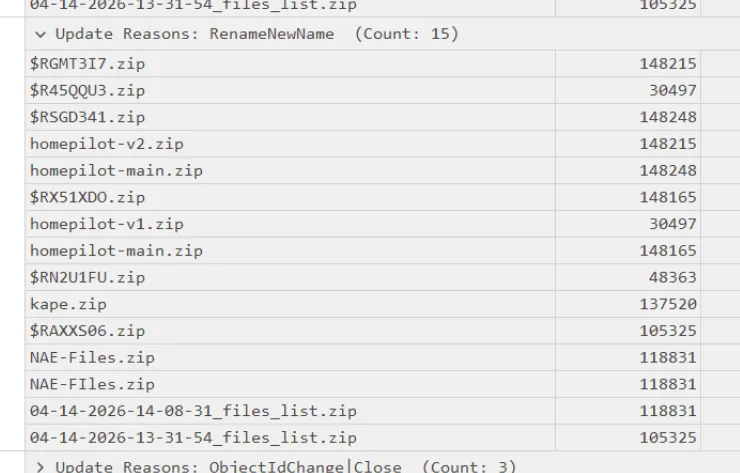
The employee downloaded homepilot-main.zip, then renamed copies into versioned files — homepilot-v2 and homepilot-v1 — before sending them to the Recycle Bin ($RGMT3I7.zip, $R45QQU3.zip) in an attempt to cover the activity.
First Write to Disk — $J Timestamp
Filtering for homepilot-main.zip FileCreate entries, the earliest timestamp corresponds to the initial download of the source code:
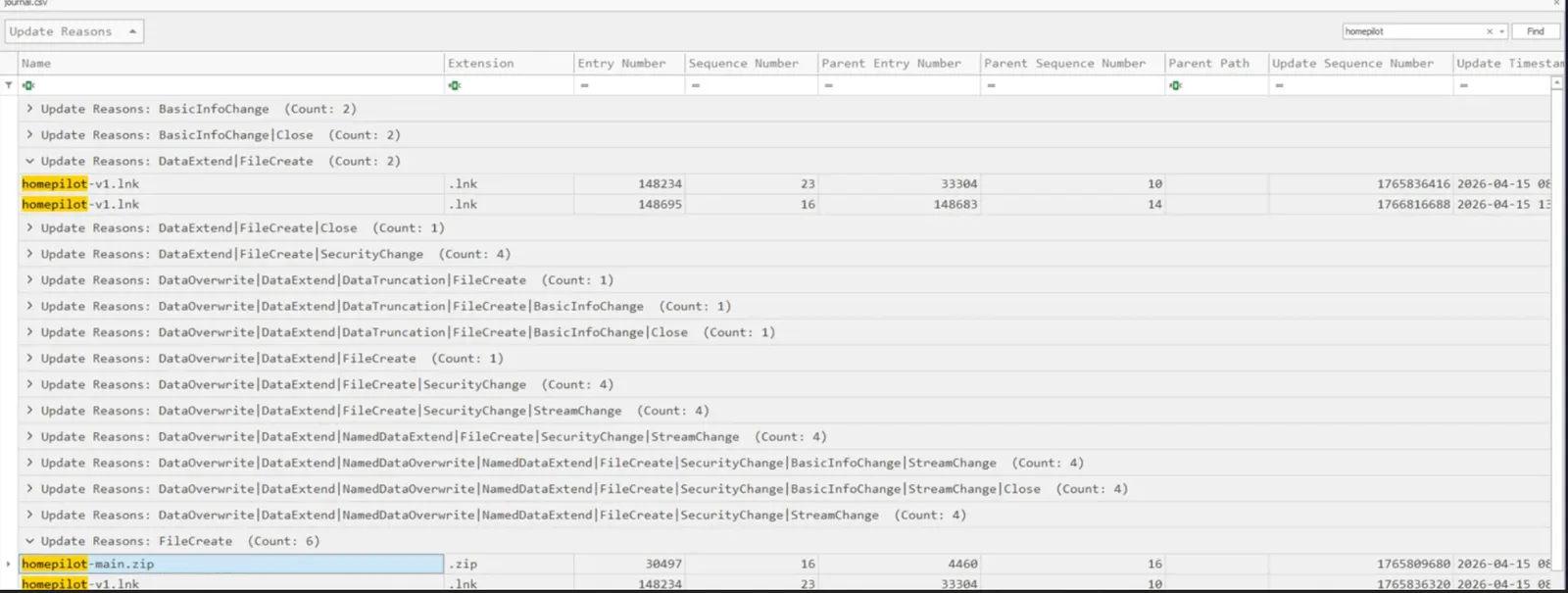
The $J record places the first write at 2026-04-15 08:51:19.
Staging and Exfiltration Chain
Searching .zip across FileCreate entries and grouping by entry number reveals the full activity chain:

The sequence is unambiguous — Chrome was used to download the homepilot zip, the archive was unpacked, the source files were versioned and renamed, the originals were deleted, and everything was repackaged into Files.zip (entry 148282, created 2026-04-15 10:51:07) for exfiltration. The Unconfirmed XXXXXX.crdownload temp files visible alongside the homepilot entries confirm Chrome as the download browser.
Covering Tracks — Tor Browser
After staging the archive, the employee downloaded Tor Browser to obscure subsequent network activity:
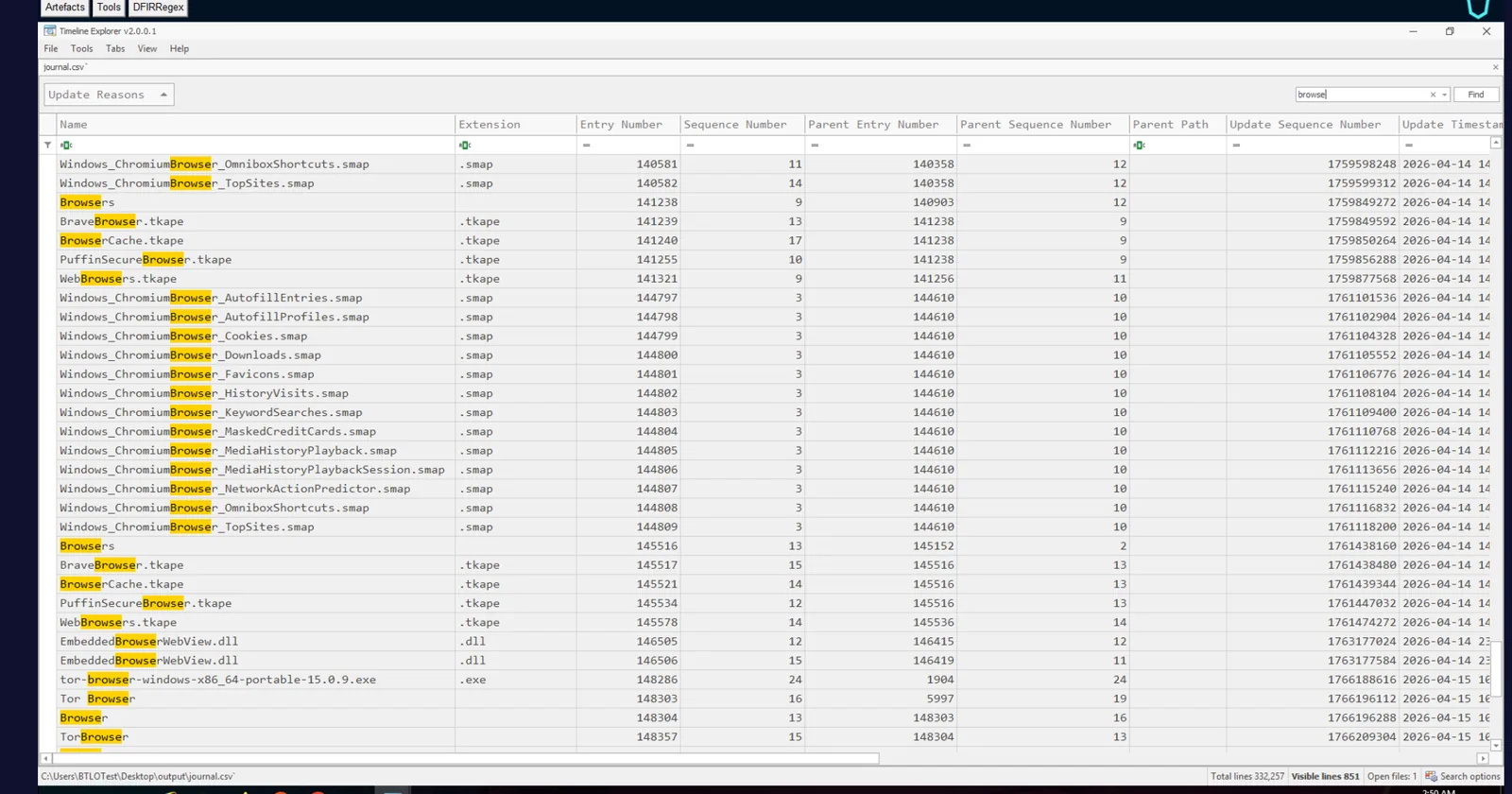
The installer tor-browser-windows-x86_64-portable-15.0.9.exe appears in the journal at entry 148286, first written to disk at 2026-04-15 10:52:44 — approximately one minute after Files.zip was created, consistent with the employee preparing to exfiltrate over an anonymised channel.
Attack Summary
| Phase | Action |
|---|---|
| Collection | homepilot source code downloaded via Chrome to employee workstation |
| Staging | Source code unpacked, versioned (homepilot-v1, homepilot-v2), and repackaged into Files.zip |
| Cover — File | Versioned zips deleted to Recycle Bin to obscure possession |
| Cover — Network | Tor Browser 15.0.9 downloaded immediately after staging to anonymise exfiltration |
| Exfiltration | Files.zip created 2026-04-15 10:51:07, Tor ready by 10:52:44 |
IOCs
| Type | Value |
|---|---|
| File | homepilot-main.zip |
| File | homepilot-v1.zip / homepilot-v2.zip |
| File | Files.zip |
| File | tor-browser-windows-x86_64-portable-15.0.9.exe |
| USN Entry | 148277 (homepilot-v1) |
| USN Entry | 148280 (homepilot-v2) |
| USN Entry | 148282 (Files.zip) |
| USN Entry | 148286 (Tor installer) |
| Timestamp (first download) | 2026-04-15 08:51:19 |
| Timestamp (archive created) | 2026-04-15 10:51:07 |
| Timestamp (Tor written) | 2026-04-15 10:52:44 |
MITRE ATT&CK
| Technique | ID | Description |
|---|---|---|
| Data from Local System | T1005 | Homepilot source code accessed and collected from workstation |
| Local Data Staging | T1074.001 | Files versioned, renamed, and repackaged into Files.zip prior to exfiltration |
| Masquerading | T1036 | Versioned zips renamed to Recycle Bin format ($R prefix) to obscure possession |
| Exfiltration Over Alternative Protocol | T1048 | Tor Browser downloaded to anonymise exfiltration channel |
| Hide Artefacts | T1564.001 | Deleted staging files sent to Recycle Bin to hinder forensic recovery |
Defender Takeaways
USN Journal is a high-fidelity artefact — The $J journal recorded every rename, create, and delete event across the entire insider threat timeline. Unlike logs that can be cleared, the USN Journal is a circular buffer that requires deliberate overwriting to tamper with. Preserving $J during acquisition should be standard IR procedure for any suspected insider threat case.
Recycle Bin deletion is not deletion — The employee sent the versioned homepilot zips to the Recycle Bin believing this concealed possession. The J RenameOldName entries preserved both the original filename and the $R Recycle Bin filename, making the activity fully recoverable. Forensic investigators should always parse Recycle Bin $I/ R pairs alongside the journal.
crdownload artefacts fingerprint the browser — Chrome’s Unconfirmed XXXXXX.crdownload temp files appeared in the journal alongside the homepilot downloads, identifying the download browser without needing browser history. These artefacts survive even when history is cleared.
Tor download is a high-confidence exfiltration indicator — A portable Tor Browser installer appearing 90 seconds after a staging archive is created is a near-certain indicator of imminent anonymised exfiltration. SIEM or EDR rules alerting on Tor installer filenames or the tor-browser string in file write events provide early warning before exfiltration completes.
Staging timelines are recoverable from $J alone — Without network captures or browser history, the $J journal reconstructed the full chain: download, unpack, version, stage, delete, repackage, prepare to exfiltrate. USN Journal analysis should be a first-pass artefact in any insider threat or data theft investigation.